





What’s the best microSD card for Switch game storage & performance?
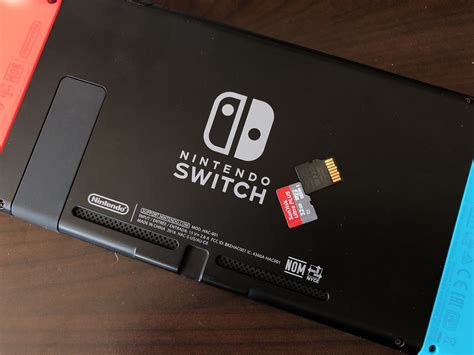
The Nintendo Switch is an incredible console, offering handheld and docked play for a vast library of games. However, its internal storage of 32GB (or 64GB for the OLED model) quickly fills up, especially with digital game purchases and game updates. This is where a microSD card becomes an essential upgrade. But with so many options available, how do you choose the best one for both ample storage and optimal game performance?
Why Your Nintendo Switch Needs a Good MicroSD Card
While some games allow for minimal installs, many modern titles, especially AAA releases, can consume tens of gigabytes. Digital downloads are convenient, but they demand significant space. A high-quality microSD card not only expands your storage capacity but also impacts game loading times and overall system responsiveness. A slow card can lead to noticeable delays when launching games, loading levels, or even navigating menus.
Understanding MicroSD Card Speed Ratings: UHS-I, U1, and U3
The key to good performance lies in the card’s speed ratings. For the Nintendo Switch, you’ll want a card that supports the UHS-I (Ultra High Speed Phase I) interface, which is the maximum speed the Switch itself can utilize. Within UHS-I, you’ll encounter two primary speed classes:
- UHS Speed Class 1 (U1): Guarantees a minimum sequential write speed of 10 MB/s.
- UHS Speed Class 3 (U3): Guarantees a minimum sequential write speed of 30 MB/s.
While the Switch can technically use U1 cards, opting for a U3 card is highly recommended. The faster read and write speeds of U3 cards significantly reduce loading times for games and ensure a smoother overall experience, especially for larger, more graphically intensive titles. Look for cards prominently displaying the ‘U3’ symbol (a ‘3’ inside a ‘U’). You might also see ‘A1’ or ‘A2’ ratings, which refer to App Performance Class. While good for smartphones, they don’t offer a direct performance benefit over U3 for the Switch itself, but a card with A2 is generally a very fast card overall.
How Much Storage Do You Really Need?
Storage capacity is a personal choice, but consider your gaming habits:
- 64GB-128GB: Suitable for casual players who own mostly physical games and download only a few digital titles or smaller indie games.
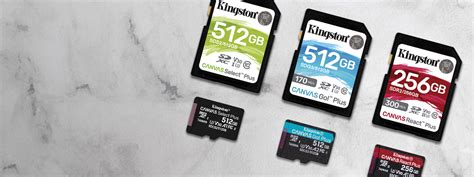
- 256GB-512GB: The sweet spot for most players. This range allows for a substantial digital library, including several large AAA games, without constantly managing storage.
- 1TB or more: Ideal for avid digital collectors who rarely buy physical games and want to download everything without limits. While 1TB cards are becoming more common, they come at a premium price.
Remember that file sizes for games are only getting larger, so it’s often wise to invest in slightly more storage than you think you currently need to future-proof your setup.

Top MicroSD Card Recommendations for Nintendo Switch
When it comes to reliability and performance, a few brands consistently stand out:
- SanDisk Ultra/Extreme: SanDisk is an official partner for Nintendo Switch microSD cards, making them a safe and popular choice. Both their Ultra and Extreme lines offer excellent performance. Look for the ‘for Nintendo Switch’ branding or simply ensure it’s a U3-rated UHS-I card.
- Samsung EVO Select/Plus: Samsung’s EVO line offers fantastic value and performance. The EVO Select and EVO Plus cards are both U3 rated, providing fast read and write speeds perfect for the Switch.
- Lexar PLAY/Professional: Lexar also produces reliable and fast microSD cards that are well-suited for the Switch. Their PLAY series is often optimized for gaming and mobile devices.
Always purchase from reputable retailers to avoid counterfeit cards, which can lead to data loss and poor performance.
Installation and Best Practices for Optimal Performance
Installing a microSD card in your Switch is straightforward: simply open the kickstand on the back of the console and slide the card into the slot. The Switch will automatically detect and prompt you to format the card if it hasn’t been used before or needs reformatting. Formatting will erase all data on the card, so back up anything important first.
Once installed, new game downloads and screenshots will automatically save to the microSD card. You can also transfer existing game data from the internal storage to the microSD card via the system settings. For best results, avoid frequently removing and inserting the card, and always power down your Switch before removing the card to prevent data corruption.
Conclusion: Making the Right Choice
The best microSD card for your Nintendo Switch balances speed, capacity, and cost. Prioritize a UHS-I, U3-rated card from a reputable brand like SanDisk or Samsung to guarantee smooth gameplay and quick loading times. While 256GB or 512GB offers the best value for most users, choose a capacity that aligns with your digital gaming habits. With the right microSD card, you can ensure your Switch is always ready for your next adventure without worrying about running out of space or waiting for games to load.


