





What’s the best microSD card for Switch game storage, balancing speed and value?

The Nintendo Switch has revolutionized portable gaming, offering a vast library of titles ranging from expansive open-world adventures to indie gems. However, its internal storage of 32GB (or 64GB for the OLED model) quickly fills up, especially for digital-first gamers. Expanding your storage with a microSD card is virtually a necessity, but with countless options on the market, how do you choose one that offers the best balance of speed and value?
The Essential Upgrade: Why Your Switch Needs More Storage
Most modern Switch games, even physical cartridge releases, require significant download space for updates, DLC, and digital-only titles. Games like The Legend of Zelda: Tears of the Kingdom or Pokémon Scarlet/Violet can easily consume over 10-15GB each. Without sufficient external storage, you’ll constantly find yourself deleting and redownloading games, a frustrating and time-consuming process.
A good microSD card ensures you have plenty of room for your growing game collection, allowing you to switch between titles seamlessly without worrying about storage limitations.
Understanding MicroSD Card Specs: What Matters for Switch
When selecting a microSD card, several specifications are crucial to consider:
- Capacity: This is the most straightforward factor. Common sizes range from 64GB to 1TB. Consider your gaming habits – do you buy many digital games, or mostly physical cartridges with minimal updates?
- UHS-I Speed Class: The Nintendo Switch supports UHS-I (Ultra High Speed Phase I) cards, with a theoretical maximum read speed of 104 MB/s. While faster UHS-II cards exist, the Switch cannot fully utilize their increased speeds, making them an unnecessary expense.
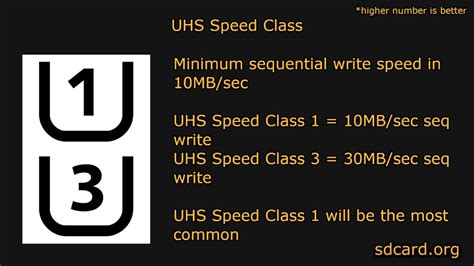
- Speed Rating (U1/U3): Within UHS-I, cards are rated U1 (minimum 10 MB/s sequential write speed) or U3 (minimum 30 MB/s sequential write speed). For optimal game loading and transfer, a U3 card is generally preferred, though U1 cards can also perform adequately.
- Application Performance Class (A1/A2): These ratings relate to random read/write speeds, which are important for running apps and games directly from the card. The Switch benefits from A1 or A2 ratings, as they indicate better performance for small, random data requests typical of game loading. An A2 rating is technically better, but the real-world difference on a Switch might be negligible compared to a good A1 card.
Finding the Sweet Spot: Capacity vs. Cost
While 1TB cards offer maximum freedom, they come at a premium. For most users, a capacity between 256GB and 512GB strikes the best balance of storage and cost-effectiveness. A 256GB card can typically hold 15-30 large games, while 512GB provides even more breathing room. Going much lower than 128GB will likely lead to storage woes again quite quickly.
Look for cards from reputable brands like SanDisk, Samsung, or Lexar. These brands are known for reliability and consistent performance, and often come with warranties.
Top Recommendations for Speed and Value
1. SanDisk Ultra / SanDisk Gaming
SanDisk’s Ultra line (often purple and gray) are excellent general-purpose microSD cards. They are readily available, highly reliable, and offer good UHS-I speeds (typically A1 or A2 rated). SanDisk also offers “Gaming” specific cards, often with Nintendo branding, which are essentially optimized Ultra cards. They deliver consistent performance without breaking the bank.
2. Samsung EVO Select / EVO Plus
Samsung’s EVO Select (Amazon exclusive, often blue and white) and EVO Plus (red and white) series are fantastic value propositions. They offer impressive read and write speeds (UHS-I U3, A2 rated for newer models), making them incredibly responsive for game loading. They are often competitively priced, especially during sales, and are a favorite among Switch owners for their performance and reliability.
3. Lexar Play
Lexar Play series cards are designed with gaming in mind, featuring high read speeds and A1/A2 ratings. They offer a compelling alternative to SanDisk and Samsung, often at competitive price points, making them a strong contender for those seeking good value performance.
Important Considerations When Buying
- Beware of Fakes: Purchase from authorized retailers (Amazon, Best Buy, Walmart, etc.) to avoid counterfeit cards that claim high capacities but deliver poor performance or are much smaller than advertised.
- Warranty: Reputable brands usually offer decent warranties, which can be a lifesaver if a card fails.
- Future-Proofing: While a 256GB card might be enough now, if you plan to vastly expand your digital library over the Switch’s lifespan, investing in a 512GB card initially might save you hassle later.

Installation and Management Tips
Installing a microSD card into your Switch is straightforward: simply open the kickstand on the back of the console and slide the card into the slot until it clicks. The Switch will automatically detect and prompt you to format it if necessary. Remember that game data can be moved between internal storage and the microSD card via the Data Management settings, allowing for flexible organization.
Conclusion
The best microSD card for your Nintendo Switch truly comes down to finding the sweet spot between sufficient storage, reliable speed, and a reasonable price. While specific models like the Samsung EVO Select/Plus or SanDisk Ultra/Gaming offer excellent performance for their cost, focusing on a reputable UHS-I U3 A1/A2 card in the 256GB to 512GB range will provide the optimal balance for most Switch gamers, ensuring countless hours of uninterrupted play.


