What’s the best microSD card for Nintendo Switch to expand storage for big games?
Why a microSD Card is Essential for Your Switch
The Nintendo Switch, an incredibly versatile and popular gaming console, comes with a rather modest amount of internal storage: 32GB for the original and Lite models, and 64GB for the OLED model. While this might suffice for a few smaller indie games or physical cartridge users, it quickly becomes a bottleneck for anyone embracing digital downloads, large AAA titles, or extensive game updates and DLC. Modern games like The Legend of Zelda: Tears of the Kingdom or Pokémon Scarlet and Violet can easily consume over 10-15GB each, making additional storage an absolute necessity rather than a luxury.
Expanding your Switch’s storage with a microSD card is the most straightforward and effective way to ensure you never have to delete beloved games to make space for new adventures. But not all microSD cards are created equal, and choosing the right one can significantly impact your gaming experience, from loading times to overall system responsiveness.
Key Factors When Choosing a microSD Card
1. Capacity: How Much Space Do You Really Need?
This is often the first consideration. While a 128GB card is a decent starting point for many, serious digital gamers will quickly fill it up. A 256GB card is widely considered the sweet spot, offering a good balance between cost and storage for a substantial library. For those who want to future-proof their console or have an extensive collection, 512GB and even 1TB cards are available. Keep in mind that system files and saved data also take up a small portion of the card’s advertised capacity.
2. Speed: A Crucial Performance Metric
The speed of your microSD card directly impacts how quickly games load, install, and transfer data. For the Nintendo Switch, you’ll want a card that meets or exceeds specific speed classes:
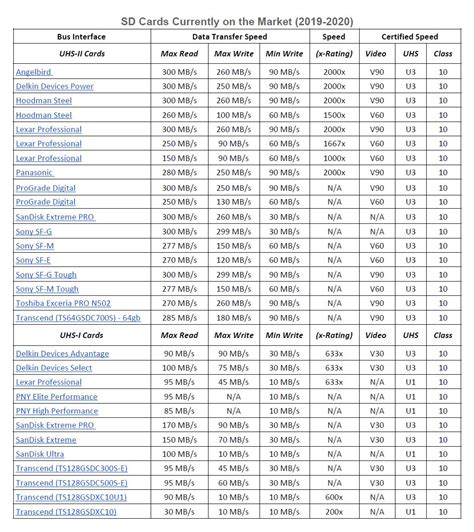
- UHS Speed Class (U1 or U3): Look for U3, which guarantees a minimum sequential write speed of 30 MB/s, compared to U1’s 10 MB/s. Faster write speeds mean quicker game installations and updates.
- Video Speed Class (V30): Often found alongside U3, V30 also guarantees a minimum sustained write speed of 30 MB/s.
- Application Performance Class (A1 or A2): While less critical for game loading on the Switch itself, A1 and especially A2 ratings indicate better performance for random read/write operations, which can slightly improve overall responsiveness. The Switch primarily benefits from high sequential read speeds, so U3/V30 is paramount.
For optimal performance on your Nintendo Switch, prioritize cards with a UHS Speed Class 3 (U3) and a Video Speed Class 30 (V30). These specifications ensure faster game loading times and a smoother overall experience.
3. Brand Reputation and Reliability
Stick to reputable brands known for quality and reliability. SanDisk, Samsung, Lexar, and PNY are industry leaders that consistently produce high-quality microSD cards suitable for the Switch. Avoid unbranded or suspiciously cheap cards, as they often fail prematurely or don’t deliver on their advertised speeds, leading to frustration and potential data loss. Always purchase from trusted retailers to avoid counterfeits.
Top Recommendations for Your Nintendo Switch
Based on capacity, speed, and reliability, here are the types of microSD cards that consistently perform well with the Nintendo Switch:
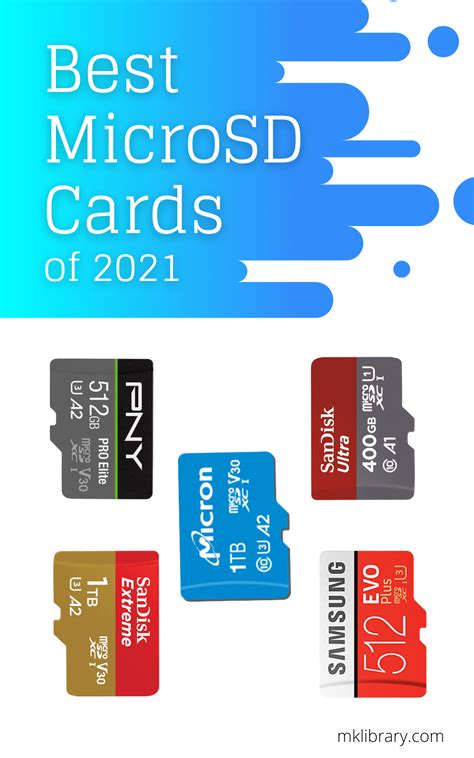
- SanDisk Extreme / Extreme Pro: These cards offer excellent read/write speeds (U3, V30, A2) and are highly reliable. They come in various capacities up to 1TB.
- Samsung EVO Select / EVO Plus: Another top contender, Samsung’s EVO series provides robust performance (U3, V30, A2) at competitive prices.
- Lexar Play / 1066x: Lexar offers cards specifically designed for gaming, providing the necessary speeds and reliability for the Switch.
While the ‘Nintendo-licensed’ SanDisk cards feature iconic branding, their performance specifications are often identical to their non-licensed SanDisk Extreme counterparts, sometimes at a slight premium. Any U3/V30 card from a reputable brand will perform excellently.
Installation and Management Tips
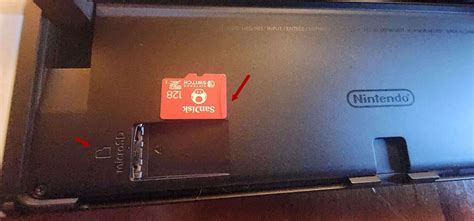
Installing a microSD card into your Nintendo Switch is simple: turn off the console, open the kickstand, and insert the card into the slot. The Switch will automatically recognize it. If you’re upgrading from a smaller card, you can transfer your data to the new card using a PC or by redownloading games from the eShop. Ensure your new card is formatted by the Switch itself for optimal compatibility.
Conclusion: Future-Proofing Your Gaming Experience
Investing in a high-quality microSD card for your Nintendo Switch is one of the best upgrades you can make to enhance your gaming experience. By prioritizing capacity, looking for U3/V30 speed ratings, and sticking to reputable brands, you’ll ensure your console has ample space and fast loading times for years to come. A 256GB or 512GB U3/V30 card from SanDisk or Samsung will provide an excellent balance of performance, reliability, and value, allowing you to focus on what matters most: enjoying your extensive game library without storage worries.