





What’s the best microSD card for Nintendo Switch to expand digital game storage?
The Nintendo Switch, with its vast library of digital-only titles and frequent eShop sales, quickly fills up its paltry 32GB (or 64GB for the OLED model) internal storage. For serious gamers, a microSD card isn’t just an accessory; it’s a necessity. But with so many options on the market, how do you choose the best one to keep your digital game collection growing?
Why Your Nintendo Switch Needs a microSD Card
While physical game cartridges are convenient, many popular indie titles, DLC, and even some large first-party games are digital-only or require significant downloads. Without sufficient storage, you’ll constantly be deleting games to make space, which can be a frustrating experience. A high-capacity microSD card ensures you can keep dozens, if not hundreds, of games readily accessible.

Understanding Nintendo Switch microSD Card Requirements
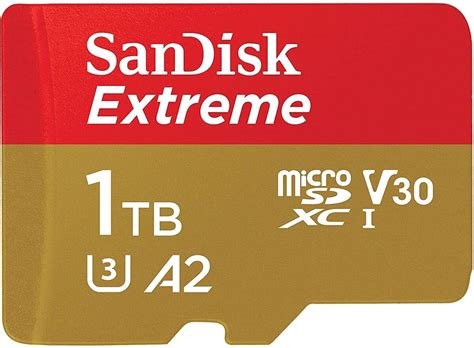
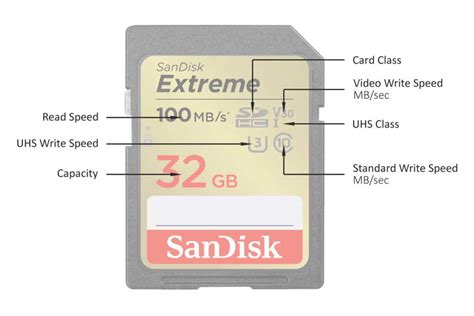
The Nintendo Switch supports microSD, microSDHC, and microSDXC cards. Importantly, it only utilizes UHS-I (Ultra High Speed Phase I) cards. While UHS-II cards exist and are faster, the Switch’s slot doesn’t take advantage of their increased speed, meaning you’d be paying more for performance you can’t use. Look for cards with a “U” class rating (U1 or U3) and ideally an “A” class rating (A1 or A2) for optimized app performance.
Key Specifications to Look For:
- Form Factor: microSD (microSDHC/microSDXC)
- Speed Class: UHS-I compatible (U1 or U3 recommended)
- Application Performance Class: A1 or A2 (for faster game loading)
Capacity: How Much Storage Do You Really Need?
This is arguably the most crucial decision. Game sizes vary wildly, from a few hundred MB for indies to over 20GB for AAA titles like The Legend of Zelda: Tears of the Kingdom. Consider your gaming habits:
- 64GB-128GB: Suitable for casual gamers with a few digital titles. You’ll still manage storage periodically.
- 256GB: A good starting point for most avid gamers. Offers a decent balance of capacity and cost.
- 512GB: Highly recommended for serious digital collectors. You’ll rarely worry about space.
- 1TB or more: The ultimate choice for those who want to download everything. Future-proof and minimizes storage management.
Speed: U1 vs. U3 and A1 vs. A2
While the Switch only supports UHS-I, the speed class within UHS-I still matters for loading times.
- U1 (UHS Speed Class 1): Guarantees a minimum sequential write speed of 10 MB/s. Good enough, but U3 is better.
- U3 (UHS Speed Class 3): Guarantees a minimum sequential write speed of 30 MB/s. This is the sweet spot for faster loading and smoother performance on the Switch.
- A1 (Application Performance Class 1): Minimum random read IOPS of 1500 and random write IOPS of 500. Good for loading applications (games).
- A2 (Application Performance Class 2): Minimum random read IOPS of 4000 and random write IOPS of 2000. Even better for app performance, though the difference might be less noticeable on the Switch compared to devices designed to fully leverage it.
Top Recommended microSD Cards for Nintendo Switch
When it comes to reliability and performance, a few brands consistently stand out. Always buy from reputable retailers to avoid counterfeits.
1. SanDisk microSDXC for Nintendo Switch (Official Licensed)
SanDisk offers officially licensed cards specifically branded for the Nintendo Switch. These cards typically come in distinctive Nintendo designs and are optimized for the console. They are U3 and A1 rated, offering excellent performance and reliability.
- Capacities: 64GB, 128GB, 256GB, 512GB, 1TB.
- Pros: Officially licensed, reliable, U3 speeds, cool designs.
- Cons: Can sometimes be slightly pricier than non-licensed equivalents.
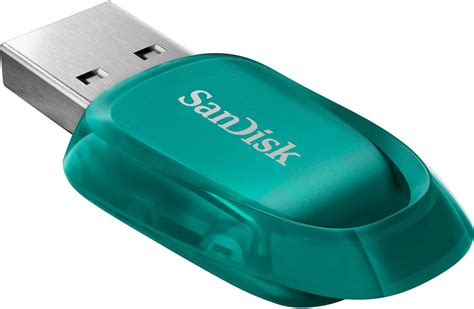
2. SanDisk Ultra microSDXC UHS-I Card
The SanDisk Ultra series is a popular and cost-effective choice. Many versions are U1 or U3 and A1 rated, providing a great balance of speed and value. They are widely available and reliable.
- Capacities: 32GB to 1.5TB.
- Pros: Excellent value, reliable, good speeds (check specific model for U3/A1).
- Cons: Not officially licensed (though this doesn’t impact performance).
3. Samsung EVO Select / Plus microSDXC UHS-I Card
Samsung’s EVO series cards are renowned for their reliability and consistent performance. The EVO Select (often an Amazon exclusive) and EVO Plus are U3 and A2 rated, making them an excellent choice for the Switch, often available at competitive prices.
- Capacities: 64GB to 512GB, 1TB.
- Pros: High endurance, U3 and A2 rated, excellent value, very reliable.
- Cons: No official Switch branding.
Installing and Setting Up Your microSD Card
- Power Off: Completely power down your Nintendo Switch (hold power button, then “Power Options” > “Turn Off”).
- Insert Card: Open the kickstand on the back of the Switch (or the flap on the OLED model) and gently push the microSD card into the slot until it clicks.
- Power On: Turn your Switch back on. The console will automatically recognize and format the card if needed.
- Check Storage: Go to System Settings > Data Management to confirm your new storage is recognized.
Any new digital downloads will automatically save to the microSD card. You can also transfer existing data from internal storage to the card via the Data Management settings, though this is primarily for save data and screenshots, as downloaded games must be re-downloaded to transfer.
Conclusion
Expanding your Nintendo Switch’s storage with a high-quality microSD card is one of the best investments you can make for your gaming experience. While specific brand preferences exist, prioritizing U3 speed class and a reputable brand like SanDisk or Samsung will ensure you have plenty of space and smooth loading times for years to come. Don’t let limited storage hold back your digital adventures – upgrade today!


