





What are the best value MicroSD cards for Switch game storage?

Why Your Nintendo Switch Needs a MicroSD Card
The Nintendo Switch, a fantastic portable and home console, comes with a rather modest 32GB (or 64GB for the OLED model) of internal storage. While sufficient for a few small indie titles, it quickly fills up once you start downloading larger digital games from the eShop or even physical games that require significant updates and DLC. A MicroSD card is not just an optional accessory; it’s practically a necessity to truly enjoy the vast library of Switch games.
Expanding your storage allows you to carry more games on the go, avoid constantly deleting and re-downloading titles, and ensure you have space for future releases. But with so many options available, how do you find the best value MicroSD card?
Key Factors for Value MicroSD Cards for Switch
When selecting a MicroSD card for your Switch, ‘value’ doesn’t just mean ‘cheapest.’ It means getting the best performance and capacity for a reasonable price. Here are the crucial factors to consider:
-
Capacity: How Much Do You Need?
This is often the biggest factor in pricing. Common capacities range from 64GB to 1TB or more. For most users, 128GB, 256GB, or 512GB offer the sweet spot between cost and usable storage. If you mainly play physical games with minimal downloads, 128GB might suffice. Digital-heavy gamers will likely want 256GB or 512GB. 1TB cards are great but generally come at a premium, making them less ‘value-oriented’ for many.
-
Speed: Class 10, U1, U3, V30
The Switch doesn’t require the absolute fastest cards available, but you do need a certain level of performance to avoid slow loading times. Look for cards with:
- Class 10: This is a minimum requirement, ensuring a minimum sequential write speed of 10 MB/s.
- UHS Speed Class 1 (U1) or 3 (U3): U1 guarantees 10 MB/s, while U3 guarantees 30 MB/s. The Switch can benefit from U3, but U1 is often sufficient for smooth gameplay.
- Video Speed Class 30 (V30): Similar to U3, V30 guarantees a minimum sustained write speed of 30 MB/s, making it excellent for gaming.
- Application Performance Class (A1 or A2): While A-ratings are more about random read/write speeds for apps on Android devices, they often indicate overall good performance. A1 is fine, A2 is even better but not strictly necessary for Switch and can sometimes be more expensive.
Aim for at least a Class 10 and U1 rating. U3/V30 cards offer better future-proofing and slightly faster loading, often at a very small price difference, making them excellent value.
-
Brand Reliability
Stick to reputable brands like SanDisk, Samsung, Lexar, and PNY. These brands are known for consistent quality, reliability, and good customer support, which is crucial for data storage.

Top Value MicroSD Card Recommendations
Based on the factors above, here are the types of MicroSD cards that typically offer the best value for Nintendo Switch owners:
SanDisk Ultra/Extreme Series
SanDisk is arguably the most popular brand for Switch MicroSD cards, and for good reason. Their Ultra and Extreme series cards consistently deliver excellent performance and reliability at competitive prices.
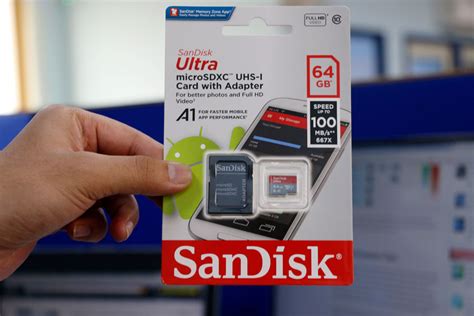
- SanDisk Ultra: Often U1 rated, these are very affordable and perfectly suitable for the vast majority of Switch users. They hit the sweet spot for capacity vs. price.
- SanDisk Extreme: These are U3/V30 rated, offering faster speeds. They are a fantastic value upgrade if you can find them close in price to the Ultra series, providing a slight edge in loading times.
Look for capacities in the 256GB to 512GB range for the best value proposition.
Samsung EVO Select/Plus Series
Samsung’s EVO series cards are also highly regarded for their performance and reliability. The EVO Select (often an Amazon exclusive) and EVO Plus lines are U3/V30 rated, making them fast enough for demanding games and future-proof.
- Samsung EVO Select/Plus: These cards offer excellent sustained speeds, which can translate to quicker game loading. They are often competitively priced, especially during sales, making them a strong contender for value.
Like SanDisk, aiming for 256GB or 512GB capacity usually offers the best bang for your buck.
Lexar PLAY/HIGH-PERFORMANCE Series
Lexar has re-emerged as a strong contender in the memory card market. Their PLAY series is specifically designed for gaming, offering U3/V30 speeds. Their HIGH-PERFORMANCE series also provides similar capabilities.
- Lexar PLAY: These are optimized for gaming and mobile devices, providing reliable performance at good prices. They’re a solid alternative to SanDisk and Samsung.
How Much Storage Do You Really Need?
To help you decide on capacity, consider these approximate figures:
- 128GB: Good for users who buy mostly physical games and download few digital titles or DLC.
- 256GB: An excellent balance for most users. Allows for a good mix of digital downloads and physical game updates. You can comfortably store 10-20 large games.
- 512GB: Ideal for digital-first gamers or those who want to build a substantial library without worrying about space for a long time. This can hold 30+ large titles.
- 1TB+: For hardcore digital collectors. While great for capacity, the price jump can make them less ‘value-oriented’ for many compared to 512GB.
Remember that game sizes vary widely, from a few hundred MB for indies to over 30GB for AAA titles like The Legend of Zelda: Tears of the Kingdom. Always factor in potential future purchases.
Installation and Management Tips
- Power Off: Always power down your Switch completely before inserting or removing a MicroSD card.
- Format: The Switch will prompt you to format the card. Always allow it to do so.
- Transfer Data: If you’re upgrading from an old card, you can transfer your game data by copying the contents of the old card to your PC, then to the new card.
- Archiving: If storage still becomes an issue, remember you can ‘archive’ games from the Switch’s data management menu, which deletes the game data but keeps the save file, allowing you to re-download it later.
Conclusion
For the best value MicroSD card for your Nintendo Switch, prioritize reputable brands like SanDisk or Samsung, look for a U3/V30 speed rating if the price is right, and select a capacity that suits your gaming habits, with 256GB or 512GB often being the sweet spot. By keeping these factors in mind, you can significantly enhance your Switch gaming experience without overspending.


