





Tips for extending mobile game battery life without sacrificing graphics?

Mobile gaming offers an unparalleled blend of entertainment and convenience, allowing us to dive into immersive worlds from virtually anywhere. However, this freedom often comes at the cost of rapid battery drain, forcing a tough choice: limit playtime or sacrifice stunning graphics. The good news is that you don’t always have to choose. By understanding how your device consumes power and implementing smart strategies, you can significantly extend your gaming sessions while keeping those beautiful visuals intact.
Understanding the Battery Drain Culprits
Before diving into solutions, it’s crucial to identify what drains your battery most during gaming. High-end mobile games push your smartphone’s CPU and GPU to their limits, demanding substantial processing power. Beyond the core processing, the bright, high-resolution display, constant network activity (for online games), and even background apps all contribute to your battery’s rapid decline. Our goal is to minimize these draws without explicitly lowering the game’s visual settings.
Smart Software Optimizations for Sustained Graphics
Many games offer a range of internal settings that can be tweaked for efficiency without a noticeable drop in visual fidelity for the average player. Look for options like frame rate caps; while a higher frame rate (e.g., 90-120fps) feels smoother, capping it at a stable 60fps often provides a great experience with significantly less power consumption. Similarly, some games might offer subtle resolution scaling that is barely perceptible but yields battery benefits. Furthermore, ensure that background app refresh is turned off for non-essential applications to prevent them from consuming resources while you’re gaming.

Device-Level Tweaks for Enhanced Endurance
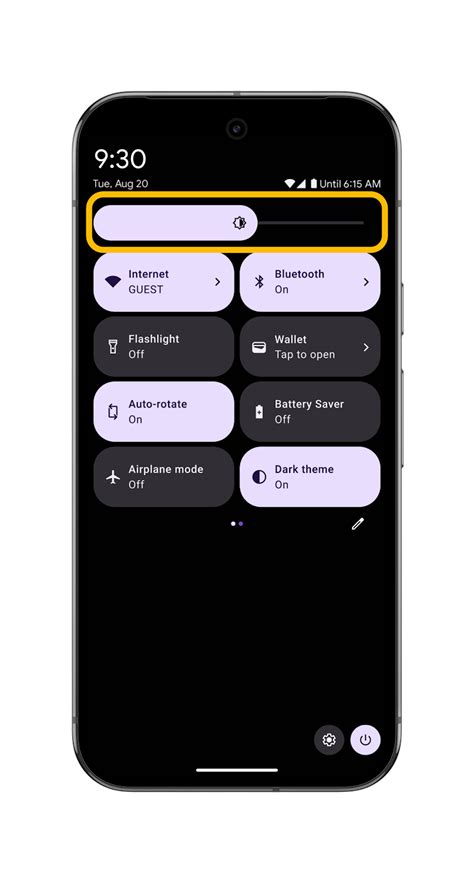
Beyond in-game settings, your device’s overall configuration plays a critical role. The screen is often the single biggest power consumer. While you want your game to look good, consider slightly lowering your screen brightness from maximum, especially if you’re in a well-lit environment. Enabling your phone’s dark mode system-wide can also subtly reduce power draw, as many app interfaces will adapt. Disabling unnecessary features like Bluetooth, GPS, and Wi-Fi (if playing an offline game) can also save precious percentage points. Turn off haptic feedback and vibrations unless absolutely necessary for gameplay.
Optimize Your Environment and Habits
Your physical environment and charging habits also impact battery life. Playing in a cooler environment prevents your phone from overheating, which in turn reduces thermal throttling and energy inefficiency. When your phone gets hot, it works harder, consuming more power and degrading the battery faster. As for charging, avoid constantly playing while charging, as this can generate more heat. Instead, top up your battery to about 80% before a gaming session and let it discharge naturally. Using a quality charger and cable is also important for efficient power delivery.

Leveraging Built-in Game Modes and Monitoring
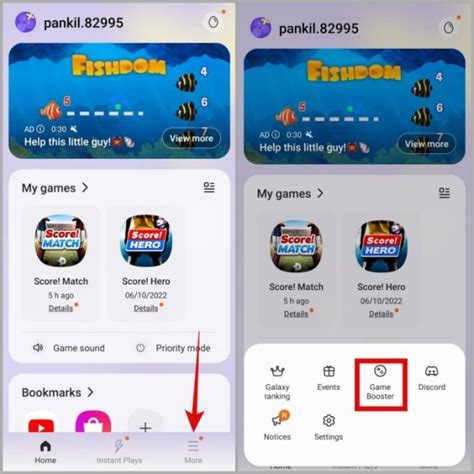
Most modern smartphones come with a dedicated ‘Game Mode’ or ‘Game Booster’ feature. These modes are designed to optimize performance and battery life by intelligently managing background processes, prioritizing network bandwidth for the game, and sometimes offering quick access to performance settings. Explore your phone’s specific game mode features and customize them to find the sweet spot between graphics and endurance. Regularly check your battery usage statistics in your phone’s settings to identify which apps and components are consuming the most power. This data can help you fine-tune your approach even further.
Conclusion: Game Longer, Look Better
Extending your mobile game battery life without compromising on visual quality is entirely achievable with a thoughtful approach. By making intelligent adjustments to in-game settings, optimizing your device’s general power consumption, adopting better gaming habits, and utilizing built-in features, you can enjoy longer, more immersive gaming sessions. It’s about finding the right balance and making smart choices that enhance your experience rather than detract from it. Happy gaming!



