





Switch game storage full? Best microSD card for more games, big & small?
Why Your Nintendo Switch Needs More Space
The Nintendo Switch, a marvel of portable gaming, comes with a rather modest 32GB of internal storage (or 64GB for the OLED model). While this might seem like enough for a few smaller titles, the reality for most gamers is that it fills up incredibly fast. Modern AAA games like The Legend of Zelda: Tears of the Kingdom or Pokémon Scarlet and Violet can easily gobble up 10-15GB each, leaving precious little room for anything else. If you’re a digital-first gamer, constantly downloading new releases or enjoying a vast library of indie games, you’ve likely already hit that frustrating ‘storage full’ notification.
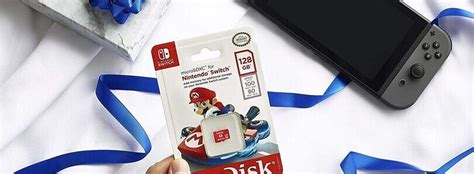
The good news? Expanding your Switch’s storage is incredibly simple and affordable thanks to microSD cards. These tiny memory powerhouses slot neatly into your console, providing an instant boost in capacity that can house hundreds of games, saving files, and screenshots.

Choosing the Right microSD Card: Key Factors
Not all microSD cards are created equal. When selecting one for your Nintendo Switch, there are a few critical factors to consider:
Capacity: How Much Space Do You Really Need?
- 128GB: A good starting point for casual gamers who mostly play physical cartridges but want space for a few digital titles and updates.
- 256GB: The sweet spot for many. Offers ample room for a decent library of digital games, including several big-hitters, without breaking the bank.
- 512GB: Ideal for avid digital gamers. You’ll rarely worry about storage, accommodating a large collection of AAA titles and indie games.
- 1TB (or more): The ultimate choice for collectors and those who want to download everything. This capacity ensures virtually unlimited space for years to come, though it comes at a premium price.
Consider your gaming habits. Do you buy many digital games? Do you download large updates frequently? Err on the side of slightly more capacity than you think you need – you’ll thank yourself later.
Speed: U1 vs. U3, A1 vs. A2
While speed isn’t as critical for the Switch as it might be for a camera recording 4K video, it still plays a role in game loading times and transfer speeds. Look for cards with:
- UHS Speed Class 1 (U1) or 3 (U3): U3 cards offer faster minimum write speeds, which can slightly improve game loading, especially for larger titles.
- Application Performance Class A1 or A2: These classes indicate optimized performance for running applications, which includes games. A2 cards generally offer better random read/write speeds than A1, leading to a smoother experience, albeit with a slightly higher cost.
For the best balance of performance and price, a U3 A1 or A2 card is recommended.
Top Recommended microSD Card Brands for Switch
When it comes to reliability and performance, sticking with reputable brands is always a good idea. Here are some of the most trusted options:
- SanDisk: Widely regarded as the official partner for Nintendo Switch, SanDisk offers officially licensed cards adorned with Mario, Zelda, and other Nintendo characters. These are guaranteed to be compatible and perform well. Their standard Extreme and Ultra lines are also excellent choices.
- Samsung: Known for their EVO Plus and PRO Plus lines, Samsung cards deliver consistent performance and reliability at competitive prices. They are a solid choice for any Switch owner.
- Lexar: Another strong contender, Lexar offers reliable and fast microSD cards that are perfect for expanding your Switch’s library. Their Play and High-Performance lines are worth considering.
Always purchase from a reputable retailer to avoid counterfeit cards, which can lead to data loss and poor performance.
Installation and Management Tips
Once you’ve chosen your perfect microSD card, getting it set up is a breeze:
- Power Down: Fully turn off your Nintendo Switch before inserting the card.
- Insert Card: Locate the microSD card slot under the kickstand on the back of your Switch. Gently push the card in until it clicks.
- Power Up: Turn your Switch back on. It should automatically detect and format the card if needed.
- Move Games: You can move existing games from your internal storage to the microSD card via System Settings > Data Management. New downloads will automatically prioritize the microSD card if enough space is available.
Don’t Let Storage Limit Your Gaming Adventures
Running out of storage on your Nintendo Switch is a common problem, but one with an easy and affordable solution. By investing in a high-quality microSD card, you can ensure that your console is always ready for your next gaming adventure, whether it’s a massive open-world RPG or a collection of charming indie titles. Consider your needs, choose a reliable brand and capacity, and never worry about deleting games to make room again. Happy gaming!



