





Practical tips to prevent Joy-Con drift on your Nintendo Switch?
Understanding Joy-Con Drift and Its Impact
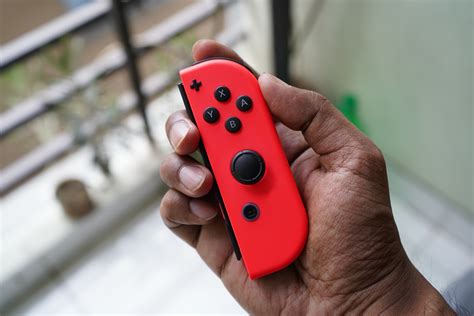
Joy-Con drift is a prevalent and frustrating issue for many Nintendo Switch owners, characterized by unintended input from the analog sticks even when they are not being touched. This phantom movement can severely disrupt gameplay, making precise controls impossible and diminishing the overall gaming experience. While a complete prevention method might not exist due to the mechanical nature of the controllers, adopting certain habits and preventative measures can significantly extend the lifespan of your Joy-Cons and reduce the likelihood of encountering this problem.
The core of the problem often lies in wear and tear of the internal components, where dust, debris, or degraded sensor contacts cause erroneous signals. Fortunately, there are several steps you can take to minimize these risks.

Keep Your Joy-Cons Clean
One of the most effective ways to prevent drift is to maintain a clean environment for your Joy-Cons. Dust, crumbs, pet hair, and other tiny particles can easily work their way under the analog stick and interfere with the sensors. Regular cleaning is crucial.
- Wipe regularly: Use a microfiber cloth to gently wipe down the exterior of your Joy-Cons after each gaming session.
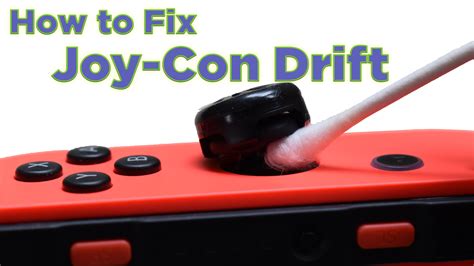
- Clean around the stick base: For deeper cleaning, carefully use compressed air (at a safe distance and angle) around the base of the analog sticks to dislodge any trapped debris. Alternatively, a cotton swab dipped in a small amount of isopropyl alcohol can be used to meticulously clean the gap between the stick and the controller housing. Ensure the alcohol evaporates completely before use.
Handle with Care and Avoid Physical Stress
The Joy-Cons are delicate instruments. Rough handling, drops, or excessive force can accelerate wear and tear, leading to drift or other malfunctions. Treating your controllers with care is paramount.
- Avoid drops: Always ensure your Joy-Cons are securely attached to the console or held firmly during gameplay. Consider using wrist straps if you’re prone to accidental drops.
- Gentle stick usage: Refrain from pushing the analog sticks with extreme force or rapidly mashing them in directions. While competitive gaming can be intense, try to be mindful of how much pressure you’re applying.
- Proper storage: When not in use, store your Switch and Joy-Cons in a protective case, especially if you travel frequently. This prevents accumulation of dust and protects against impacts.
Environmental Considerations and Storage
The environment in which you use and store your Nintendo Switch can also play a role in the longevity of your Joy-Cons.
- Avoid extreme conditions: High humidity, extreme temperatures, or dusty environments can negatively impact electronic components. Try to use your Switch in a clean, temperature-controlled space.
- Store properly: When not in use, especially for extended periods, store your Joy-Cons in a way that the analog sticks aren’t being constantly pushed or stressed. A dedicated carrying case with molded compartments is ideal.
Regular Calibration and Firmware Updates
While these steps don’t physically prevent drift, they can sometimes resolve minor issues or confirm if drift is truly present. They are crucial diagnostic and maintenance steps.
- Calibrate your analog sticks: Nintendo provides a calibration tool in the Switch settings. Navigate to System Settings > Controllers and Sensors > Calibrate Control Sticks. Follow the on-screen instructions to recalibrate both sticks. Do this periodically.
- Update Joy-Con firmware: Ensure your Joy-Cons are running the latest firmware. Go to System Settings > Controllers and Sensors > Update Controllers. Nintendo often releases updates that can improve controller performance and stability.
Consider Protective Accessories
Some accessories can offer an extra layer of protection for your Joy-Cons:
- Thumbstick caps: Silicone or rubber caps can protect the original analog stick surface from wear and tear, and some claim they can also slightly reduce dust ingress.
- Protective cases/skins: While primarily for aesthetics and grip, a well-fitting skin or full-body case for the Joy-Cons can offer some protection against minor bumps and scrapes.
When Prevention Isn’t Enough
Despite all preventative measures, Joy-Con drift can still occur due to manufacturing defects or inherent design limitations. If you encounter persistent drift:
- Check warranty: If your console is still under warranty, contact Nintendo’s customer support. They have a known program for repairing or replacing drifting Joy-Cons, often free of charge even outside of warranty in some regions.
- DIY repair kits: For those comfortable with electronics repair, third-party repair kits are available. However, proceed with caution as this can void your warranty and carries the risk of further damage if not done correctly.
Conclusion
While Joy-Con drift remains a challenging issue for Nintendo Switch owners, proactive care and maintenance can significantly mitigate its occurrence and impact. By keeping your controllers clean, handling them gently, storing them properly, and performing regular calibrations, you can extend their lifespan and ensure a smoother, more enjoyable gaming experience for longer. Remember, even with the best prevention, some issues may still arise, but these tips will give your Joy-Cons the best fighting chance.


