Optimizing Switch storage: Best SD card for digital games?
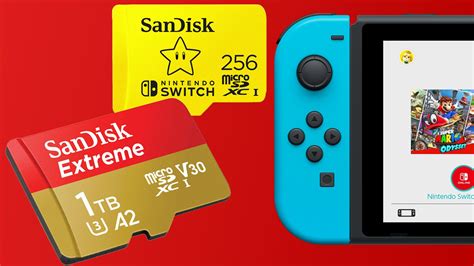
The Nintendo Switch, with its vast library of fantastic digital titles, is a portable gaming marvel. However, its Achilles’ heel for many dedicated gamers is its relatively modest internal storage. Whether you own the original Switch, the Lite, or the OLED model, the built-in storage fills up fast, making an external microSD card an essential upgrade. But with so many options, how do you pick the best one for your digital game collection?
Why Internal Storage Isn’t Enough for Your Switch
The standard Nintendo Switch models come with either 32GB or 64GB of internal storage. While this might seem adequate at first, many modern Switch games can range from a few gigabytes to over 20GB each. Titles like The Legend of Zelda: Tears of the Kingdom or Pokémon Scarlet and Violet can quickly gobble up significant space, especially when combined with system updates, DLC, and smaller indie games. Relying solely on internal storage means constant game deletions and re-downloads, which is far from ideal.
Expanding your storage with a microSD card is not just about convenience; it’s about preserving your game library and ensuring you can always download the latest titles without compromise. This is where choosing the right SD card becomes paramount.

Understanding SD Card Types: microSDHC vs. microSDXC
When you start looking for an SD card, you’ll primarily encounter two types relevant to the Switch: microSDHC and microSDXC.
- microSDHC (High Capacity): These cards have a capacity range from 4GB to 32GB. While compatible with the Switch, their limited storage makes them less ideal for a growing digital library.
- microSDXC (Extended Capacity): These cards range from 64GB all the way up to 2TB. This is the format you should focus on for your Switch, offering ample space for dozens, if not hundreds, of games.
All Nintendo Switch models support microSDXC cards, so don’t hesitate to invest in a higher capacity card.
The Need for Speed: UHS and Application Performance Classes
Beyond capacity, the speed of your microSD card is crucial for optimal performance, affecting game loading times and system responsiveness. The key specifications to look for are:
UHS Speed Class (U1, U3)
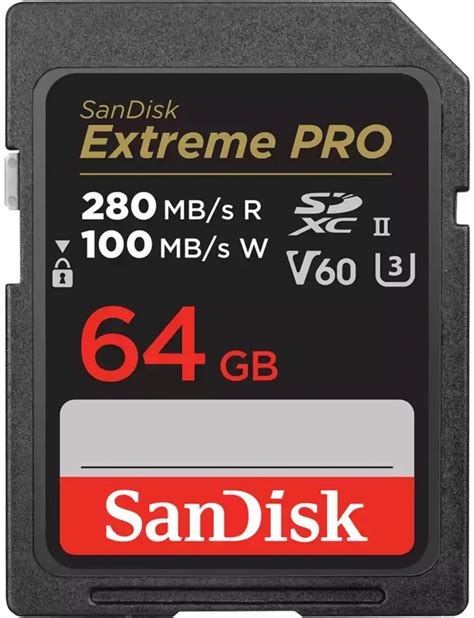
UHS (Ultra High Speed) refers to the interface that allows for faster data transfer speeds. The Switch supports UHS-I cards, which are the most common type. While UHS-II cards exist and are faster, the Switch cannot fully utilize their increased speeds, making them an unnecessary expense.
- UHS Speed Class 1 (U1): Guarantees a minimum sequential write speed of 10 MB/s.
- UHS Speed Class 3 (U3): Guarantees a minimum sequential write speed of 30 MB/s.
For gaming, a U3 card is generally recommended for better performance, though U1 is often sufficient.
Application Performance Class (A1, A2)
This rating is increasingly important for devices like the Switch that run applications directly from the card. It measures random read and write speeds, which are vital for game loading and saving.
- A1 (App Performance Class 1): Minimum random read of 1500 IOPS and random write of 500 IOPS, with a minimum sequential write of 10 MB/s.
- A2 (App Performance Class 2): Minimum random read of 4000 IOPS and random write of 2000 IOPS, with a minimum sequential write of 10 MB/s.
An A2-rated card will provide superior performance for your Switch games compared to an A1 card, potentially reducing load times and improving overall responsiveness. Always aim for at least A1, but A2 is preferable.
Capacity is King: How Much Storage Do You Really Need?
This depends entirely on your gaming habits and the size of your digital library. Here’s a general guide:
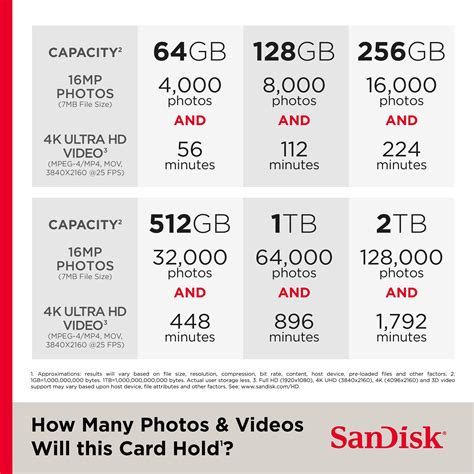
- 64GB/128GB: Suitable for casual gamers with a few digital titles and mostly physical cartridges.
- 256GB: A good starting point for most digital-first gamers, offering space for a decent collection of AAA and indie titles.
- 512GB: Recommended for avid digital gamers who download many large titles. This is often the sweet spot for value and capacity.
- 1TB: For collectors who want virtually unlimited space for years to come. These are pricier but offer peace of mind.
Consider future-proofing. It’s better to buy a slightly larger card than you think you need now, rather than having to upgrade again in a year.
Top Recommendations for Nintendo Switch SD Cards
While specific models change, reputable brands consistently deliver high-quality cards that meet the Switch’s requirements. Look for cards from:
- SanDisk: Especially their ‘Extreme’ or ‘Ultra’ lines.
- Samsung: Their ‘EVO Select’ or ‘PRO Endurance’ series are excellent choices.
- Lexar: Known for reliable performance.
Always prioritize cards that specify UHS-I U3 and A1 or A2 ratings. SanDisk even offers officially licensed Nintendo Switch microSD cards, which are essentially re-branded versions of their proven cards, ensuring full compatibility and good performance.
Installation and Management Tips
Installing an SD card in your Switch is straightforward:
- Turn off your Switch completely.
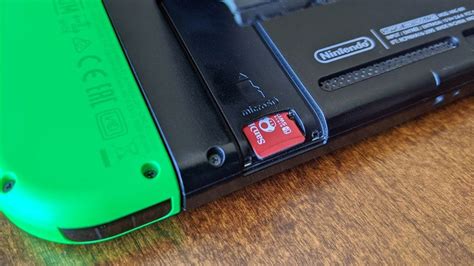
- Open the kickstand on the back of the console to reveal the microSD card slot.
- Insert the microSD card with the label facing down until it clicks into place.
- Close the kickstand and power on your Switch.
The Switch will automatically format the card if needed. All new game downloads will automatically save to the microSD card if one is present. You can also move existing data from internal storage to the SD card via System Settings > Data Management.
Conclusion: Making the Right Choice
Choosing the best SD card for your Nintendo Switch doesn’t have to be complicated. Focus on microSDXC for capacity, aim for a U3 speed class, and prioritize A1 or, even better, A2 application performance ratings. Combine these specs with a reputable brand, and you’ll ensure a smooth, expansive, and frustration-free gaming experience on your Switch for years to come. Don’t let storage limitations hold back your digital adventures!