





Optimize Switch & console storage for your growing digital game library?

The Digital Deluge: Why Console Storage Matters More Than Ever
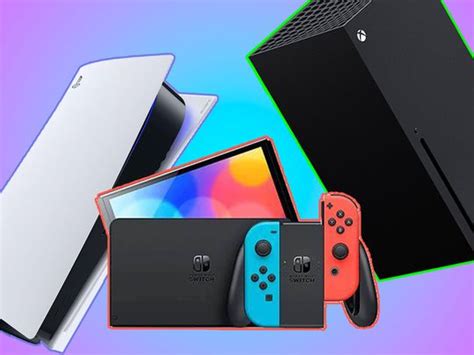
The shift towards digital game purchases offers convenience, but it comes with a significant challenge: managing an ever-growing library on finite console storage. Modern game sizes are colossal, often exceeding 100GB for a single title, making built-in console storage fill up rapidly. Whether you’re a Nintendo Switch enthusiast, a PlayStation loyalist, or an Xbox gamer, understanding how to optimize and expand your storage is key to uninterrupted play.
This guide will walk you through platform-specific solutions and general best practices to ensure your digital game collection never hits a dead end.
Nintendo Switch: Master Your MicroSD
The Nintendo Switch, with its modest internal storage (32GB or 64GB on the OLED model), is perhaps the most reliant on external storage. Fortunately, the solution is elegant and user-friendly: microSD cards.

Choosing the Right MicroSD Card
When selecting a microSD card for your Switch, capacity is paramount. Cards range from 64GB to a massive 1TB or even 2TB. Consider your typical game library size and future growth. Speed is also important; look for cards with U3 (UHS Speed Class 3) or V30 (Video Speed Class 30) ratings for optimal loading times. While these higher-speed cards don’t drastically improve game performance in most cases, they do make initial game transfers and installations quicker.
Archiving vs. Deleting
The Switch offers two main ways to free up space: archiving software or deleting software. Archiving removes the game data but keeps its icon on your home screen and saves data intact. This is ideal if you plan to re-download the game later. Deleting software removes everything, including the icon and save data (unless you have Nintendo Switch Online cloud saves enabled). Always check your cloud save status before permanently deleting a game you might want to revisit.
PlayStation & Xbox: Expanding Beyond the Built-in
Modern PlayStation and Xbox consoles boast faster SSD storage, but even 1TB can quickly disappear. The expansion methods differ significantly between the generations and brands.
PlayStation 5 (PS5) Storage Expansion
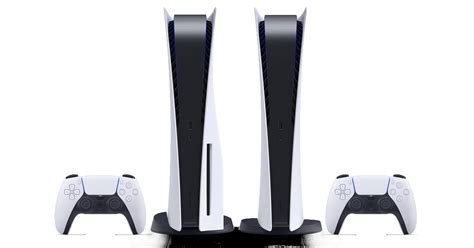
The PS5 allows for internal expansion using compatible M.2 NVMe SSDs. These drives must meet specific speed and size requirements (PCIe Gen4x4, 5,500MB/s read speed minimum, with a heatsink) to run PS5 games directly. This is the most seamless way to increase storage for your current-gen titles. For PS4 games, you can also use external USB hard drives, but these cannot play PS5-specific titles.
Xbox Series X|S Storage Solutions
Xbox Series X|S offers a proprietary Seagate Storage Expansion Card, which plugs directly into a dedicated slot, offering identical performance to the internal SSD. This is the premium solution for expanding your Series X|S optimized games library. For older Xbox One, Xbox 360, and original Xbox games, or to simply store Series X|S games for later transfer back to the internal/expansion card, standard external USB 3.0 hard drives work perfectly.
Previous Generation Consoles (PS4, Xbox One)
For PS4 and Xbox One consoles, the primary and most cost-effective storage expansion method is an external USB 3.0 hard drive. Simply plug it into your console, format it, and you’re ready to install games. These drives can be significantly larger and cheaper per gigabyte than internal solutions for current-gen consoles.
Universal Best Practices for Game Management
Regardless of your console, adopting smart habits can significantly improve your storage situation.

- Regularly Review Your Library: Periodically go through your installed games. If you haven’t played a game in months and don’t plan to soon, consider uninstalling it. You can always re-download it later.
- Utilize Cloud Saves: Always ensure cloud saves are enabled (via PlayStation Plus, Xbox Game Pass Ultimate, or Nintendo Switch Online) for your games. This protects your progress if you delete a game or experience a hardware failure.
- Understand Game Data Sizes: Some games have massive patches or DLC that can rival the base game’s size. Check these before downloading if you’re low on space.
- Prioritize Critical Games: Keep your most frequently played or largest competitive games on the fastest storage (internal SSD or dedicated expansion). Move less-played titles or those with smaller file sizes to slower, higher-capacity drives if applicable.
Conclusion: Take Control of Your Digital Universe
A growing digital game library is a joy, not a burden, when you have the right storage strategy. By understanding the specific needs and solutions for your Nintendo Switch, PlayStation, or Xbox, and by adopting good game management habits, you can ensure that you always have space for the next big adventure. Invest wisely in your storage, and your gaming experience will remain seamless and expansive.


