





Optimal microSD for Switch storage of many digital games?

The Nintendo Switch, an incredible hybrid console, offers unparalleled gaming on the go and at home. However, its internal storage — 32GB for the original and Lite models, and 64GB for the OLED model — fills up remarkably fast, especially if you’re an avid collector of digital games. From massive AAA titles to a plethora of indie gems, expanding your Switch’s storage with a high-quality microSD card isn’t just an upgrade; it’s a necessity for most gamers. This comprehensive guide will help you navigate the options and choose the optimal microSD card to house your ever-growing digital library.
Why a MicroSD Card is Crucial for Switch Owners
Many modern Switch games, even those available physically, require significant download sizes for updates, DLC, and even core game data. Titles like The Legend of Zelda: Tears of the Kingdom or Pokémon Scarlet/Violet can easily consume tens of gigabytes. Without a microSD card, you’ll constantly be deleting and redownloading games, a tedious process that hinders your gaming experience. A microSD card offers seamless, expandable storage, allowing you to keep dozens, if not hundreds, of games ready to play at a moment’s notice.
Understanding Key MicroSD Card Specifications
Not all microSD cards are created equal. To pick the best one for your Switch, you need to understand a few critical specifications:
Capacity: How Much Space Do You Really Need?
- 128GB: A decent starting point if you only play a few large games or many smaller indie titles. You’ll likely outgrow this quickly.
- 256GB: A solid option for moderate digital game collectors, offering a good balance between cost and storage.
- 512GB: Often considered the sweet spot for serious digital collectors. Provides significant room for a large library without breaking the bank.
- 1TB or 2TB: For the ultimate collector or those who want to download virtually everything without worry. These come at a higher premium but offer maximum convenience and future-proofing.
Consider your gaming habits: Are you buying only a handful of big-name titles, or do you dive deep into the eShop’s extensive indie catalog? Plan for not just your current collection, but also future purchases.
Speed: The Key to Faster Loading Times
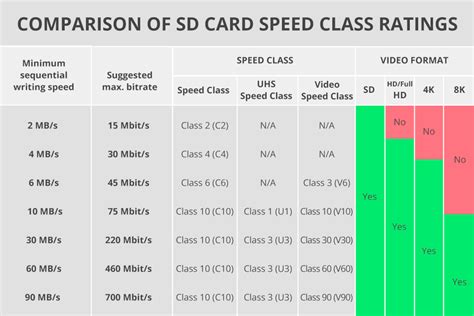
The Nintendo Switch supports UHS-I microSD cards with transfer speeds up to 104MB/s. While faster UHS-II cards exist, the Switch cannot fully utilize their increased speed, so investing in one is often unnecessary. For optimal performance within the UHS-I standard, look for these ratings:
- UHS Speed Class 3 (U3) or Video Speed Class 30 (V30): These ratings guarantee a minimum sequential write speed of 30MB/s. This is crucial for faster game loading, smoother gameplay, and quicker data transfers.
- A1 or A2 Application Performance Class: While primarily designed for app performance on Android devices, cards with A1 or A2 ratings often indicate good random read/write speeds, which can benefit game loading.
Avoid slower U1 or Class 10 cards if possible, as they will result in noticeably longer loading times for games.
Brand Reliability: Trustworthy Performance
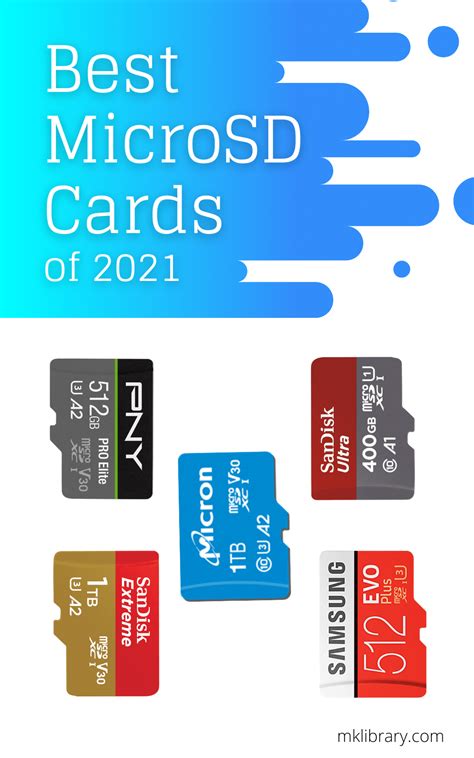
Always stick with reputable brands. SanDisk, Samsung, Kingston, PNY, and Lexar are established manufacturers known for their quality, reliability, and robust warranties. Generic or suspiciously cheap cards from unknown brands often have inflated specifications, poor performance, or shorter lifespans, leading to frustration and potential data loss.
Optimal MicroSD Card Recommendations (General Types)
Based on the factors above, here are the types of microSD cards generally recommended for the Nintendo Switch:
- SanDisk Ultra / Extreme: The SanDisk Ultra series (especially the A1 or A2 versions) offers a great balance of performance and value. For slightly better speeds, the Extreme series is an excellent choice. Both are widely available and reliable.
- Samsung EVO Select / Plus: Samsung’s EVO Select (Amazon exclusive) and EVO Plus lines are highly regarded for their consistent performance and durability, making them superb options for Switch storage.
- Kingston Canvas Go! Plus: A good alternative that offers U3/V30 speeds and solid reliability.
Focus on cards that clearly state UHS-I, U3, and ideally A1 or A2. These combinations ensure you’re getting a card that can handle the demands of modern Switch games without bottlenecks.
Tips for Installation and Management
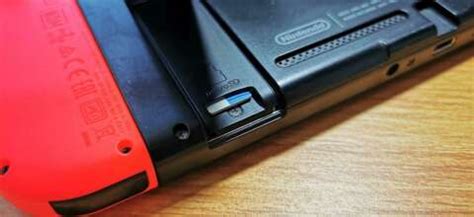
- Installation: Power off your Nintendo Switch completely. Open the kickstand on the back of the console, and you’ll find the microSD card slot. Insert the card gently until it clicks into place.
- Formatting: The Switch will likely prompt you to format a new card. Follow the on-screen instructions. This prepares the card for Switch-specific data.
- Data Transfer: You can move existing games from your Switch’s internal memory to the microSD card. Go to System Settings > Data Management > Move Data Between System / microSD Card.
- New Downloads: Once a microSD card is inserted, all new game downloads and updates will automatically go to the card until it’s full.
- Save Data: Remember that game save data is stored on the Switch’s internal memory, not the microSD card (unless you have a Nintendo Switch Online subscription for cloud backups).
Conclusion
Choosing the optimal microSD card for your Nintendo Switch is a straightforward process once you understand the key specifications. Prioritize a card with sufficient capacity for your gaming habits, ensure it has a U3 or V30 speed rating for efficient performance, and always opt for a reputable brand to guarantee reliability. With the right microSD card, you can transform your Nintendo Switch into a true digital gaming powerhouse, ready to hold countless adventures without the constant worry of running out of space.


