





My Switch runs slow. How to improve performance for new big games & old indies?

Understanding Why Your Switch Might Be Lagging
The Nintendo Switch, while a marvel of portable gaming, isn’t immune to performance hiccups, especially as its hardware ages and game demands increase. Both graphically intensive new titles and even some older indie games can struggle if your console isn’t optimized. Understanding the root causes is the first step towards a smoother gaming experience.

Essential Performance Boosters for Every Switch Owner
Before diving into specific game settings, let’s cover fundamental steps that can significantly improve your Switch’s overall responsiveness and game performance.
1. Restart Your Console Regularly
It sounds simple, but a full system restart can work wonders. Unlike merely putting it to sleep, a restart clears the system RAM and closes all background processes, giving your games a fresh slate. Hold the Power button for a few seconds, select “Power Options,” then “Restart.”
2. Clear the System Cache
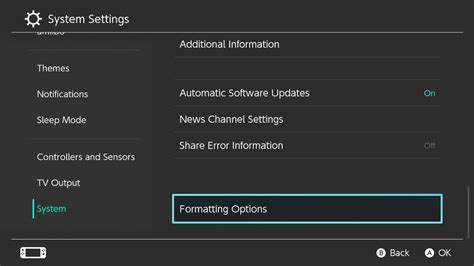
Over time, your Switch accumulates temporary data in its cache, which can slow things down. Clearing it can free up resources. Go to System Settings > System > Formatting Options > Clear Cache. Don’t worry, this won’t delete save data or downloaded games.
3. Manage Your Storage Space
Running low on storage, especially on the internal memory, can impact performance. Even if a game is on an SD card, the system still uses internal storage for various operations. Check your space via System Settings > Data Management. If you’re near capacity:
- Archive Software: This removes the game data but keeps your save data. You can redownload it later.
- Delete Software: Removes both game data and save data. Only do this if you’re sure you won’t need the save.
- Consider a Faster microSD Card: If you’re using an older or slower card (e.g., Class 4 or 6), upgrading to a Class 10 or UHS-I (U1 or U3) card can significantly improve loading times and potentially in-game streaming for some titles.
4. Keep Your System and Games Updated
Nintendo frequently releases system updates that include performance enhancements and bug fixes. Similarly, game developers often patch their games to optimize performance. Ensure both your console and all your games are running the latest versions.
- System Update: System Settings > System > System Update.
- Game Updates: Highlight a game on the HOME Menu, press ‘+’, select “Software Update” > “Via the Internet.”
Optimizing for Demanding New Games & Resource-Hungry Indies
Beyond the general tips, some games might require specific attention.
1. Close Other Applications
While the Switch isn’t a multitasking powerhouse like a PC, having multiple games suspended can still consume resources. Always close any game you’re not actively playing by pressing ‘X’ on its icon in the Home menu.
2. Check In-Game Settings
Some games, particularly larger AAA titles, offer graphical options within their settings menus. Look for options like “Performance Mode,” “Resolution Scaling,” or “Motion Blur” toggles. Lowering these settings, if available, can often provide a noticeable frame rate boost.
3. Docked Mode vs. Handheld Mode
The Switch often runs games at a higher clock speed and resolution when docked, as it has access to more consistent power. If you’re experiencing severe lag in handheld mode, try playing in docked mode to see if performance improves. Conversely, some games might perform better in handheld mode if the docked resolution is too ambitious.

When All Else Fails: Hardware Considerations
If you’ve tried all the software and optimization tips and your Switch still struggles, especially with newer, more demanding titles, it might be a hardware limitation. Older original Switch models (pre-V2) have less efficient processors and shorter battery life compared to the V2 or OLED models, which offer minor performance improvements due to better thermal management and more efficient chips, allowing for sustained clock speeds.
For most users, however, the tips above should provide a significant boost, ensuring your Switch can handle both grand adventures and charming indie gems with greater ease.


