Maximize Switch storage: SD card vs. deleting games?
The Ever-Growing Digital Library: A Switch User’s Dilemma
For Nintendo Switch owners, the joy of a vast game library often comes with a looming headache: storage. With games, updates, DLC, and screenshots all vying for space, the console’s internal 32GB (or 64GB for the OLED model) fills up surprisingly fast. This inevitably leads to a critical decision point: should you invest in an SD card, or rely on deleting and re-downloading games as needed? Let’s break down both approaches to help you make an informed choice.

Option 1: Embracing the SD Card – Expand Your Horizons
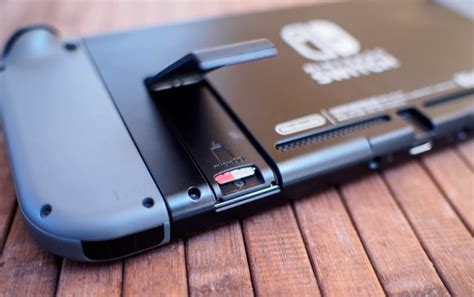
The most popular and often recommended solution for Switch storage woes is a microSD card. The Switch supports microSDHC and microSDXC cards, with microSDXC offering capacities up to 2TB (though 128GB, 256GB, or 512GB are usually sufficient for most users and more cost-effective). Simply pop one into the dedicated slot, and voilà—significantly more space for your digital adventures.
The Advantages of SD Cards:
- Vast Expandability: Easily add hundreds of gigabytes, accommodating dozens of large digital games without constant worry.
- Convenience: Once installed, games download directly to the SD card, and you rarely have to think about storage management again.
- Speed: While not as fast as internal storage, modern high-speed microSD cards (UHS-I, Speed Class 3/V30 recommended) offer excellent load times, often indistinguishable from internal storage for most Switch games.
- Preserves Save Data: Game save data is always stored internally, so removing an SD card or deleting a game from it won’t affect your progress.
Considerations: The initial cost of a high-capacity SD card can be a deterrent for some, though prices have become quite reasonable for good quality cards.
Option 2: The Deleting and Re-downloading Approach – The Free (But Fiddly) Option
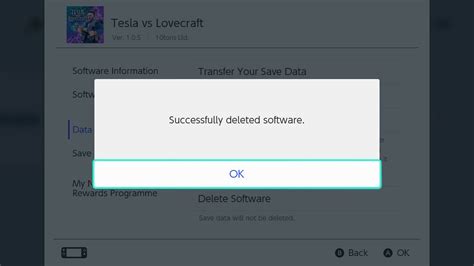
If you’re averse to spending extra money, or if you primarily play physical game cartridges, relying on the ‘delete and re-download’ method might seem appealing. The Switch allows you to archive or delete games from your system memory at any time, freeing up space.
The Advantages of Deleting Games:
- Free: It costs nothing beyond your internet bill.
- Temporary Solution: Useful if you only play a few digital games at a time and have a fast, reliable internet connection.
The Disadvantages:
- Time-Consuming: Re-downloading large games can take hours, depending on your internet speed and the game’s size. This can be a major inconvenience if you suddenly want to play an old favorite.
- Internet Dependent: You need an active internet connection to re-download games. If you’re traveling or without Wi-Fi, you’re out of luck.
- Constant Management: You’ll frequently find yourself deleting games to make room for new ones, adding a layer of management to your gaming experience.
- Update Hassles: Even physical game cartridges require digital updates and DLC, which still consume internal storage.
The Hybrid Approach and Save Data Essentials
For most users, the optimal strategy involves a hybrid approach. An SD card is almost a necessity for anyone with a significant digital library or plans to download larger titles. However, even with an SD card, you might occasionally delete games you’ve finished and aren’t likely to revisit soon, especially if they are smaller titles.
Understanding Save Data:
Crucially, game save data is always stored on the Switch’s internal memory. Deleting a game (whether it’s on the internal memory or an SD card) does not delete its save data. This means you can confidently delete a game knowing your progress is safe for when you re-download it later. For added peace of mind, consider subscribing to Nintendo Switch Online for cloud save backups.
Conclusion: An SD Card Is Your Best Bet
While deleting and re-downloading games is a viable, free option, it comes with significant drawbacks in terms of convenience and time. For the vast majority of Nintendo Switch users, investing in a good quality, high-capacity microSD card is the most efficient and stress-free way to maximize your storage. It allows you to build an extensive digital library without constant management, ensuring your gaming experience remains fluid and enjoyable. Think of it as an essential upgrade for any serious Switch gamer.