





Maximize Nintendo Switch storage for indie & AAA digital games?
Why Your Nintendo Switch Storage Fills Up Fast
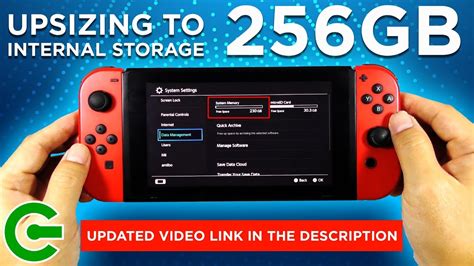
The Nintendo Switch, a marvel of portable gaming, comes with a respectable but ultimately limited amount of internal storage. The original Switch and Switch Lite offer 32GB, while the OLED model boasts 64GB. While this might sound like a decent starting point, a significant portion is reserved for the operating system and essential updates, leaving you with much less usable space – often around 25GB or 50GB, respectively. With modern AAA digital titles easily hitting 10-20GB (or even more for some, like The Witcher 3 or DOOM Eternal), and even smaller indie games adding up quickly, it doesn’t take long for that dreaded “insufficient space” message to appear. This is especially true for players who prefer the convenience of digital downloads over physical game cartridges.

The Indispensable Solution: A MicroSD Card
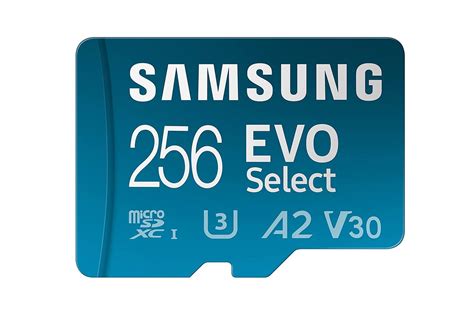
Fortunately, Nintendo designed the Switch with expandable storage in mind. The primary and most effective way to boost your console’s capacity is by investing in a high-quality MicroSD card. The Switch supports MicroSD, MicroSDHC, and MicroSDXC cards, with MicroSDXC being the standard for larger capacities. When choosing a card, look for a UHS-I (Ultra High Speed Phase I) card with an A1 or A2 application performance class rating. These ratings indicate faster random read/write speeds, which translate to quicker game loading times and smoother performance. While a U3 speed class is also beneficial, the A1/A2 rating is crucial for gaming.
Recommended MicroSD Card Capacities
The size of the MicroSD card you choose depends largely on your gaming habits and budget. Here’s a quick guide:
- 128GB: A good entry-level upgrade for casual players with a mix of physical and digital games.
- 256GB: A popular sweet spot, offering substantial space for a growing digital library without breaking the bank.
- 512GB: Ideal for avid digital collectors who download many AAA titles and don’t want to constantly manage space.
- 1TB or more: For the ultimate digital hoarder, offering virtually limitless space for the foreseeable future. Just be aware that these higher capacities come with a premium price tag.
Remember that games on physical cartridges often still require significant downloads for updates or additional content, which will consume your internal or MicroSD card storage. Installing a MicroSD card is simple: just open the kickstand on the back of your Switch and slide the card into the slot. The system will automatically recognize it.
Smart Storage Management Tips
Even with a large MicroSD card, good storage hygiene can go a long way.
1. Archive Unplayed Games
Instead of deleting games entirely, which removes both the game data and save data, consider archiving them. Archiving frees up space by removing the game data but keeps its icon on your home screen and preserves your save data (unless you’re not using Nintendo Switch Online’s cloud saves). You can redownload archived games anytime.
2. Check Storage Usage Regularly
Go to System Settings > Data Management to see a breakdown of your storage. This helps identify which games or software are taking up the most space, allowing you to make informed decisions about what to keep or archive.
3. Move Data (If Necessary)
While most new downloads will automatically go to your MicroSD card if one is present, you might have older games still on internal storage. Nintendo Switch doesn’t allow direct transfer of games between internal and external storage without re-downloading. The typical method is to archive the game from internal storage and then redownload it, ensuring it installs to your MicroSD card. Your save data will remain.
4. Leverage Cloud Saves with Nintendo Switch Online
While not a direct storage solution for game data, a Nintendo Switch Online subscription provides cloud save backups for most games. This means even if you accidentally delete a game’s save data, you can often recover it, offering peace of mind when managing your game library.
The Best Strategy for Digital Game Lovers
For players who primarily buy digital games, a large MicroSD card is not just an upgrade; it’s a necessity. Aim for at least 256GB, but 512GB or even 1TB will provide the most freedom. Combine this with regular archiving of games you’ve completed or aren’t actively playing, and you’ll virtually eliminate storage concerns. This ensures your Nintendo Switch is always ready for new releases, expansive DLC, and spontaneous gaming sessions without the frustration of needing to delete something else first. Happy gaming!



