How to structure game beginner guides for quick, intuitive player onboarding?
First impressions are critical in the gaming world. A well-structured beginner guide can be the difference between a player falling in love with your game and abandoning it within minutes. The goal isn’t just to teach controls, but to immerse players, build confidence, and ignite curiosity for what lies ahead. This article will break down how to design guides that are quick, intuitive, and genuinely effective for player onboarding.
The Core Principles of Effective Onboarding
At the heart of any successful beginner guide are a few key philosophies. Firstly, prioritize essential mechanics. New players don’t need to know every single system upfront; they need just enough information to feel competent and progress. Secondly, embrace contextual learning. Players learn best by doing, not by reading long text boxes. Integrate tutorials directly into gameplay, allowing players to experiment and understand the ‘why’ behind each action. Lastly, employ progressive disclosure, gradually revealing complexity as the player masters simpler concepts. Overloading players with information too early can be overwhelming and lead to frustration.
Structuring Your Guide: A Step-by-Step Approach
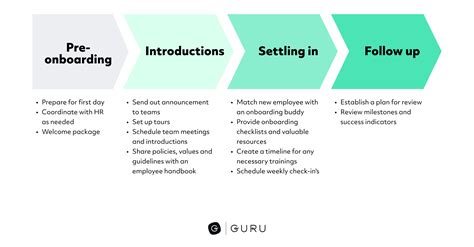
Initial Hook & Basic Movement (First 1-5 minutes)
Your very first moments in the game should be about immediate gratification and agency. Get the player moving, looking, and performing basic interactions within seconds of starting. A compelling narrative hook or an engaging visual immediately draws them in. Avoid lengthy cinematics or walls of text here; instead, use environmental cues and intuitive prompts to guide their first actions. The objective is to make them feel like they’re already playing, not just watching a tutorial.
Core Loop Introduction (Next 5-15 minutes)
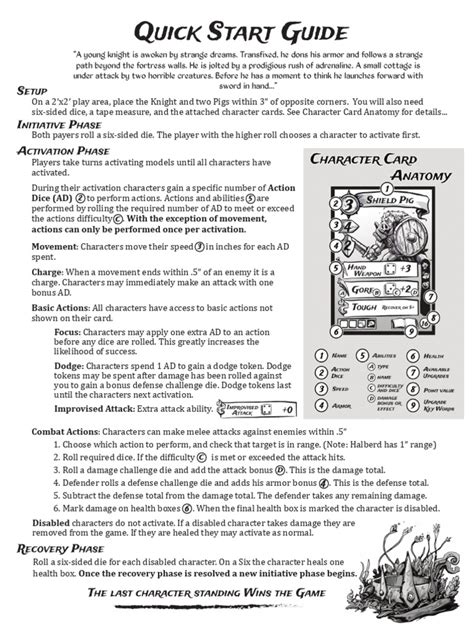
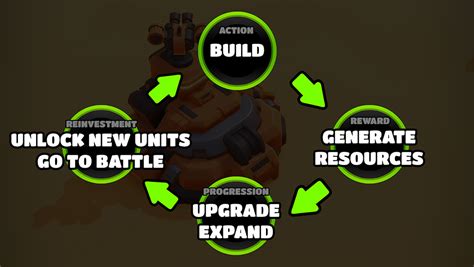
Once basic movement is mastered, introduce the game’s core loop. This might involve a simple combat encounter, collecting resources, or solving a basic puzzle. Break down complex actions into manageable chunks. For instance, if combat is key, teach movement, then a basic attack, then perhaps a block or dodge, one concept at a time within a safe environment. Provide immediate feedback for their actions, whether through visual effects, sound cues, or on-screen prompts, reinforcing successful completion of tasks.
Advanced Mechanics & Systems (Beyond 15 minutes)
Once the player is comfortable with the fundamentals, you can begin to introduce more nuanced systems. This could include crafting, inventory management, skill trees, or deeper strategic elements. Crucially, these should be introduced when they become relevant to the player’s progression, often tied to a quest or a natural point in the game’s narrative. Always provide a clear “why” for learning a new system – how will it benefit the player? Offer optional “deep dive” sections or in-game encyclopedias for those who want to explore further without forcing everyone to consume all information.
Practical Implementation Tips
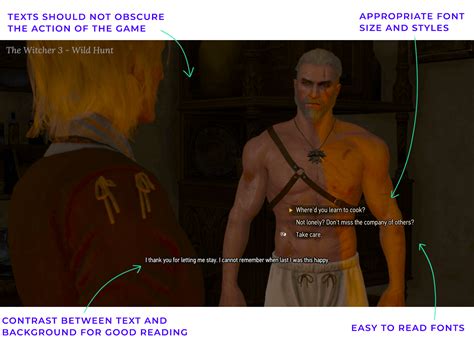
- Visual Aids are Crucial: Utilize highlighted UI elements, animated arrows, brief video clips, or clear iconography to convey information quickly and effectively. “Show, don’t just tell.”
- Interactive Tutorials vs. Static Text: Whenever possible, turn instructions into mini-challenges. Instead of “Press ‘E’ to interact,” have a prompt appear when the player is near an interactable object, asking them to press ‘E’.
- Test, Iterate, and Gather Feedback: Your guide might seem perfect to you, but new players will expose its flaws. Conduct playtests with individuals unfamiliar with your game and observe where they get stuck or confused. Be prepared to refine and simplify based on their feedback.
- Offer Optional Deeper Dives: Not every player learns at the same pace or desires the same level of detail. Provide tooltips, an in-game glossary, or a robust help section for players who want to explore mechanics in more detail without cluttering the main onboarding experience.
Conclusion
Crafting an intuitive and quick beginner guide is an art form that balances guiding players with letting them discover. By focusing on essential mechanics, providing contextual learning, progressively disclosing information, and continuously testing, you can create an onboarding experience that not only teaches but also excites. Remember, a great first impression is the foundation for a lasting player relationship and a thriving game community.