





How to reduce mobile game battery drain for longer play sessions?
The Quest for Uninterrupted Mobile Gaming
Mobile gaming has evolved into a powerhouse of entertainment, offering console-quality experiences right in the palm of your hand. However, this immersive world often comes with a significant drawback: rapid battery drain. Nothing interrupts the thrill of an epic boss battle or a crucial multiplayer match faster than a low battery warning. Fortunately, with a few strategic adjustments, you can significantly extend your device’s playtime. Let’s dive into practical ways to keep your gaming sessions going longer.

Optimize In-Game Settings for Efficiency
Many modern mobile games offer a plethora of graphical and performance settings. While it’s tempting to crank everything to the max, these settings are often the biggest culprits of battery consumption. Lowering them can have a dramatic impact on your device’s endurance without necessarily sacrificing too much of the experience.
- Reduce Graphics Quality: Most games allow you to adjust resolution, texture quality, shadow details, and special effects. Experiment with medium or even low settings; you might be surprised how good games still look while consuming significantly less power.
- Cap Frame Rate: Higher frame rates (e.g., 60fps or 120fps) provide smoother gameplay but demand more processing power. Capping your frame rate to 30fps or 45fps can save substantial battery life, especially for games where ultra-smoothness isn’t critical.
- Adjust In-Game Sound: While immersive, high-volume game audio, especially through external speakers, uses more power. Using headphones (especially wired ones) or simply lowering the volume can conserve energy.
Tweak Your Phone’s System Settings
Beyond the game itself, your device’s operating system offers several controls that can drastically impact battery performance during gaming.
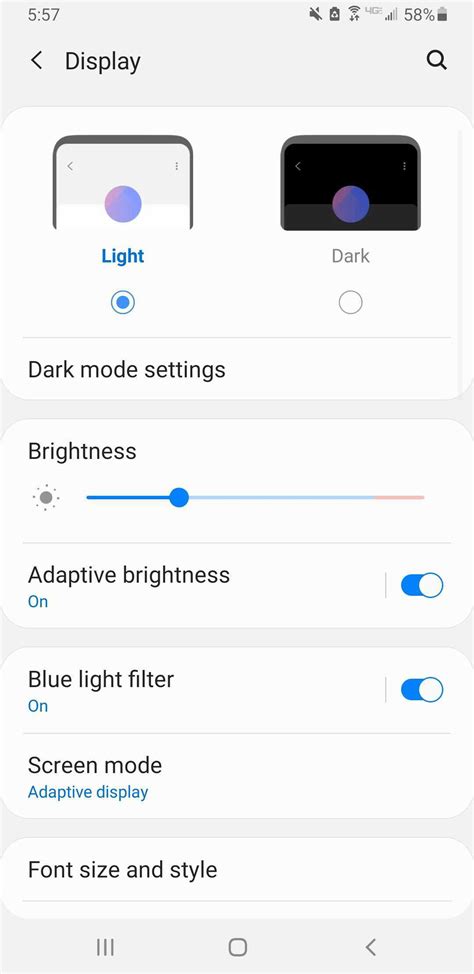
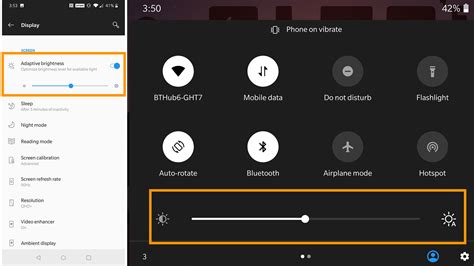
- Lower Screen Brightness: The display is often the most power-hungry component. Manually reduce your screen brightness to the lowest comfortable level, or use adaptive brightness settings.
- Reduce Screen Refresh Rate: If your phone boasts a high refresh rate display (90Hz, 120Hz, or more), switch it down to 60Hz when gaming. While 120Hz is great for scrolling, it’s often overkill for many games and a huge battery drain.
- Enable Power Saving Mode: Most smartphones have a built-in power-saving mode. Activating it will automatically reduce CPU performance, limit background activity, and lower screen brightness, extending your play sessions significantly.
- Disable Unnecessary Connectivity: Turn off Wi-Fi, Bluetooth, GPS, and mobile data if they’re not required for your current game. Searching for networks and devices consumes a lot of power. If you’re playing an online game, prefer Wi-Fi over mobile data as it’s generally more energy-efficient.
- Close Background Apps: Apps running in the background consume RAM and CPU cycles. Close all non-essential applications before starting a game to free up resources and reduce background power consumption.
- Manage Notifications: Constant notifications wake up your screen and cause vibrations or sounds, all of which consume power. Turn on Do Not Disturb mode or silence notifications during gameplay.

Hardware and Environmental Considerations
How you interact with your phone and its environment can also play a role in battery longevity.
- Keep Your Device Cool: Overheating is detrimental to battery health and can cause thermal throttling, reducing performance and increasing power consumption. Avoid playing in direct sunlight or in very hot environments. If your phone gets noticeably warm, take a break or remove its protective case to allow better heat dissipation.
- Consider External Cooling: For hardcore gamers, external phone coolers or gamepads with built-in fans can help manage heat, ensuring consistent performance and potentially better battery life.
Smart Charging Habits for Battery Health
While not directly reducing battery drain during a session, maintaining overall battery health contributes to its long-term capacity and efficiency.
- Avoid Full Drains: Try not to let your battery frequently drop to 0%. Lithium-ion batteries prefer to be topped up regularly rather than discharged completely.
- Mind Charging While Playing: While playing and charging simultaneously is possible, it generates more heat, which can degrade battery health over time. If possible, charge your device fully before a long session, or take short breaks to let it cool down while charging.
Conclusion
By implementing a combination of these tips, you can significantly extend your mobile gaming sessions and get more enjoyment out of your device without constantly being tethered to a charger. Start by experimenting with in-game graphical settings, then delve into your phone’s system preferences. A little optimization goes a long way in ensuring your mobile adventures last as long as you do!



