How to prevent mobile game battery drain & optimize performance for longer sessions?

Conquering Battery Drain and Lag in Mobile Gaming
Mobile gaming has revolutionized entertainment, offering immersive experiences right in the palm of your hand. However, the joy of a long gaming session can quickly be cut short by a rapidly depleting battery or frustrating performance lag. These issues not only disrupt your gameplay but can also impact your device’s overall health in the long run. Understanding why your phone struggles and implementing smart strategies can significantly extend your playtime and improve your gaming experience.
From resource-intensive graphics to background processes, numerous factors contribute to your device’s struggle. This guide will walk you through actionable steps to combat battery drain and optimize your phone’s performance, ensuring you can enjoy uninterrupted, high-quality mobile gaming for longer.
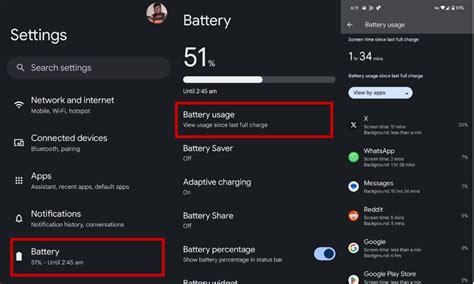
Understanding the Culprits of Battery Drain
Before diving into solutions, it’s crucial to identify what’s draining your battery and slowing down your phone:
- High Screen Brightness: The display is often the single biggest power consumer.
- Intensive Graphics Settings: High resolutions, detailed textures, and complex effects demand significant processing power.
- Background Apps and Processes: Apps running in the background, even if not actively used, consume CPU, RAM, and battery.
- Network Connectivity: Constantly searching for Wi-Fi or cellular signals, especially in areas with poor reception, uses a lot of power.
- Vibration and Haptic Feedback: While subtle, these features contribute to battery usage over time.
- Outdated Software: Unoptimized operating systems or game versions can lead to inefficiencies.
Strategies to Minimize Battery Drain
1. Adjust In-Game Settings
Most modern mobile games offer a range of graphic and performance settings. Dialing these down can have an immediate impact:
- Lower Graphics Quality: Reduce texture quality, shadow detail, and visual effects.
- Decrease Resolution: A lower rendering resolution means fewer pixels for your GPU to process.
- Limit Frame Rate: While 60fps is smooth, 30fps is often perfectly playable and significantly less demanding.
2. Optimize Device Settings
Your phone’s general settings play a huge role:
- Reduce Screen Brightness: Manually lower your screen brightness or enable adaptive brightness.
- Enable Dark Mode: For OLED screens, dark mode uses less power by turning off individual pixels.
- Disable Auto-Sync: Turn off automatic syncing for accounts you don’t need constantly updated.
- Turn Off Location Services: Restrict location access for apps that don’t need it, especially while gaming.
- Shorten Screen Timeout: Set your screen to turn off after a short period of inactivity.
3. Manage Background Apps and Connectivity
- Close Unused Apps: Before starting a game, close all other background applications to free up RAM and CPU cycles.
- Restrict Background Data: In your phone’s settings, you can prevent specific apps from using data in the background.
- Use Wi-Fi Over Cellular: Wi-Fi generally consumes less power than cellular data, especially for continuous usage.
- Disable Bluetooth/NFC: If not in use, turn off these connectivity options.
- Turn On Airplane Mode (for offline games): This disables all wireless communication, offering maximum battery savings for games that don’t require internet.
Tips for Boosting Performance
Beyond battery, performance is key for a smooth gaming experience:
- Clear Game and Phone Cache: Accumulated cache files can slow down apps and the operating system. Regularly clear cache for games and your device’s system.
- Free Up Storage: A full storage drive can lead to slower performance. Delete unnecessary photos, videos, or apps.
- Restart Your Device: A simple reboot can clear temporary files and background processes, giving your phone a fresh start.
- Keep Software Updated: Ensure your phone’s operating system and your games are always updated to the latest versions. Developers often release performance optimizations and bug fixes.
- Utilize Game Boosters/Modes: Many modern smartphones come with a ‘Game Mode’ or ‘Game Booster’ feature. These tools often prioritize game performance by clearing RAM, blocking notifications, and optimizing CPU/GPU usage.

Long-Term Battery Health and Habits
Sustainable gaming also means taking care of your device’s battery for the long haul:
- Avoid Overheating: High temperatures are detrimental to battery health. Play in a cool environment, remove your phone case during intense sessions, and avoid playing while charging if the device gets excessively hot.
- Smart Charging Habits: Don’t consistently drain your battery to 0% or charge it to 100%. Modern lithium-ion batteries prefer to stay between 20% and 80%.
- Monitor Battery Usage: Regularly check your phone’s battery usage stats to identify which apps are the biggest power hogs. This can help you make informed decisions about app management.

Conclusion
Optimizing your mobile gaming experience involves a combination of adjusting in-game settings, fine-tuning your device’s general settings, and adopting healthy usage habits. By implementing these strategies, you can significantly reduce battery drain, minimize lag, and enjoy longer, more enjoyable gaming sessions without constant worry about your phone giving up. Take control of your mobile gaming environment and immerse yourself fully in the virtual worlds you love.