How to prevent Joy-Con drift on your Switch console?
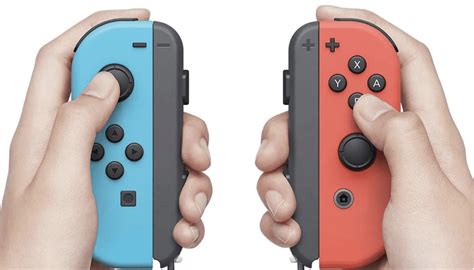
Joy-Con drift is a frustrating issue for many Nintendo Switch owners, causing characters to move or menus to scroll without any input. While a complete prevention might be challenging due to the mechanical nature of the joysticks, several proactive steps can significantly reduce the likelihood and severity of this problem, extending the life of your controllers.
Understanding the Culprit: Why Drift Happens
Before diving into prevention, it’s helpful to understand what causes drift. Primarily, it’s wear and tear on the internal components of the analog stick. Dust, debris, and microscopic particles can get under the rubber membrane and interfere with the electrical contacts. Over time, the physical contact points themselves can wear down, leading to inaccurate readings.

1. Keep Your Joy-Cons Clean
One of the most crucial preventative measures is regular cleaning. Dust and debris are common culprits. Use a can of compressed air to blast around the base of the analog sticks. Hold the can upright and use short bursts to dislodge any foreign particles. You can also use a lint-free cloth or cotton swab lightly dampened with isopropyl alcohol (90% or higher) to clean the exterior of the sticks and the surrounding area. Ensure no liquid seeps into the controller.
2. Handle with Care
Rough handling can accelerate wear and tear. Avoid dropping your Joy-Cons or applying excessive force when pushing or rotating the analog sticks. While gaming can be intense, try to be mindful of how you’re treating your controllers. When detaching them from the console or accessories, use the release button and pull them straight off, rather than yanking them at an angle.

3. Utilize Protective Accessories
Consider using joystick caps or protective cases. Joystick caps (thumb grips) can add an extra layer of protection to the analog stick’s rubber surface, preventing direct wear from your thumbs and potentially deflecting some dust. Full protective cases for the Joy-Cons can shield them from impacts and environmental debris when not in use.
4. Calibrate Your Joy-Cons Regularly
While not strictly a “prevention” method against physical wear, regular calibration can help correct minor inaccuracies before they become major issues. If your Joy-Cons start exhibiting slight unwanted movement, recalibrating them through the Switch’s system settings can often resolve it temporarily or confirm if a hardware issue is developing. Go to System Settings > Controllers and Sensors > Calibrate Control Sticks.
5. Keep Your Switch Software Updated
Nintendo frequently releases system updates that can include improvements to controller recognition and stability. While it won’t fix a physical drift issue, ensuring your console’s software is up-to-date can help rule out software-related glitches that might mimic drift or exacerbate minor issues. Always connect to the internet periodically to check for and install the latest firmware.
6. Proper Storage
When you’re not using your Switch, store it and its Joy-Cons in a clean, dry place, ideally away from excessive dust, pet hair, and extreme temperatures. Using a carrying case for your Switch, especially when traveling, can prevent debris from entering the controllers and protect them from physical damage.

7. Avoid Third-Party Cleaning Solutions or Modifications
Be extremely cautious with third-party cleaning solutions that aren’t specifically designed for electronics or with opening your Joy-Cons for DIY repairs unless you are confident in your technical skills. Using incorrect liquids can cause corrosion, and improper disassembly can lead to further damage, potentially voiding any warranty.
By implementing these preventative measures, you can significantly reduce the chances of encountering Joy-Con drift and ensure your Nintendo Switch gaming experience remains smooth and enjoyable for years to come. While no method offers 100% immunity, proactive care is your best defense.