





How to fix Joy-Con drift on your Nintendo Switch for better gameplay?
Understanding Joy-Con Drift and Its Impact
Joy-Con drift is a common and frustrating issue experienced by many Nintendo Switch owners, where the console registers movement from the joystick even when it’s not being touched. This phantom input can lead to characters moving on their own, camera angles shifting uncontrollably, and general gameplay frustration, severely impacting the immersive experience Nintendo is known for.
Often, this problem stems from wear and tear on the joystick mechanism, microscopic dust and debris accumulating inside the module, or even manufacturing defects. While it can feel like a game-ending problem, there are several steps you can take, ranging from simple software adjustments to more involved hardware fixes, to reclaim control of your gaming experience.

Initial Software & Calibration Solutions
Before diving into more complex solutions, it’s always wise to start with basic software troubleshooting. These steps are quick, easy, and often resolve minor cases of drift.
1. Calibrate Your Joy-Cons
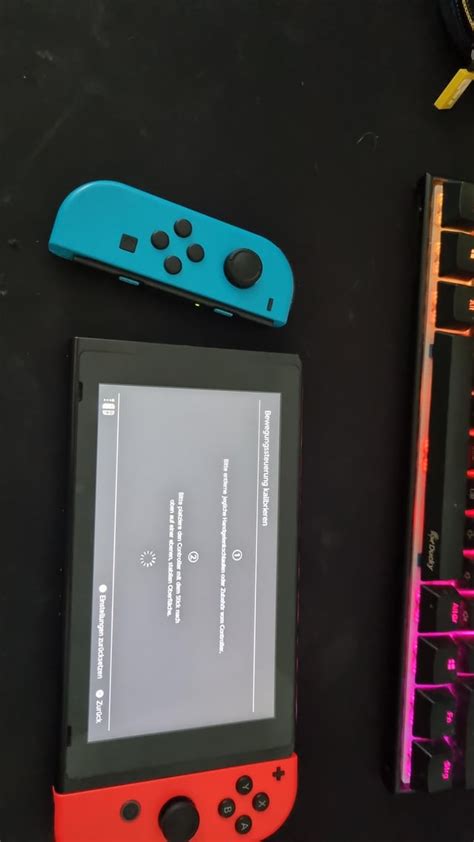
Nintendo Switch allows you to calibrate your Joy-Cons to correct input inaccuracies. Go to System Settings > Controllers and Sensors > Calibrate Control Sticks. Follow the on-screen prompts carefully. If one stick is drifting, perform the calibration specifically for that stick.
2. Update Your System Firmware and Joy-Con Firmware
Ensure both your Nintendo Switch console and your Joy-Cons have the latest firmware updates. Outdated software can sometimes lead to unexpected input issues. Navigate to System Settings > System > System Update. For Joy-Con firmware, go to System Settings > Controllers and Sensors > Update Controllers.
3. Disconnect and Reconnect Joy-Cons
Sometimes a simple re-sync can help. Detach both Joy-Cons from the console and then reattach them. You can also try disconnecting them wirelessly by going to System Settings > Controllers and Sensors > Disconnect Controllers, then press any button on the Joy-Cons to reconnect.
Intermediate Cleaning & Maintenance Methods
If software fixes don’t work, the drift might be caused by physical debris or wear inside the joystick mechanism. These methods require a little more hands-on effort but can be very effective.
1. Use Compressed Air
Dust, lint, and other tiny particles can easily get lodged under the rubber skirt of the joystick, interfering with its sensors. Use a can of compressed air with a thin nozzle to blow around the base of the control stick. Gently lift the rubber skirt slightly while blowing to get air directly underneath. Do this carefully to avoid damaging the components.
2. Apply Isopropyl Alcohol
For more stubborn grime or oil buildup, a small amount of high-percentage isopropyl alcohol (90% or higher) can be effective. Power off your Switch. Dip a cotton swab or a clean microfiber cloth in isopropyl alcohol and gently work it around the base of the control stick, under the rubber skirt. Move the stick around in circles to help the alcohol seep in and break down contaminants. Allow it to dry completely before powering on your Switch again (at least 15-30 minutes).
Advanced Hardware Solutions & Professional Repair
When all else fails, the problem might be a mechanical failure requiring a part replacement or professional intervention.
1. Replace the Joystick Module (DIY)
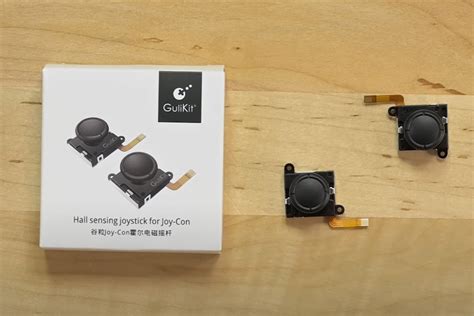
For those comfortable with small electronics repair, replacing the faulty joystick module yourself is an option. Replacement kits are readily available online and typically include the new joystick, screwdrivers, and prying tools. This can be a cost-effective solution, but it voids your warranty and carries the risk of further damage if not done carefully. Watch detailed video tutorials before attempting this.
2. Contact Nintendo Support for Repair
Nintendo offers repair services for Joy-Con drift. In many regions, they have acknowledged the issue and may offer free out-of-warranty repairs. Visit Nintendo’s official support website for your region and follow the instructions to set up a repair. This is often the safest and most reliable long-term solution, preserving your warranty and ensuring the repair is done by professionals.
3. Consider Third-Party Controllers
If you’re tired of dealing with Joy-Con drift, or if your Joy-Cons are beyond repair and you’re looking for an alternative, consider investing in a high-quality third-party controller. Many excellent wired and wireless options offer comfortable ergonomics and drift-resistant designs, providing a solid alternative for docked or tabletop play.

Preventative Measures for Future Gaming
While Joy-Con drift can be unavoidable due to manufacturing quirks, adopting good habits can help prolong the life of your controllers and potentially prevent future issues:
- Handle with Care: Avoid dropping your Joy-Cons or subjecting them to excessive force.
- Keep Them Clean: Regularly wipe down your controllers with a dry cloth to prevent dust and grime buildup.
- Proper Storage: Store your Switch and Joy-Cons in a clean, dust-free environment, perhaps in a carrying case when not in use.

Conclusion
Joy-Con drift can be a major irritant, but with a range of solutions from simple software tweaks to more involved hardware repairs, you don’t have to let it ruin your gaming. By systematically working through these methods, or by reaching out to Nintendo for professional help, you can restore precision and enjoyment to your Nintendo Switch gameplay. Don’t let phantom movements dictate your gaming destiny – take action and get back to seamless play!


