





How to expand console storage cost-effectively for big and small games?
The Ever-Growing Storage Dilemma for Gamers
In today’s gaming landscape, digital downloads are king, and game sizes are skyrocketing. A single AAA title can easily consume over 100GB, while a robust collection of indie games can collectively gobble up valuable console storage faster than you can say “patch update.” Running out of space often leads to the agonizing decision of which beloved game to uninstall, only to redownload it later. Fortunately, there are several cost-effective ways to expand your console’s storage, catering to the unique needs of different platforms and budgets.
Nintendo Switch: The MicroSD Card Advantage
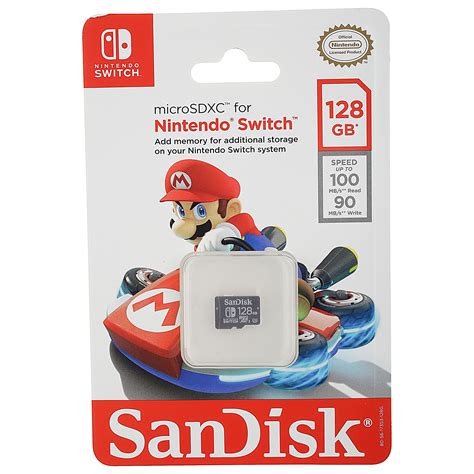
For Nintendo Switch owners, expanding storage is remarkably straightforward and often the most budget-friendly option. The Switch natively supports microSD cards, making it an incredibly accessible upgrade.
Choosing the Right MicroSD Card:
- Capacity: MicroSD cards range from 64GB to a massive 1TB or even more. For most users, a 256GB or 512GB card strikes a good balance between cost and storage, allowing for dozens of large games.
- Speed: Look for cards with “UHS-I” speed class 3 (U3) and an “A1” or “A2” app performance rating. These ensure faster game loading times and smoother performance. While faster cards exist, the Switch’s internal architecture won’t fully utilize their peak speeds, so spending extra on ultra-fast cards isn’t always cost-effective.
- Cost-Effectiveness: Prices for microSD cards have become very competitive. Watch out for sales, especially during major shopping events, to snag a high-capacity card at a significant discount.
PlayStation & Xbox: External Drives & Internal Upgrades
Sony PlayStation and Microsoft Xbox consoles offer more varied solutions, ranging from simple external hard drives to more advanced internal SSD upgrades. The approach you take depends on your console generation and performance needs.
External USB Hard Drives (HDDs)
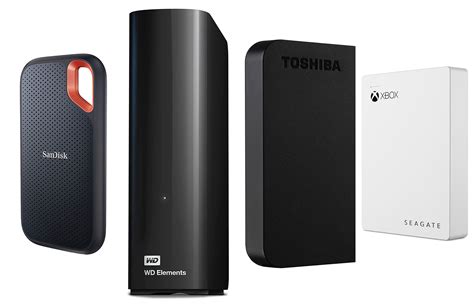
This is often the most cost-effective solution for both PS4/PS5 and Xbox One/Series X|S. External HDDs connect via USB and offer vast storage capacities (typically 1TB-8TB) at a low price per gigabyte.
- Pros: Extremely affordable, high capacity, easy to set up (plug-and-play).
- Cons: Slower loading times compared to SSDs, typically only suitable for storing and playing older generation games (PS4 games on PS5, Xbox One games on Xbox Series X|S). Next-gen optimized games often need to be moved to the internal drive or a specific expansion card/SSD to run.
External USB Solid State Drives (SSDs)
For a noticeable speed boost over HDDs, external USB SSDs are a great option. They offer faster loading times for games stored on them, though they are more expensive per gigabyte than HDDs.
- Pros: Faster loading, more durable (no moving parts).
- Cons: More expensive than HDDs, still may not run next-gen optimized games directly on PS5/Xbox Series X|S without transferring to internal storage.
PS5 M.2 SSD Expansion
The PlayStation 5 offers an internal M.2 SSD slot, allowing users to install a high-speed NVMe PCIe Gen4 SSD. This is the only way to expand the PS5’s storage while maintaining the ability to play PS5-native games directly from the expanded drive at full speed.

- Considerations: Requires a compatible NVMe SSD with a heatsink (or one added separately) and a specific set of performance specifications. While more expensive than external drives, it’s the premium solution for seamless PS5 game expansion. Prices have come down significantly, making it more cost-effective than at launch.
Xbox Series X|S Storage Expansion Card
Microsoft offers a proprietary Storage Expansion Card for the Xbox Series X|S, developed in partnership with Seagate. These cards plug directly into a dedicated port on the back of the console and replicate the internal SSD’s speed and performance, allowing next-gen games to be played directly from them.
- Considerations: Extremely convenient, truly plug-and-play. However, they are significantly more expensive than generic external SSDs of comparable capacity. For ultimate convenience and performance, it’s the best option, but not the most budget-friendly.
Cost-Effective Strategies for All Gamers
Beyond hardware solutions, smart game management can also save you money and headaches.
- Uninstall Games You Aren’t Playing: It sounds obvious, but regularly clearing out games you’ve finished or lost interest in is a free way to reclaim space. Remember, digital purchases can always be re-downloaded.
- Prioritize Storage: Store smaller, frequently played indie titles on your console’s faster internal storage, and move larger, less-played AAA games to external slower storage if your console supports playing from it.
- Utilize Cloud Saves: Always ensure your game saves are backed up to the cloud (most consoles do this automatically with a subscription), so you can uninstall games without fear of losing progress.
- Physical vs. Digital: For some, buying physical game discs can save internal storage space, as parts of the game are often read from the disc, though modern games still install significant data.
Conclusion: Maximizing Your Gaming Library Without Breaking the Bank
Expanding your console’s storage doesn’t have to be an exorbitant expense. Whether you opt for a budget-friendly microSD card for your Switch, a high-capacity external HDD for older generation games, or invest in a faster internal M.2 SSD for your PS5, there’s a solution tailored to your needs and wallet. By understanding the options and employing smart storage management, you can ensure your console always has room for the next big adventure and every small gem in between.


