





How to effectively block or minimize intrusive ads in free mobile games?
Free mobile games are a fantastic way to pass the time and enjoy diverse experiences without an upfront cost. However, their primary monetization strategy often involves showing advertisements, which can range from mildly annoying banners to disruptive full-screen video ads that interrupt gameplay. These intrusive ads can significantly detract from the user experience. Fortunately, several methods can help you effectively block or minimize them, allowing for a more enjoyable gaming session.
Understanding Why Free Games Have Ads
The vast majority of free-to-play mobile games rely on advertising revenue to support development, maintenance, and ongoing content creation. Without an initial purchase, ads, alongside in-app purchases, are how developers earn money. While understandable, the aggressive nature of some ad implementations can be frustrating for players. Understanding this trade-off is the first step in finding solutions that balance developer support with player experience.

Direct Solutions: Investing in Ad-Free Play
1. Purchase the Ad-Free Version or Premium Pass
Many free games offer an in-app purchase to remove ads. This is often the most straightforward and developer-friendly solution. By making a small one-time payment, you directly support the creators and gain an uninterrupted gaming experience. Look for options like “Remove Ads,” “Premium Version,” or “Battle Pass” which sometimes include ad removal among other perks.
2. Play Offline (Where Possible)
For games that don’t require a constant internet connection, simply turning off your Wi-Fi or mobile data can often prevent ads from loading. Most ad networks require an active internet connection to fetch and display advertisements. This method is incredibly effective for single-player, offline-compatible games, but obviously won’t work for online multiplayer titles or games that need to download content.

Technical Strategies to Block Ads
3. Utilize System-Wide Ad Blockers or VPNs with Blocking Features
Several apps and services are designed to block ads across your entire mobile device, not just in web browsers. These can include:
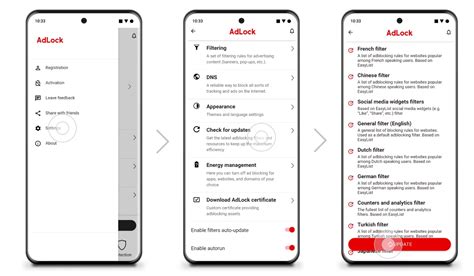
- Dedicated Ad Blocker Apps: Apps like AdGuard, Blokada, or similar solutions can create a local VPN (without routing traffic through an external server) to filter ad requests at the DNS level or by monitoring network traffic. These often require some setup but can be very effective.
- VPN Services with Ad Blocking: Some premium VPN providers integrate ad and tracker blocking directly into their service. When you route your traffic through their VPN, they filter out known ad domains. This offers a dual benefit of privacy and ad reduction.
It’s important to research and choose reputable apps or services, as some free ad blockers might have privacy implications.
4. Change Your DNS Settings
A more advanced but highly effective method is to change your device’s DNS (Domain Name System) settings to a server that filters out known ad domains. Popular options include:
- AdGuard DNS: Offers public DNS servers that block ads and trackers. You can manually configure this in your Wi-Fi settings or router.
- NextDNS: A customizable DNS service that allows you to choose what to block, including ad and tracker lists.
- Pi-hole (for home network): If you’re tech-savvy, setting up a Pi-hole on your home network can block ads for all devices connected to it.
Changing DNS at the device level (Settings > Wi-Fi > Modify Network > IP settings) or router level can provide comprehensive ad blocking.
5. Restrict App Network Permissions (Android Only)
On Android devices, you can sometimes restrict individual app’s access to mobile data or Wi-Fi. While this might prevent ads, it could also break core functionalities of the game if it requires internet for save data, content downloads, or online features. This is a less reliable method but worth exploring for very specific games if other methods fail and offline play isn’t an option.
Ethical Considerations and Alternatives
Be Mindful of Developer Support
Remember that blocking ads directly impacts a developer’s revenue. If you enjoy a game and play it frequently, consider purchasing the ad-free version or making other in-app purchases to support the creators. A healthy mobile game ecosystem relies on players supporting developers.
Explore Ad-Free or Premium Games
Sometimes, the best solution is to simply seek out games that don’t rely on an ad-based model. There are many excellent premium mobile games available for a one-time purchase that offer a completely ad-free and often higher-quality experience. Services like Apple Arcade or Google Play Pass also offer curated collections of ad-free games for a monthly subscription.

Conclusion
Intrusive ads can undeniably diminish the enjoyment of free mobile games. While various methods exist to block or minimize them, from simple offline play to more technical DNS configurations, the most effective solution often involves a conscious choice. Whether you invest in an ad-free version, leverage system-wide blockers, or opt for premium titles, taking control of your ad experience can significantly enhance your mobile gaming sessions. Choose the method that best suits your comfort level, technical ability, and desire to support the game developers you appreciate.



