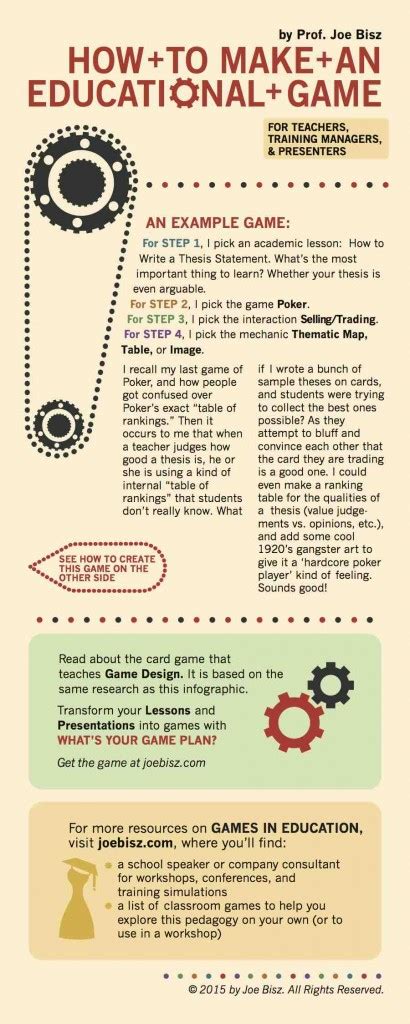
How to design beginner guides for complex indie games without overwhelming new players?

Indie games often captivate players with their unique mechanics, deep systems, and innovative gameplay. However, this very complexity can be a double-edged sword, intimidating new players and leading to early abandonment. Designing a beginner guide for a complex indie game isn’t just about explaining rules; it’s about artfully onboarding players without stifling their sense of discovery or overwhelming them with information. The challenge lies in balancing the desire to teach with the need to engage.
The Core Challenge: Balancing Depth and Accessibility
Many indie games pride themselves on emergent gameplay and intricate systems, a stark contrast to more linear, hand-holding AAA titles. While this depth is a strength, it can become a barrier if not introduced thoughtfully. The goal isn’t to spoon-feed every detail but to equip players with the foundational knowledge and confidence to explore the game’s systems on their own terms. It’s about opening a door, not dragging them through a maze.

Prioritize Core Mechanics First
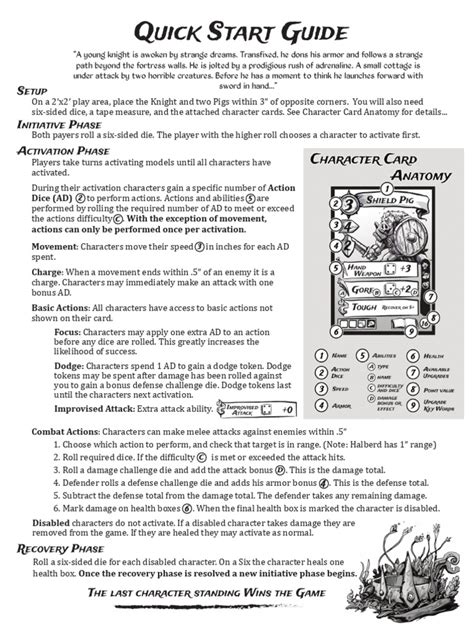
Before designing any guide, identify the absolute essentials. What does a player need to know to survive the first five minutes? What are the core verbs of your game – move, interact, attack, build? Focus on these fundamental actions and their immediate consequences. Resist the urge to explain every nuanced mechanic, advanced strategy, or lore detail in the initial onboarding. That information can come later, when the player is ready for it.
Breaking down the learning curve into manageable chunks prevents cognitive overload. Think of it like teaching a new language: you start with basic greetings and simple sentences, not complex grammar and philosophical debates.
Embrace Contextual and Gradual Learning
Players learn best by doing, especially when the information is relevant to their immediate situation. Instead of a standalone tutorial mode, consider integrating learning into the gameplay itself. This means introducing mechanics ‘just-in-time’ – when a player naturally encounters a new item, enemy, or system, that’s the perfect moment to offer a brief explanation or a mini-challenge.
Gradual complexity means layering information. Introduce a basic mechanic, let the player practice it, then introduce a modifier or an advanced application of that mechanic. This iterative approach builds understanding step-by-step, reinforcing previous lessons as new ones are introduced.
Leverage UI/UX for Passive Guidance
A well-designed User Interface (UI) and User Experience (UX) can be a silent, powerful guide. Clear iconography, intuitive layouts, and consistent visual language can convey information without needing explicit text. Tooltips that appear on hover, visual cues that highlight interactive objects, and consistent feedback for player actions (e.g., sound effects, animations) all contribute to a player’s understanding without them feeling ‘taught’.
Avoid relying solely on walls of text. Wherever possible, show rather than tell. A short, animated GIF or a brief in-game demonstration can often communicate a complex idea more effectively than a lengthy paragraph.
Offer Optional Deeper Dives
Not all players learn or engage with complexity in the same way. Some thrive on discovery, others prefer structured learning, and a third group wants to master every minute detail. Your beginner guide should cater to the broad middle, but also offer optional avenues for those who want more. This could include:
- In-game encyclopedias or codexes: Accessible menus containing detailed information on items, enemies, and systems.
- Optional advanced tutorials: Dedicated sections for mastering specific, complex mechanics.
- Hint systems: A subtle way to nudge players who are stuck without giving away the entire solution.
- Contextual reminders: Small, dismissible pop-ups that briefly explain a mechanic when the player is about to use it.
By making deeper explanations opt-in, you empower players to seek information when they feel ready, rather than forcing it upon them.
Iterate and Gather Feedback
Your first attempt at a beginner guide will likely not be perfect. It’s crucial to observe new players as they experience your game for the first time. Playtesting, user interviews, and analytics can reveal points of confusion, frustration, or areas where players get stuck. Pay close attention to where players deviate from expected paths or struggle with core mechanics.
Use this feedback to refine your guide, perhaps by clarifying language, adding new visual cues, or restructuring the introduction of certain mechanics. Designing an effective beginner guide is an iterative process, much like game development itself.
Conclusion
Creating an effective beginner guide for a complex indie game is an art. It requires empathy for the new player’s experience, a clear understanding of your game’s core loop, and a commitment to gradual, contextual learning. By prioritizing essential mechanics, leveraging intuitive UI, offering optional deep dives, and continuously iterating based on feedback, you can transform your game’s complexity from a barrier into a rewarding journey of discovery, welcoming new players into the rich world you’ve built without ever overwhelming them.