How to create game beginner guides that teach core skills without overwhelming new players?

Creating an engaging and accessible experience for new players is crucial for any game’s success. While it’s tempting to bombard beginners with all the game’s complexities upfront, a well-designed guide teaches core skills gradually, allowing players to build confidence and mastery without feeling overwhelmed. The challenge lies in striking the perfect balance: providing enough information to get started, but not so much that it leads to frustration or disengagement.
This article will explore strategies for developing beginner guides that effectively introduce essential game mechanics, ensuring new players grasp fundamental skills and enjoy their initial hours in your game world.
The Importance of a Gentle Introduction
First impressions matter, and a game’s onboarding experience is often the make-or-break moment for a new player. A poorly designed beginner guide can lead to: a steep learning curve, confusion about basic controls or objectives, and ultimately, players quitting before they’ve even experienced the game’s true potential. Conversely, a thoughtful introduction fosters engagement, encourages exploration, and sets the stage for long-term player retention.
Core Principles for Effective Beginner Guides
1. Prioritize Core Mechanics First
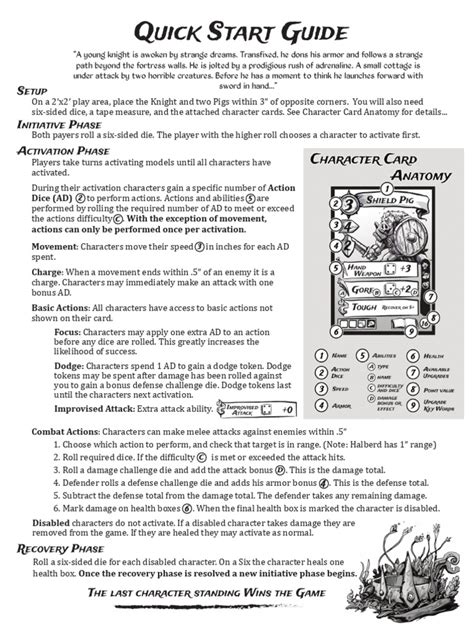
Identify the absolute essential skills a player needs to function within your game. These are the foundational building blocks upon which all other mechanics rest. Focus exclusively on these for the initial guide sections.
- Movement: How to navigate the game world.
- Interaction: How to pick up items, talk to NPCs, open menus.
- Basic Combat/Puzzle Solving: The simplest form of the game’s primary challenge.
- Objective Understanding: What is the immediate goal and how to progress.
2. Incremental Learning: Introduce Concepts Gradually
Avoid information dumps. Instead, “drip-feed” new mechanics as they become relevant. Introduce one new concept or skill at a time, allowing players to practice and master it before moving on to the next. This layered approach prevents cognitive overload.
For instance, introduce basic movement, then a simple objective, then a basic combat encounter, rather than explaining all movement, all combat, and all objectives at once.

3. Contextual Learning: Show, Don’t Just Tell
The most effective tutorials are integrated into gameplay itself. Instead of static text boxes, guide players through actions within the game world. If you want them to jump, prompt them to jump over a small obstacle. If they need to use a specific item, provide an immediate opportunity to use it.
- Interactive Prompts: Overlay UI elements that highlight where to click or what key to press.
- Guided Scenarios: Design small, safe environments specifically for practicing new skills.
4. Clear and Concise Language
Use simple, direct language. Avoid jargon, abbreviations, or overly technical terms that new players won’t understand. Keep sentences short and paragraphs focused on a single idea. If complex terms are necessary, introduce them clearly and explain their meaning.

5. Visual Aids and Feedback
Leverage visual design to reinforce learning. Use arrows, glowing elements, or highlighted UI components to draw attention to important information or actions. Provide immediate, clear feedback when a player performs an action correctly or incorrectly. This positive reinforcement builds confidence.
- UI Highlighting: Point directly to relevant buttons or inventory slots.
- Sound Cues: Distinct sounds for success or failure.
- Text Prompts: Brief messages confirming successful completion.

Practical Techniques for Implementation
Beyond the core principles, several practical techniques can enhance your beginner guides:
- Interactive Tutorials: Design an introductory mission or quest line that serves as the tutorial, guiding players through the initial actions and story elements.
- Tooltips and On-Demand Info: Allow players to hover over UI elements or specific objects to get more information, rather than forcing it all at once.
- “First 5 Minutes” Experience: Focus intensely on what a player does in the very first few minutes. This initial experience should be smooth, rewarding, and immediately understandable.
- Progressive Unlocking: Lock off advanced features or game areas until the player has demonstrated proficiency with basic skills, or reached a certain progression point.
- Optional Advanced Guides: Provide separate, easily accessible guides or in-game encyclopedias for players who want to dive deeper into lore, advanced mechanics, or strategies.
- Playtesting with New Players: Crucially, test your beginner guide with actual new players who have never seen your game before. Observe where they get stuck, confused, or bored, and iterate based on their feedback.
Conclusion: Guiding, Not Dictating
Creating effective beginner guides is an art form. It requires empathy for the new player, understanding their potential frustrations, and a commitment to incremental, contextual learning. By prioritizing core skills, introducing mechanics gradually, and providing clear, visual instruction, you can empower new players to confidently explore your game world. Remember, your goal is to guide them gently into mastery, not to dictate every single step, fostering a sense of accomplishment and a desire to delve deeper into the rich experience you’ve created.