How to choose the best Switch SD card for a huge library of indie and AAA games?

The Nintendo Switch, while a marvel of portable gaming, comes with a rather modest 32GB (or 64GB for the OLED model) of internal storage. For anyone planning to build a significant library of digital games, especially a mix of expansive AAA titles and charming indie darlings, an external microSD card isn’t just an accessory—it’s an absolute necessity. But with a plethora of options on the market, how do you pick the perfect one?
Why an SD Card is Essential for Switch Gamers
Digital game sizes vary wildly. Indie games might be a few hundred megabytes, but many AAA titles can easily consume tens of gigabytes. For instance, games like The Legend of Zelda: Breath of the Wild are around 14GB, while Pokémon Scarlet and Violet weigh in at over 10GB, and some third-party games can exceed 20GB. Without additional storage, your Switch’s internal memory will fill up incredibly fast, forcing you to constantly delete and re-download games.
A microSD card expands your storage significantly, allowing you to keep dozens, if not hundreds, of games readily accessible. This means less waiting for downloads and more time playing, whether you’re at home or on the go.
Understanding SD Card Types: MicroSD, SDHC, and SDXC
For the Nintendo Switch, you’ll specifically need a microSD card. There are three main types within the microSD family, differentiated by their maximum storage capacity:
- microSDHC (High Capacity): Supports capacities from 4GB to 32GB.
- microSDXC (Extended Capacity): Supports capacities from 64GB up to 2TB.
Given the storage demands of modern games, you should exclusively look for microSDXC cards. These are compatible with the Switch and offer the vast capacities needed for a large game library.
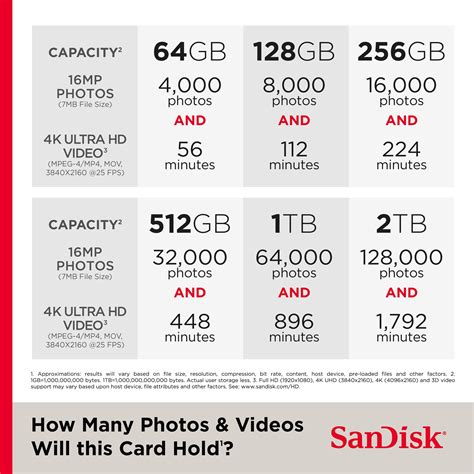
Capacity: How Much Space Do You Really Need?
This is arguably the most critical factor. Consider your gaming habits:
- 128GB: A good starting point for casual gamers or those who buy mostly physical cartridges but want some digital indies. This will hold a decent number of games.
- 256GB: An excellent balance for most digital-heavy gamers. It provides ample space for a mix of AAA and indie titles without breaking the bank.
- 512GB: Ideal for serious digital collectors. This capacity will comfortably hold a very large library, including many AAA games and practically all the indie titles you could want.
- 1TB or more: For the ultimate collector who wants to download everything and never worry about storage. While more expensive, prices for 1TB cards are becoming more reasonable.
Remember, it’s always better to slightly overestimate your needs. Game sizes tend to increase over time, and a slightly larger card now can save you the hassle of upgrading later.
Speed Matters: Reading and Writing Data
While capacity gets most of the attention, speed is crucial for game loading times. SD cards have various speed ratings:
- UHS Speed Class (U1, U3): U1 cards offer a minimum write speed of 10MB/s, while U3 cards guarantee 30MB/s. For the best performance on Switch, especially with larger games, a U3 card is highly recommended.
- Video Speed Class (V10, V30, etc.): Similar to UHS, V30 ensures a minimum 30MB/s write speed.
- Application Performance Class (A1, A2): A1 and A2 ratings indicate optimized performance for running apps (like games) directly from the card. A1 cards offer minimum random read speeds of 1500 IOPS and random write speeds of 500 IOPS. A2 cards improve this significantly (4000 IOPS read, 2000 IOPS write). While not strictly necessary, an A1 or A2 rated card can contribute to smoother game loading and performance on the Switch.
The Nintendo Switch can theoretically support read speeds up to 100MB/s. Look for cards that offer read speeds in the range of 90-100MB/s and a U3 or A1/A2 rating for the best experience.
Top Brands and Where to Buy
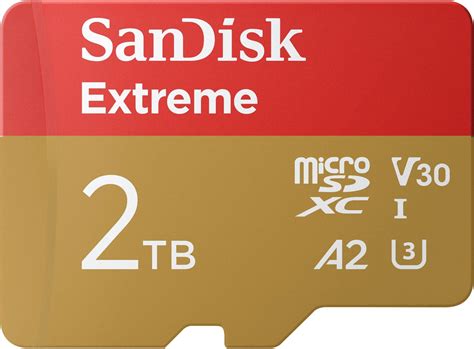
Stick with reputable brands to ensure reliability and performance. SanDisk, Samsung, Lexar, and PNY are widely recognized for their quality microSD cards. Be wary of unbranded or suspiciously cheap cards, as they often have slower speeds or inflated capacity claims.
You can purchase microSD cards from major electronics retailers, online marketplaces like Amazon or Best Buy, and even directly from Nintendo’s official partners. Always buy from trusted vendors to avoid counterfeits.
Installation and Management Tips
- Installation: Ensure your Switch is powered off before inserting the microSD card into the slot located under the kickstand.
- Data Transfer: If you’re upgrading from an older, smaller card, you can transfer your game data by copying the contents of the old card to your computer, then onto the new card. Alternatively, you can re-download games directly to the new card.
- Storage Management: The Switch’s system settings allow you to monitor your storage usage and archive software to free up space, though with a large microSD card, you’ll rarely need to do this.
Choosing the right microSD card is a straightforward upgrade that vastly improves your Nintendo Switch experience. By focusing on a microSDXC card with sufficient capacity (256GB or 512GB is often the sweet spot) and good speed ratings (U3, A1/A2), you’ll ensure your huge library of indie and AAA games loads quickly and is always ready to play.