Expand Switch storage: Best microSD cards for digital games & saves?
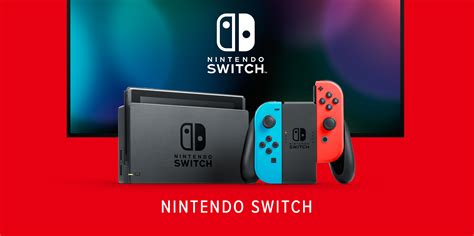
The Nintendo Switch, an incredibly versatile console, comes with a rather modest 32GB of internal storage (or 64GB for the OLED model). While this might suffice for a few physical game cartridges and their associated save data, it quickly becomes a bottleneck for anyone who prefers digital downloads, extensive game libraries, or frequently purchases games from the eShop. Modern game titles, especially larger first-party releases, can easily consume several gigabytes each, making expanded storage an absolute necessity for an unhindered gaming experience.
Without additional storage, you’ll find yourself constantly deleting and re-downloading games, a frustrating and time-consuming process. Thankfully, expanding your Switch’s capacity is straightforward thanks to its compatibility with microSD cards. But with a myriad of options on the market, how do you choose the best one for your console?
Understanding Your Switch Storage Needs
Before diving into specific recommendations, it’s crucial to understand what kind of storage you need. The Nintendo Switch supports microSD, microSDHC, and microSDXC cards. For most users, microSDXC cards (ranging from 64GB to 2TB) are the go-to choice due to their higher capacities. Game save data is typically stored on the console’s internal memory, but downloadable software, updates, and screenshots/videos will fill up your microSD card.
Consider your gaming habits: Do you buy many digital games? Do you download large updates? Are you planning to keep a vast library on your console? These questions will help determine the optimal capacity for you. For casual gamers, 128GB might be enough, but serious digital collectors should look at 256GB, 512GB, or even 1TB cards.
Key Factors When Choosing a microSD Card for Switch
Capacity: How Much is Enough?
- 128GB: Good for casual players with a mix of physical and digital games.
- 256GB: A popular sweet spot for many, offering ample space for a decent digital library without breaking the bank.
- 512GB: Recommended for avid digital collectors or those who want to future-proof their storage.
- 1TB: The ultimate choice for extensive digital libraries, virtually eliminating any storage concerns for the foreseeable future.
Speed: Read, Write, and A-Ratings
While maximum write speeds are less critical for gaming than read speeds, both contribute to overall performance. Look for cards with a ‘UHS-I’ classification and a ‘U3’ speed class, indicating a minimum write speed of 30MB/s. More importantly, consider the ‘Application Performance Class’ (A1 or A2).
- A1-rated cards: Offer a minimum random read speed of 1,500 IOPS and a random write speed of 500 IOPS. Good for general app usage.
- A2-rated cards: Provide significantly better performance with a minimum random read speed of 4,000 IOPS and a random write speed of 2,000 IOPS. These offer the best experience for loading games and data on the Switch, leading to faster loading times and smoother gameplay.
![Choosing the Right SD Card for Photos and Video [VIDEO]](/images/aHR0cHM6Ly90czIubW0uYmluZy5uZXQvdGg/aWQ9T0lQLlV6cmZGa2xfeGJwZ0taZ0dwS3RFNUFIYUVLJnBpZD0xNS4x.webp)
Brand Reliability and Durability
Investing in a reputable brand ensures not only performance but also reliability and data integrity. Top brands like SanDisk, Samsung, and Lexar are known for their high-quality memory products. Many also offer impressive warranties, providing peace of mind.
Top Recommended microSD Cards for Nintendo Switch
Based on performance, reliability, and value, here are some of the best microSD cards to consider for your Nintendo Switch:
1. SanDisk microSDXC for Nintendo Switch
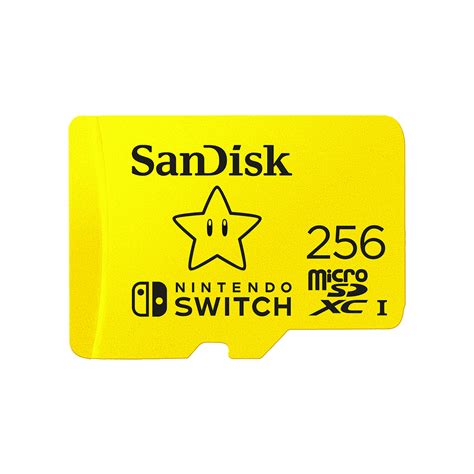
SanDisk offers officially licensed Nintendo Switch microSD cards, often featuring iconic artwork (like a mushroom or star). These cards are specifically tested and optimized for the Switch, offering excellent read speeds up to 100MB/s and write speeds up to 90MB/s (UHS-I, U3, A1). They are a no-brainer for guaranteed compatibility and performance.
2. SanDisk Extreme / Extreme Pro
For those seeking top-tier performance, the SanDisk Extreme and Extreme Pro series are outstanding. These A2-rated cards boast even faster read and write speeds, significantly reducing game loading times. While slightly more expensive, the speed benefits are noticeable, especially with larger titles.
3. Samsung EVO Select / EVO Plus
Samsung’s EVO Select and EVO Plus lines are highly regarded for their consistent performance and excellent value. These UHS-I, U3, A2-rated cards offer fast read/write speeds, making them ideal for the Switch. They are often available at competitive prices, making them a fantastic budget-friendly premium option.
4. Lexar Play microSDXC
Designed specifically for gaming, the Lexar Play series offers A2-rated performance with high read speeds up to 150MB/s. They provide a smooth experience for loading games and apps, making them another strong contender for Switch users, often at a good price point.
Installation and Management Tips
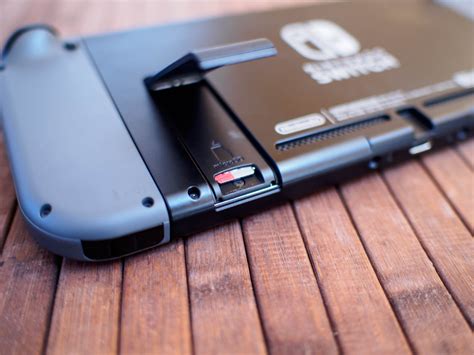
- Installation: Turn off your Switch completely before inserting the microSD card into the slot located under the kickstand on the back of the console.
- Formatting: The Switch will automatically format a new card for optimal use. If you’ve used the card elsewhere, it’s wise to let the Switch format it.
- Data Transfer: You can transfer data between your internal storage and the microSD card via the Switch’s settings menu (System Settings > Data Management).
- Don’t Remove During Play: Always power off your Switch before removing or inserting a microSD card to prevent data corruption.
Conclusion
Expanding your Nintendo Switch’s storage with a quality microSD card is perhaps the most essential upgrade for any digital game enthusiast. Prioritize cards from reputable brands like SanDisk, Samsung, or Lexar, and look for a capacity that suits your gaming habits. While an A2-rated card offers the best performance, an A1-rated card is perfectly adequate for most users. With the right microSD card, you can finally build that expansive digital library you’ve always wanted, enjoying faster load times and an uninterrupted gaming experience on your beloved Switch.