Effective fixes & prevention for Nintendo Switch Joy-Con drift?
Understanding Joy-Con Drift and Its Causes
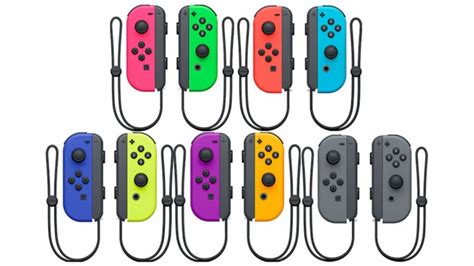
Joy-Con drift is a prevalent and frustrating issue for many Nintendo Switch owners, where the console registers movement even when the joystick is untouched. This phantom input can severely impact gameplay, making precise movements impossible and often leading to unintended actions. While Nintendo has acknowledged the problem, it continues to affect both original Joy-Cons and newer models.
The root cause primarily lies in the internal joystick mechanism, specifically the potentiometers responsible for tracking movement. Over time, dust, debris, or general wear and tear on these sensitive components can lead to inaccurate readings. The constant friction from stick movement can degrade the contact points, causing the erratic signals that manifest as drift.
Immediate & Software-Based Fixes
Before diving into more intrusive solutions, there are several initial steps you can take that might resolve minor drift issues. These are often the easiest and cheapest to attempt:
- Recalibrate Joysticks: Navigate to System Settings > Controllers and Sensors > Calibrate Control Sticks. Follow the on-screen prompts to reset the joystick’s neutral position. This can sometimes correct minor calibration errors.
- Update Joy-Con Firmware: Ensure your Joy-Cons are running the latest firmware. In System Settings > Controllers and Sensors > Update Controllers, you can check for and apply any available updates.
- Clean Around the Joystick: Using a can of compressed air, carefully spray around the base of the joystick. Angle the straw slightly under the rubber skirt to dislodge any dust or debris trapped inside. For a more thorough clean, a small amount of electrical contact cleaner (like isopropyl alcohol) applied with a cotton swab around the base can help break down grime, but use sparingly and allow to dry completely before use.

DIY Hardware Repair: Replacing the Joystick Module
If software fixes and cleaning don’t resolve the drift, the most effective DIY solution is often to replace the faulty joystick module itself. This requires a small set of tools and a steady hand, but many third-party replacement kits are available online, complete with tools and instructions.
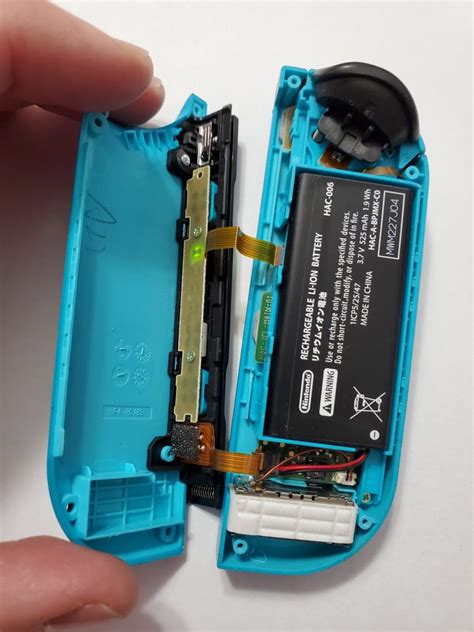
The process generally involves carefully opening the Joy-Con, disconnecting the battery, detaching ribbon cables, and unscrewing the old joystick module before installing a new one. While seemingly daunting, numerous online tutorials and videos can guide you through each step. It’s crucial to use appropriate repair tools to avoid damaging the delicate internal components.
Seeking Professional Help & Warranty Options
For those uncomfortable with DIY repairs, or if your Joy-Cons are still under warranty, contacting Nintendo directly is a viable option. Nintendo has faced lawsuits over Joy-Con drift and often offers free repairs, even outside the standard warranty period in some regions. Check Nintendo’s official support website for your specific region’s repair policies and instructions on how to send in your controllers.
Be prepared to provide proof of purchase, though some regions have relaxed this requirement given the widespread nature of the issue. A professional repair ensures that the fix is done correctly and with genuine parts, often coming with its own repair warranty.
Preventing Future Joy-Con Drift
While drift can be an inherent design flaw, adopting preventative measures can significantly extend the lifespan of your Joy-Cons and reduce the likelihood of future issues:
- Gentle Use: Avoid excessive force or aggressive movements when playing, as this can accelerate wear and tear on the joystick mechanisms.
- Regular Cleaning: Periodically use compressed air around the base of the joysticks to prevent dust and debris buildup.
- Protective Covers: Silicone covers or thumbstick grips can add a layer of protection, though their primary benefit is often for grip and comfort rather than direct drift prevention. However, they can help prevent direct impact damage.
- Proper Storage: When not in use, store your Switch and Joy-Cons in a clean, dust-free environment. Keep them away from extreme temperatures and direct sunlight.
Conclusion
Joy-Con drift is a persistent problem for Nintendo Switch owners, but it’s not insurmountable. From simple software adjustments and careful cleaning to more involved DIY hardware replacements or official Nintendo repairs, there are multiple avenues to explore. By understanding the causes and implementing preventative measures, you can keep your gaming experience smooth and uninterrupted, ensuring your adventures in Hyrule or beyond remain precise and enjoyable.