





Best Switch SD card to maximize game storage?

The Nintendo Switch, with its vast library of incredible games, often leaves players facing a common dilemma: limited storage. Whether you’re a fan of digital downloads or simply want to ensure space for future updates and DLCs, upgrading your Switch’s storage with a high-quality microSD card is essential. This guide will help you navigate the options and choose the best SD card to maximize your game storage.
Understanding Your Switch’s Storage Needs
Out of the box, the standard Nintendo Switch comes with 32GB of internal storage, while the OLED model boasts 64GB. While this might seem sufficient for a few games, modern titles, especially AAA releases, can easily consume several gigabytes each. Coupled with system updates, screenshots, and save data, the internal memory fills up surprisingly fast. A microSD card is the official and most convenient way to expand this storage.
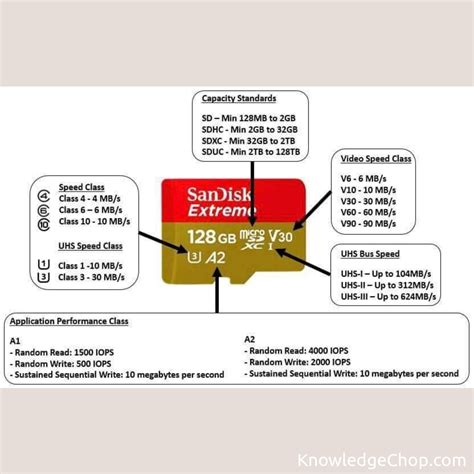
The Nintendo Switch supports microSD, microSDHC, and microSDXC cards. For optimal performance and capacity, microSDXC cards are generally recommended, especially those with U1 or U3 speed ratings, and A1 or A2 application performance classes.
Key Factors When Choosing a Switch SD Card
Capacity: How Much Space Do You Really Need?
This is arguably the most critical decision. Consider your gaming habits. Do you primarily buy physical cartridges or download many digital titles? Popular games like The Legend of Zelda: Tears of the Kingdom can be over 18GB, while others like Fortnite or Doom Eternal are even larger. Here’s a general guide:
- 128GB: A good starting point for moderate digital gamers, offering space for about 5-10 large titles.
- 256GB: An excellent balance of cost and capacity for most users, comfortably holding 15-25 large games.
- 512GB: Ideal for avid digital collectors who want to download a significant portion of their library without worrying about space.
- 1TB: For the ultimate digital hoarder, offering vast space for dozens of games and future-proofing your console for years to come. While the Switch technically supports up to 2TB, 1TB is currently the largest practically available and affordable option.
Speed: The Importance of Read/Write Performance
While capacity is about how many games you can store, speed affects how quickly those games load and perform. The Switch recommends a card with a transfer speed of 60-95 MB/s. Look for these ratings:
- UHS-I (Ultra High Speed Phase I): Most common for microSD cards.
- Speed Class (C10): Indicates a minimum write speed of 10 MB/s.
- UHS Speed Class (U1 or U3): U1 means a minimum write speed of 10 MB/s, while U3 guarantees a minimum of 30 MB/s. U3 cards offer better performance.
- Application Performance Class (A1 or A2): A1 cards are optimized for running apps and provide better random read/write speeds, which is beneficial for games. A2 offers even better performance.
For the best experience, aim for a U3 A1 or A2 rated card. This will minimize loading times and ensure smooth gameplay, especially for digitally installed titles.
Top Recommended SD Cards for Nintendo Switch
SanDisk Ultra/Extreme microSDXC
SanDisk is a long-standing favorite for Switch owners, and for good reason. Their cards are reliable, widely available, and often endorsed by Nintendo itself. The SanDisk Ultra line offers great value with U1 and A1 ratings, perfect for most users. For those seeking slightly faster performance and higher durability, the SanDisk Extreme series (U3 A2 rated) provides excellent read/write speeds, ideal for reducing loading times.
Samsung EVO Select/Plus microSDXC
Samsung’s EVO line of microSD cards are another top-tier choice. The EVO Select and EVO Plus cards offer competitive speeds (often U3 A2 rated) and excellent reliability. They are known for their robust build quality, often coming with multi-proof protection against water, temperature, X-rays, and magnets. Samsung cards provide a strong balance of performance, durability, and value.
Installation and Management Tips
Installing an SD card in your Switch is straightforward. Simply open the kickstand on the back of the console to reveal the microSD card slot. Insert the card face down until it clicks into place. The Switch will automatically detect and format the card if necessary. Any new game downloads will automatically default to the microSD card if sufficient space is available.
If you’re upgrading from a smaller SD card, you can transfer your data by copying all contents from the old card to a PC, then pasting them onto the new, larger card. Alternatively, you can re-download all games directly to the new card from the eShop, as save data is stored internally on the console.

Common Questions About Switch SD Cards
Can I use any microSD card?
While the Switch technically supports any microSD card, it’s highly recommended to use a reputable brand (like SanDisk, Samsung, or Lexar) with the recommended speed ratings (UHS-I, U1/U3, A1/A2) to ensure optimal performance and avoid data corruption or slow loading times.
What’s the maximum size SD card the Switch supports?
The Nintendo Switch officially supports microSDXC cards up to 2TB. However, 1TB cards are currently the largest widely available and cost-effective option, offering more than enough space for even the most extensive digital game libraries.
Conclusion: Never Run Out of Space Again
Investing in a good quality, high-capacity microSD card is one of the best upgrades you can make for your Nintendo Switch. It frees you from the constant worry of deleting games to make space and allows you to build a comprehensive digital library. By considering capacity and speed, and choosing a reputable brand like SanDisk or Samsung, you can ensure a seamless and enjoyable gaming experience for years to come.


