





Best Switch SD card: Maximize game storage without lag?

Why Your Nintendo Switch Needs an SD Card Upgrade
The Nintendo Switch, a marvel of portable gaming, comes with a modest 32GB (or 64GB for the OLED model) of internal storage. While sufficient for a few digital titles, this quickly fills up, especially with large AAA games, DLC, and software updates. An external microSD card is not just an option; it’s a necessity for any avid Switch gamer looking to expand their digital library and enjoy uninterrupted gameplay.
Understanding Nintendo Switch SD Card Requirements
Not just any microSD card will do. The Nintendo Switch is compatible with microSD, microSDHC, and microSDXC cards. However, to ensure optimal performance and avoid frustrating lag during game loading or in-game operations, speed is paramount. The Switch benefits significantly from cards that offer high read and write speeds.
- MicroSD vs. microSDHC vs. microSDXC: MicroSD cards typically go up to 2GB. MicroSDHC (High Capacity) range from 4GB to 32GB. MicroSDXC (eXtended Capacity) offer 64GB and above, making them the standard choice for modern game storage.
- Speed Classes: Look for cards with a UHS Speed Class 1 (U1) or, preferably, UHS Speed Class 3 (U3). A V30 Video Speed Class rating is also a good indicator of sustained write speeds, crucial for large file transfers. While A1 and A2 Application Performance Class ratings are great for mobile apps, they generally don’t offer a significant advantage over U3/V30 for Switch game performance, but U3/V30 are excellent benchmarks for reliable speed.
Key Factors When Choosing Your Switch SD Card
Selecting the perfect SD card involves balancing capacity, speed, and reliability.
- Capacity: Consider your gaming habits. If you mostly play physical cartridges but download many digital indies, 128GB-256GB might suffice. For digital-only gamers or those with extensive libraries, 512GB or even 1TB microSDXC cards are increasingly popular. Remember, larger games can easily consume tens of gigabytes.
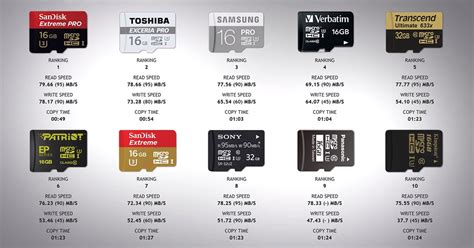
- Speed: This is where the “without lag” aspect comes in. Aim for cards with read speeds of 100MB/s or higher, and write speeds that match or come close. Look for the UHS Speed Class 3 (U3) or V30 labels. This ensures quick game loading, smooth transitions, and minimal stuttering during intense gameplay.
- Brand Reputation: Stick to reputable brands known for quality and reliability. SanDisk, Samsung, PNY, and Lexar are common choices that consistently deliver on performance and offer strong warranties.
- Price: While price is always a factor, don’t solely optimize for the cheapest option. Investing in a slightly more expensive, but reliable and fast, card will save you headaches in the long run.
Our Top SD Card Recommendations for Switch
While specific models vary, here are the characteristics of the best SD cards for your Nintendo Switch, ensuring you get the most out of your console without experiencing frustrating slowdowns:
- SanDisk Extreme/Extreme Pro (or equivalent): Often heralded as the best for Switch, these cards typically boast read speeds of up to 160MB/s (or even 190MB/s for newer models) and U3/V30 speed classes. They provide excellent performance for even the most demanding titles.
- Samsung EVO Select/EVO Plus (or equivalent): Samsung’s offerings are consistently reliable, offering similar speeds to SanDisk’s high-end cards at a competitive price point. They are U3/V30 rated and known for their durability.
- Lexar Play (or equivalent): Designed specifically for portable gaming devices, Lexar Play cards often offer U3 speeds and high capacities, making them a strong contender for Switch users.
- PNY Pro Elite (or equivalent): Another solid choice, PNY cards deliver strong performance and are often a good value, also adhering to the U3/V30 standards.
For capacity, we recommend starting at 256GB as a good balance for most users, moving up to 512GB or 1TB if you plan to go all-digital or have an extensive collection.
Installing and Managing Your Switch SD Card
Inserting an SD card into your Switch is straightforward: simply open the kickstand and slide the card into the slot. The console will recognize it automatically. To move data from internal storage to the SD card (or vice-versa), navigate to System Settings > Data Management. You can also redownload games directly to the SD card.
Tips:
- Always format new SD cards through your Switch console for optimal compatibility.
- Avoid removing the SD card while the console is powered on or during data transfer.
- Regularly check your storage usage in Data Management to ensure you don’t run out of space unexpectedly.
Conclusion: Unlock Your Switch’s Full Potential
Choosing the right microSD card is a fundamental step towards maximizing your Nintendo Switch gaming experience. By prioritizing high capacity and, more importantly, fast read/write speeds (UHS-I U3 or V30), you can say goodbye to storage woes and frustrating load times. Invest wisely, and your Switch will be ready for countless hours of uninterrupted, lag-free adventure.


