Best Switch SD card for game storage?

Why Your Nintendo Switch Needs an SD Card for Game Storage
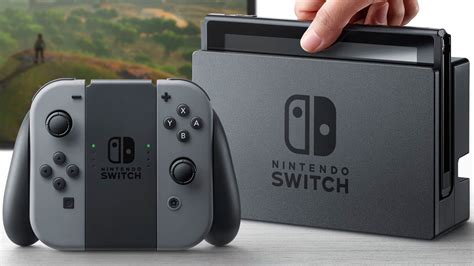
The Nintendo Switch is a fantastic portable console, but its Achilles’ heel for many gamers is its limited internal storage. With only 32GB (or 64GB for the OLED model), a significant portion of which is reserved for the system, it doesn’t take long for digital game downloads, updates, and DLC to fill up your available space. This is where a high-quality microSD card becomes an indispensable accessory, transforming your gaming experience by providing ample room for all your favorite titles.
Without an SD card, you’ll constantly be forced to delete games to make space for new ones, a frustrating and time-consuming process. Investing in the right SD card ensures you can keep a vast library of games ready to play whenever you are.
Understanding SD Card Specifications for Switch Gaming
Choosing an SD card isn’t just about picking the largest capacity; speed and compatibility are equally crucial for optimal performance on your Switch. Here’s what you need to look for:
Capacity: How Much Storage Do You Need?
- 256GB: A good starting point for casual gamers or those who mostly buy physical cartridges.
- 512GB: The sweet spot for most digital-heavy gamers, offering significant space for numerous AAA titles and indie games.
- 1TB: For the ultimate digital collector, ensuring you virtually never run out of space, even with massive game libraries.
Remember that some games, like The Legend of Zelda: Tears of the Kingdom, can exceed 18GB, and many others hover around the 10-15GB mark. Factor in updates and DLC, and storage fills up fast.
Speed: A1 vs. A2 and UHS-I
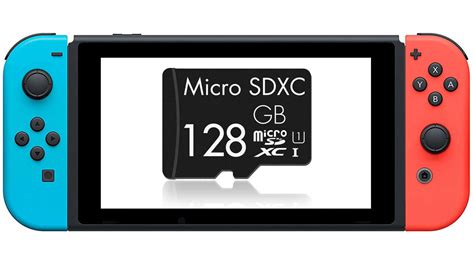
The Nintendo Switch supports UHS-I microSD cards, with theoretical read speeds up to 104 MB/s. While faster cards exist, the Switch itself can’t fully utilize UHS-II or UHS-III speeds, so stick to UHS-I for the best value.
- UHS Speed Class (U1, U3): Look for U1 (10MB/s minimum write speed) or U3 (30MB/s minimum write speed). U3 is generally preferred for smoother performance, especially with larger games.
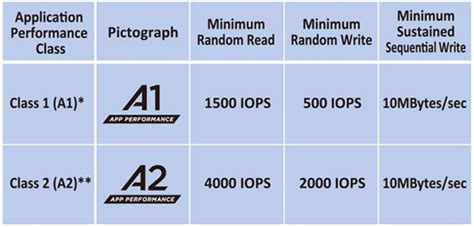
- Application Performance Class (A1, A2): This rating is crucial for gaming.
- A1 cards offer minimum random read speeds of 1500 IOPS and random write speeds of 500 IOPS.
- A2 cards provide significantly better performance, with minimum random read speeds of 4000 IOPS and random write speeds of 2000 IOPS. While the Switch may not fully leverage all A2 benefits, these cards generally offer better overall responsiveness for loading games and in-game assets.
For the best experience, aim for a U3 A2 rated card.
Top Recommended SD Cards for Nintendo Switch
Based on performance, reliability, and value, here are our top picks for expanding your Switch storage:
1. SanDisk microSDXC Card for Nintendo Switch (Official Licensed)
These cards are officially licensed by Nintendo and feature iconic Switch designs (e.g., Mario Mushroom, Hylian Crest). They are U3 A1 rated, offering reliable performance. While not A2, their optimized firmware for the Switch makes them an excellent, hassle-free choice. Available in capacities up to 1TB.
2. Samsung EVO Select/Plus microSDXC
Samsung’s EVO Select and EVO Plus lines are highly regarded for their excellent balance of performance and price. They are U3 A2 rated, providing superb speeds for game loading and smooth gameplay. These are often more affordable than the official SanDisk cards and are a fantastic value option. Available up to 512GB or 1TB for the newer EVO Plus models.
3. Lexar PLAY microSDXC UHS-I Card
Designed specifically for gaming, the Lexar PLAY series offers U3 A2 performance at competitive prices. These cards are a solid choice for those looking for dedicated gaming performance without the premium of official branding. Available in various capacities, including a popular 1TB option.

Installation and Best Practices
Installing an SD card in your Nintendo Switch is straightforward:
- Turn off your Switch completely (not just sleep mode).
- Open the kickstand on the back of the console to reveal the microSD card slot.
- Insert the microSD card with the label facing down until it clicks into place.
- Close the kickstand and power on your Switch.
- The Switch will automatically format the card if it’s new. If you’re moving data, navigate to System Settings > Data Management to transfer content.
Always buy from reputable retailers to avoid counterfeit cards, which can lead to data corruption and poor performance.
Conclusion: Future-Proof Your Gaming Library
Choosing the best SD card for your Nintendo Switch is a simple upgrade that pays dividends in convenience and enjoyment. By opting for a high-capacity, U3 A2-rated card from a reputable brand like SanDisk, Samsung, or Lexar, you’ll future-proof your gaming library and ensure you have plenty of room for all the fantastic titles Nintendo continues to release. Don’t let limited storage hold back your gaming adventures – invest in an SD card today and download to your heart’s content!