Best Switch SD card for expanding game storage & avoiding slow load times?

Why Your Nintendo Switch Needs a Good SD Card
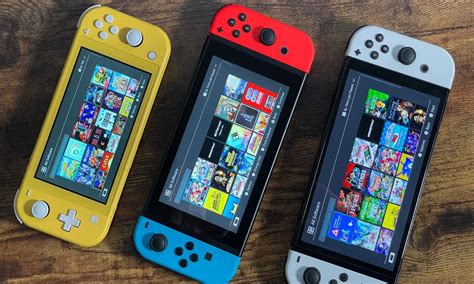
The Nintendo Switch, an incredibly popular portable console, comes with a rather modest 32GB (for the original and Lite models) or 64GB (for the OLED model) of internal storage. While this might seem sufficient for a few downloaded indie games or save data, it quickly becomes a bottleneck for anyone looking to build a digital game library or download larger titles like The Legend of Zelda: Tears of the Kingdom. This is where a microSD card becomes an essential upgrade, transforming your console’s storage capacity.
Beyond simply adding space, the speed of your SD card significantly impacts your gaming experience. A slow card can lead to frustratingly long load times, sluggish menu navigation, and even performance hitches in games installed on the card. Investing in a high-quality, fast SD card ensures your games launch quickly and run smoothly, making your Switch more enjoyable.
Understanding SD Card Speed Ratings for Your Switch
When selecting an SD card, speed is paramount. You’ll encounter several ratings on packaging:
- UHS Speed Class (U1 vs. U3): U1 cards offer a minimum write speed of 10 MB/s, while U3 cards guarantee a minimum of 30 MB/s. For the Switch, U3 is highly recommended, especially for larger games, as it ensures faster data transfer and quicker load times.
- Application Performance Class (A1 vs. A2): This rating specifically indicates a card’s ability to handle random read/write operations, which is crucial for applications and games. A2 cards offer superior random read/write performance compared to A1 cards, translating to noticeably faster game loading and smoother gameplay for titles installed on the card. While the Switch doesn’t officially support A2’s full potential, many users report better performance with A2 cards due to their generally higher underlying speeds.
- Read/Write Speeds: Look for cards with high sequential read speeds (e.g., 100 MB/s or more). While write speed is important for transferring games to the card, read speed directly affects how quickly your Switch can access game data, impacting load times.
How Much Storage Do You Really Need?
The ideal capacity depends on your gaming habits. Nintendo Switch games vary wildly in size, from a few hundred MBs for smaller indies to over 15GB, 20GB, or even 30GB for AAA titles.
- 128GB: A good starting point for casual gamers with a mix of physical and digital games. It offers a significant boost over internal storage.
- 256GB: Ideal for most digital-first gamers. This capacity provides ample space for a substantial library of downloadable titles without breaking the bank.
- 512GB: For dedicated digital gamers or those who want to future-proof their console, a 512GB card allows for a massive collection of games.
- 1TB: If you’re an extreme digital hoarder or plan to keep virtually every game you own on your Switch, 1TB is the ultimate choice, though it comes at a premium.
Remember that you can always upgrade later, but transferring games can be time-consuming. It’s often better to slightly overestimate your needs if your budget allows.
Top SD Card Recommendations for Nintendo Switch
Several brands consistently produce reliable and high-performing microSD cards suitable for the Nintendo Switch. Here are some top contenders:
SanDisk: Widely regarded as a top choice, SanDisk offers excellent performance and reliability. Their ‘SanDisk Extreme’ and ‘Extreme Pro’ lines are particularly good, often featuring U3 and A2 ratings, delivering excellent read and write speeds. The ‘SanDisk Ultra’ series is a more budget-friendly option, usually U1/A1, which is still perfectly adequate for many users but might offer slightly slower load times for demanding titles.
Samsung: Samsung’s ‘EVO Select’ and ‘EVO Plus’ microSD cards are fantastic alternatives, known for their strong performance and durability. They typically come with U3 ratings and often boast impressive read speeds, making them a great fit for the Switch. They offer a strong balance between price and performance.
Lexar: The ‘Lexar Play’ series is specifically designed with gaming in mind, often featuring high capacities and good speeds (U3/A2 equivalent). They are a reliable choice for dedicated Switch players.
Key Features to Look For
- UHS Speed Class 3 (U3): This is the minimum recommendation for optimal performance.
- Application Performance Class 2 (A2): While not strictly necessary, A2 cards generally offer superior performance.
- Read Speed: Aim for 100 MB/s or higher.
- Reputable Brand: Stick to well-known brands like SanDisk, Samsung, or Lexar to ensure quality and reliability.
- Warranty: Many quality SD cards come with lengthy warranties (often 5-10 years), which can be a good indicator of a manufacturer’s confidence in their product.

Installing and Formatting Your Switch SD Card
Installing a microSD card in your Nintendo Switch is straightforward. Simply power off your console, open the kickstand on the back (or the dedicated slot on the Switch Lite), and insert the card until it clicks. When you power the Switch back on, it will automatically detect the new card and prompt you to format it. This process is quick and prepares the card for game storage. Any new games you download will automatically be saved to the SD card, provided there’s enough space.

Avoiding Counterfeit Cards
Be wary of unusually cheap microSD cards, especially from unknown sellers. Counterfeit cards are rampant, often advertised with high capacities but delivering much lower storage or abysmal speeds. Always purchase from reputable retailers or official brand stores to ensure you’re getting a genuine product that performs as advertised.
Conclusion: Optimize Your Switch Gaming Experience
Choosing the best SD card for your Nintendo Switch doesn’t have to be complicated. By focusing on cards with a U3 speed class (and preferably A2), a read speed of 100 MB/s or higher, and selecting a reputable brand, you can ensure expanded storage and significantly reduced load times. A 256GB or 512GB card from SanDisk, Samsung, or Lexar will provide an excellent balance of capacity, speed, and value, allowing you to enjoy your extensive game library without frustrating delays. Upgrade your Switch, and dive into your favorite adventures faster than ever before!