Best Switch SD card for expanding digital game storage: speed, size, brand?

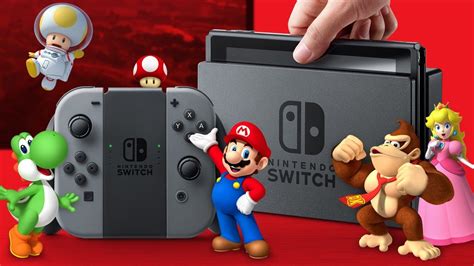
The Nintendo Switch, a marvel of portable gaming, comes with a rather modest 32GB (or 64GB for the OLED model) of internal storage. While sufficient for a few small titles, serious digital game collectors will quickly find themselves running out of space. Thankfully, the Switch supports microSD cards, offering an easy and essential way to expand your game library. But with so many options, how do you pick the best one? This guide breaks down everything you need to know about speed, size, and brand to make an informed decision.
Understanding SD Card Types and Speed
The Nintendo Switch uses microSDXC cards. While there are different speed classifications, the Switch itself has limitations. It supports UHS-I cards, with a maximum data transfer rate of around 100MB/s. This means investing in a faster, more expensive UHS-II card won’t yield any performance benefits for your Switch, as the console simply can’t utilize the extra speed.
When looking at UHS-I cards, pay attention to the speed class ratings:
- Class 10: Minimum write speed of 10MB/s.
- UHS Speed Class 1 (U1): Minimum write speed of 10MB/s.
- UHS Speed Class 3 (U3): Minimum write speed of 30MB/s.
For the best experience on the Switch, a U1 or U3 rated card is ideal. While a U3 offers faster theoretical write speeds, the practical difference in game loading times on the Switch between a good U1 and U3 card is often negligible due to the console’s internal bus limitations. Focus on cards with high read speeds, typically around 90-100MB/s, for faster game loading.
How Much Storage Do You Really Need?
This is arguably the most critical decision. Game sizes on the Switch vary wildly. Smaller indie titles might be under 1GB, while AAA games like The Legend of Zelda: Tears of the Kingdom can exceed 18GB, and DOOM is over 25GB. Consider your gaming habits:
- Casual Gamer (Mostly Physical, Few Digital): A 128GB card might suffice.
- Moderate Digital Gamer: 256GB is a good starting point, offering plenty of room for several large titles and many smaller ones.
- Heavy Digital Gamer/Future-Proofing: 512GB is highly recommended and offers excellent value per gigabyte. You’ll rarely need to delete games.
- Ultimate Digital Collection: 1TB cards are now available and increasingly affordable. This option is for those who want to download virtually every game they own without ever worrying about space.
Keep in mind that while 1.5TB cards exist, 1TB is generally the sweet spot for value and capacity that the Switch can handle flawlessly. Always remember that system software and save data will also take up a small portion of your storage.
Reliable Brands for Your Switch SD Card
When it comes to something as crucial as your game library, sticking with reputable brands is key. Counterfeit SD cards are unfortunately common, often offering advertised capacities and speeds that aren’t real, leading to data corruption and frustration. Here are the top contenders:
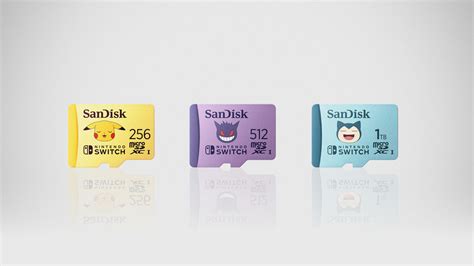
- SanDisk: Often considered the gold standard, especially their officially licensed Nintendo Switch microSD cards. These cards are quality-tested and often feature iconic Nintendo branding. Their Extreme and Ultra lines are also excellent choices.
- Samsung: Another highly reliable brand. Samsung EVO Select and EVO Plus cards offer competitive speeds and excellent durability at reasonable prices.
- Lexar: A long-standing player in the memory market, Lexar offers reliable and fast microSD cards that are perfect for the Switch.
- Kingston: While not as frequently marketed for Switch specifically, Kingston’s Canvas Go! Plus line is a solid and dependable option.
Purchasing from trusted retailers (Amazon directly, Best Buy, Walmart, etc.) rather than third-party sellers on marketplaces can help mitigate the risk of buying counterfeit products.
Installation and Data Management Tips
Installing a microSD card into your Switch is straightforward: simply open the kickstand on the back of the console and slide the card into the slot. The Switch will automatically recognize it. If you’re upgrading from an existing card, you can easily transfer your data by copying the contents of the old card to your computer, then copying them to the new card. Just ensure the new card is formatted as exFAT before transferring.

Conclusion: Picking Your Perfect Switch SD Card
To summarize, the best Switch SD card combines sufficient storage with reliable performance from a trusted brand. Prioritize a UHS-I U1 or U3 card with high read speeds (90-100MB/s) and choose a capacity that aligns with your digital game collection – 256GB or 512GB are excellent starting points for most, with 1TB offering ultimate peace of mind. Stick to brands like SanDisk, Samsung, or Lexar purchased from reputable sellers to protect your games and ensure a smooth, enjoyable experience on your Nintendo Switch.