





Best Switch SD card for big game libraries & indie downloads?

Why Your Nintendo Switch Needs a Spacious SD Card
The Nintendo Switch, with its vast library of fantastic titles, from sprawling first-party epics to charming indie gems, offers endless entertainment. However, its modest internal storage – 32GB for the standard and Lite models, and 64GB for the OLED model – quickly fills up, especially if you prefer digital downloads. Many AAA games can easily consume 10-20GB or more, and even indie titles, while smaller, add up quickly when you have a vast collection. This is where an external microSD card becomes not just a convenience, but an absolute necessity for any serious Switch gamer.
Expanding your Switch’s storage ensures you never have to delete beloved games to make space for new adventures. It means having your entire digital library at your fingertips, ready to play whenever and wherever you are. For those with a burgeoning collection of digital blockbusters and a passion for discovering every indie masterpiece, investing in the right microSD card is a game-changer.
Understanding SD Card Essentials for Your Switch
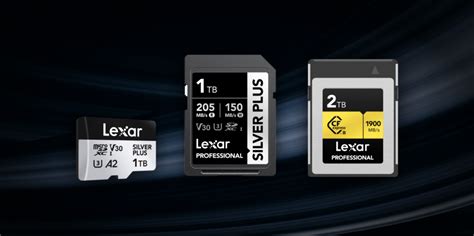
When selecting a microSD card for your Nintendo Switch, there are a few key specifications to consider. The Switch specifically uses microSDXC cards, which support larger capacities. Beyond capacity, speed is paramount for smooth gaming. You’ll want a card that meets or exceeds Nintendo’s recommended minimum read speed of 60-95 MB/s.
Look for cards labeled UHS-I (Ultra High Speed Phase I), which is the standard supported by the Switch. Within UHS-I, you’ll often see speed classes like U3 (Video Speed Class V30) and application performance classes like A1 or A2. While the Switch doesn’t fully utilize the faster A2 standard, an A1 or A2 card will still perform exceptionally well and offer excellent load times for your games.
Capacity Sweet Spots: How Much Storage Do You Really Need?
- 128GB – 256GB: A good starting point for casual gamers or those who mostly buy physical cartridges but want space for a handful of digital indies and DLC. You’ll still need to manage space periodically.
- 512GB: This is often the sweet spot for many Switch owners. It provides ample room for a substantial collection of both AAA digital titles and numerous indie games without constant worrying about space.
- 1TB: For the ultimate collector or those who exclusively download games, a 1TB card offers virtually limitless storage for years to come. It’s perfect for future-proofing your library and ensuring you never have to delete a game.
- 1.5TB – 2TB: While more expensive, these high-capacity cards are for the most dedicated digital-only players who want to download every game imaginable. The Switch supports up to 2TB, though cards of this size are less common and pricier.
Top Factors When Choosing Your Switch SD Card
Speed: A1 vs. A2 Performance
As mentioned, the Switch supports UHS-I cards. A1-rated cards are optimized for running apps, offering a minimum random read of 1,500 IOPS and random write of 500 IOPS. A2 cards offer higher minimums (4,000 IOPS random read, 2,000 IOPS random write). While the Switch might not fully leverage the A2 benefits, both A1 and A2 cards will provide excellent in-game performance and fast load times compared to older, slower cards. The read speed (sequential read) is what directly impacts game loading, so aim for 100MB/s or close to it.
Reliability and Brand Reputation
It’s crucial to purchase microSD cards from reputable brands to ensure reliability, durability, and genuine performance. Counterfeit cards are unfortunately common and can lead to data loss or poor performance. Stick with well-known manufacturers who offer warranties and stand behind their products.
Price vs. Value
While the biggest capacity might seem appealing, consider your actual usage. A 512GB card often offers the best balance of cost per gigabyte and practical storage for most users. Prices fluctuate, so it’s worth checking deals, especially during sales events. Remember, a slightly more expensive, reliable card is a better investment than a cheap, no-name card that might fail.

Our Top Picks for Nintendo Switch SD Cards
Based on performance, reliability, and value, several brands consistently stand out as excellent choices for the Nintendo Switch. These cards offer the optimal blend of speed and capacity to handle even the largest game libraries and extensive indie collections.
- SanDisk Ultra / Extreme microSDXC: SanDisk is an official partner with Nintendo for Switch-branded cards, but their standard Ultra and Extreme lines are equally excellent and often more cost-effective. The Extreme series offers slightly faster speeds, making it a premium choice. Look for capacities from 256GB to 1TB.
- Samsung EVO Select / EVO Plus microSDXC: Samsung’s EVO line offers fantastic value and reliable performance. The EVO Select (often found on Amazon) and EVO Plus are both highly recommended, providing great speeds suitable for the Switch. Available in popular sizes like 256GB, 512GB, and 1TB.
- PNY Pro Elite microSDXC: PNY offers robust and high-performing microSD cards, often at competitive prices. The Pro Elite series is a solid contender, providing excellent read speeds and reliability.
- Kingston Canvas Go! Plus microSDXC: Kingston is another reputable brand, and their Canvas Go! Plus series is designed for devices like the Switch, offering good speeds and capacities.

Tips for SD Card Management on Your Switch
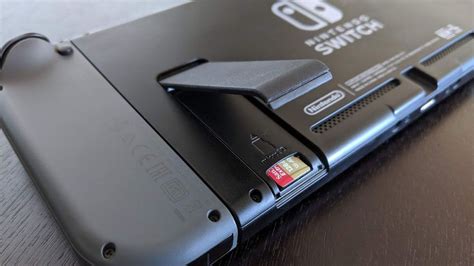
Once you have your new microSD card, installing it is simple: power off your Switch, open the kickstand, and slide the card into the slot. The Switch will automatically recognize and format it if necessary. You can change where new downloads are saved in the System Settings under ‘Data Management’.
If you’re upgrading from a smaller SD card, you can transfer your data. Power off both Switches, remove the old card, insert the new one into your computer, copy all contents from the old card to your computer, then paste them onto the new card. Ensure you copy the entire root directory. For best results, use a card reader and avoid directly copying between two cards connected to the Switch. Remember that save data is stored on the console’s internal memory (or cloud if you have Nintendo Switch Online), so it won’t be on the SD card.
Conclusion: Future-Proofing Your Digital Library
A high-quality, spacious microSD card is an indispensable accessory for any Nintendo Switch owner, especially those with a passion for digital games and a growing library of indie titles. By carefully considering capacity, speed, and brand reliability, you can ensure seamless gaming, lightning-fast load times, and the freedom to download every game that catches your eye without ever worrying about storage limits. Invest wisely, and your Switch will serve as an endless portal to adventure for years to come.


