





Best Switch MicroSD cards for more game storage & faster loads?

Why Your Nintendo Switch Needs a MicroSD Card
The Nintendo Switch, Switch Lite, and Switch OLED models come with limited internal storage – 32GB for the original and Lite, and 64GB for the OLED. While this might seem sufficient for a few small titles, it quickly fills up once you start downloading larger games from the eShop, installing game updates, or capturing screenshots and video clips. Unlike traditional consoles, the Switch relies heavily on digital distribution, making external storage not just a convenience, but a necessity for most gamers.
A high-quality MicroSD card not only provides ample space for your growing game library but can also contribute to faster game loading times and smoother performance, especially for titles stored on the card. Don’t let a full storage message interrupt your gaming adventure; investing in a good MicroSD card is one of the best upgrades you can make for your Switch.
Understanding MicroSD Card Specs: Speed and Capacity
When selecting a MicroSD card for your Switch, two primary factors come into play: capacity and speed. Understanding these will help you make an informed decision.
Capacity: How Much Space Do You Need?
- 64GB-128GB: A good starting point for casual gamers or those who mainly buy physical cartridges.
- 256GB-512GB: The sweet spot for most digital-heavy gamers, offering a significant amount of space for multiple AAA titles and indie gems.
- 1TB or more: For hardcore digital collectors who want to download virtually every game imaginable without worrying about space. While more expensive, these offer ultimate peace of mind.
It’s generally recommended to buy the largest capacity you can reasonably afford, as game sizes only tend to increase.
Speed: Look for UHS-I and A1 Ratings
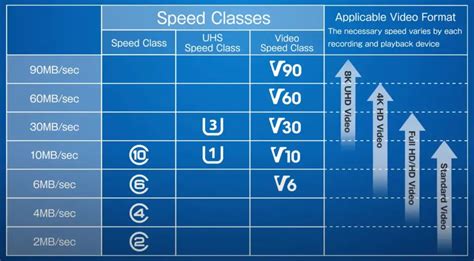
The Nintendo Switch supports UHS-I (Ultra High Speed-I) MicroSD cards, with a maximum data transfer rate of up to 100MB/s. While faster UHS-II cards exist, the Switch cannot fully utilize their increased speeds, so stick to UHS-I for the best value.
Within UHS-I, pay attention to these ratings:
- UHS Speed Class (U1 or U3): U3 indicates a minimum write speed of 30MB/s, while U1 guarantees 10MB/s. For optimal game performance, U3 is preferable.
- Application Performance Class (A1 or A2): The A1 rating indicates a card is optimized for running apps (which games essentially are on the Switch) with better random read/write speeds, offering more responsive game loading. A2 is even better but might not always be necessary or fully utilized by the Switch for games.
Aim for cards with a ‘U3’ and ‘A1’ (or ‘A2’) rating for the best balance of speed and compatibility.
Top Picks for Nintendo Switch MicroSD Cards
Several brands offer excellent MicroSD cards suitable for the Nintendo Switch. Here are some of the most reliable and popular choices:
SanDisk MicroSDXC for Nintendo Switch
SanDisk offers officially licensed MicroSD cards specifically designed for the Nintendo Switch, often featuring iconic Nintendo branding (like a Mario mushroom or a Zelda Triforce). These cards are guaranteed to be compatible and perform well. They typically offer read speeds of up to 100MB/s and write speeds of 90MB/s, come with a U3 and A1 rating, and are available in capacities from 64GB up to 1TB. While they might be slightly more expensive than generic equivalents, the official licensing provides extra peace of mind regarding performance and reliability.
Samsung EVO Select / Plus MicroSDXC
Samsung’s EVO Select and EVO Plus lines are highly regarded for their consistent performance and excellent value. These cards typically boast read speeds of up to 130MB/s (though the Switch caps at 100MB/s) and U3/A2 ratings, making them incredibly fast and reliable for the Switch. They are readily available in various capacities, from 64GB to 512GB and even 1TB, making them a fantastic alternative to the official SanDisk cards if you’re looking for similar performance at a potentially lower price point.
Kingston Canvas Go! Plus MicroSDXC
Kingston’s Canvas Go! Plus series is another strong contender, designed for devices like the Switch. These cards offer U3 and A2 ratings, with impressive read speeds up to 170MB/s (again, capped by the Switch) and write speeds up to 90MB/s. They provide robust performance for gaming and are known for their durability and reliability, available in a wide range of capacities.

Key Factors to Consider When Buying
- Authenticity: Always buy from reputable retailers to avoid counterfeit cards, which often have inflated capacity claims and poor performance.
- Warranty: Look for cards with a good warranty. Reputable brands like SanDisk, Samsung, and Kingston often offer extended warranties.
- Price vs. Capacity: While bigger is generally better, balance your storage needs with your budget. Prices per GB tend to decrease at higher capacities, but avoid extremely cheap, no-name cards.

Installation and Management Tips
Installing a MicroSD card in your Switch is straightforward: simply open the kickstand on the back of the console and slide the card into the slot. The Switch will format it automatically if needed. To ensure games download to your new card, you might need to go into System Settings > Data Management to verify the default save location. You can also manually transfer data between the system memory and the MicroSD card, though transferring games can take some time.
Periodically check your storage in System Settings to keep track of your available space. Deleting old games you no longer play can also free up space, as your save data is usually stored on the console’s internal memory and won’t be lost when you delete the game data itself.

Conclusion
Upgrading your Nintendo Switch’s storage with a quality MicroSD card is one of the most impactful enhancements you can make. It not only eliminates the headache of constantly managing space but can also slightly improve your gaming experience with faster load times. By opting for a reputable brand like SanDisk or Samsung, with appropriate capacity and speed ratings (UHS-I U3 A1 or A2), you’ll ensure your Switch is ready for years of gaming adventures to come.


