





Best Switch microSD card for optimal game storage & performance?

Why Your Nintendo Switch Needs a microSD Card
The Nintendo Switch, a fantastic portable and home console, comes with a rather modest 32GB of internal storage (or 64GB for the OLED model). While this is enough for a few smaller digital titles, it quickly fills up when you start downloading larger games like The Legend of Zelda: Tears of the Kingdom, Pokémon Scarlet/Violet, or even multiple indie gems. Physical game cartridges only store the base game, with many requiring significant downloads for updates, DLC, and even core game data. To truly maximize your Switch experience, a reliable and spacious microSD card is an absolute necessity.
Key Factors When Choosing a Switch microSD Card
Not all microSD cards are created equal. To ensure optimal performance for your Switch, you need to consider two primary factors: capacity and speed.
Capacity: How Much Storage Do You Really Need?
The amount of storage you need largely depends on your gaming habits. Do you primarily buy physical cartridges or download most of your games digitally? Do you play many games or just a select few? MicroSD cards for the Switch typically range from 64GB all the way up to 1TB (and even 2TB, though these are less common and more expensive).
- 64GB-128GB: Suitable for casual players with a mix of physical and a few digital games/updates.
- 256GB-512GB: Ideal for most gamers who download a good number of digital titles and larger updates. This range offers a great balance of cost and capacity.
- 1TB+: Perfect for hardcore digital-only gamers or those who simply never want to worry about storage. While pricey, these offer unparalleled freedom.
Remember, it’s often better to go slightly larger than you think you need, as game sizes continue to grow.
Speed: Understanding UHS-I, V30, A1, and A2 Ratings
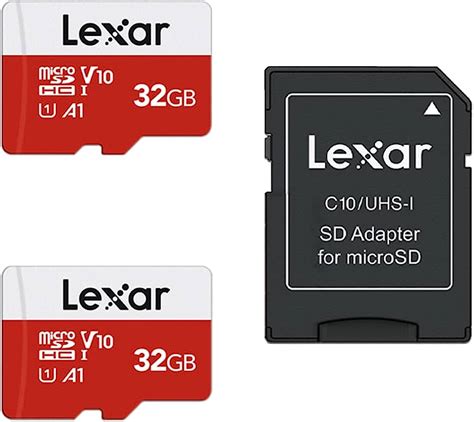
While storage capacity is about how much you can store, speed determines how quickly your games load and how smoothly they run from the card. The Nintendo Switch supports UHS-I microSD cards, meaning you don’t need to splurge on the faster (and more expensive) UHS-II cards, as the Switch won’t utilize their full potential.
- UHS-I: This is the standard you need. Look for cards with at least a U1 (UHS Speed Class 1) rating, though U3 (UHS Speed Class 3) is better.
- V30 (Video Speed Class 30): Indicates a minimum sustained write speed of 30MB/s, which is excellent for gaming and video recording.
- A1 or A2 (Application Performance Class): These ratings are crucial. A1 (minimum random read 1500 IOPS, random write 500 IOPS) and especially A2 (minimum random read 4000 IOPS, random write 2000 IOPS) are designed for better application performance, which translates directly to faster game loading times and smoother gameplay on your Switch. Aim for an A2-rated card if your budget allows.
Always prioritize cards with U3 and A1/A2 ratings for the best Switch performance.
Top Recommendations for Nintendo Switch microSD Cards
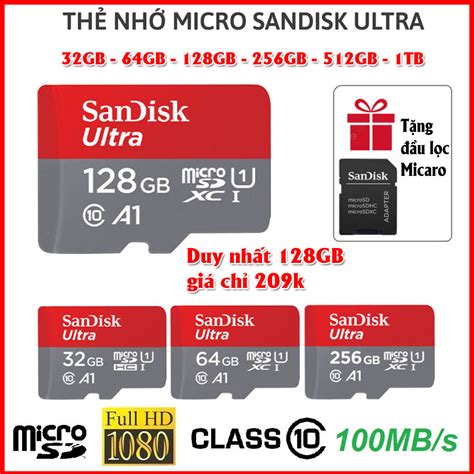
When it comes to reputable brands that offer reliable performance, certain names consistently rise to the top. While Nintendo officially licenses some SanDisk cards (which often feature Nintendo characters), any high-quality microSD card meeting the specifications above will work perfectly.
- SanDisk Ultra/Extreme: Widely available and highly reliable. The SanDisk Extreme line often boasts U3 and A2 ratings, making them an excellent choice for performance. The Ultra line (often A1) is a great value option.
- Samsung EVO Select/Plus: Samsung’s EVO line offers fantastic value and performance, typically featuring U3 and A2 ratings. They are known for their durability.
- Lexar PLAY/Professional: Lexar’s cards are another strong contender, often providing competitive speeds and reliability, especially their PLAY and Professional series with U3 and A2 ratings.
Always purchase from reputable retailers to avoid counterfeit cards, which can lead to data loss and poor performance.

Installation and Maintenance Tips
Installing a microSD card into your Switch is straightforward:
- Turn off your Nintendo Switch completely (not just sleep mode).
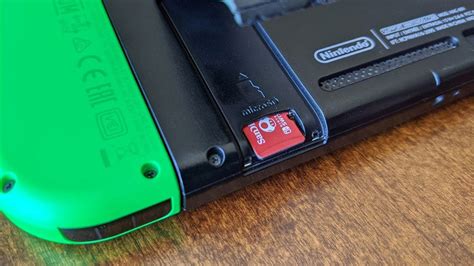
- Open the kickstand on the back of the console to reveal the microSD card slot.
- Insert the microSD card with the label facing down until it clicks into place.
- Close the kickstand and power on your Switch.
Your Switch will automatically detect and format the card if necessary. If you’re upgrading from an existing card, you can transfer your data using a computer, but for simplicity, most users opt to redownload games from the eShop onto the new, larger card.
Conclusion
Investing in a high-quality microSD card is one of the best upgrades you can make for your Nintendo Switch. By choosing a card with ample capacity and appropriate speed ratings (UHS-I, U3, and ideally A2), you’ll ensure smooth game loading, plenty of storage for your ever-growing digital library, and an overall enhanced gaming experience. Don’t let limited storage hold back your adventures in Hyrule or beyond – gear up with the right microSD card today!


