





Best Switch microSD card for growing digital game libraries?

For any Nintendo Switch owner, the joy of a growing digital game library can quickly turn into the frustration of running out of storage space. With many fantastic titles available only digitally, or physical games still requiring significant downloads, a reliable microSD card isn’t just a luxury – it’s an essential upgrade. But with so many options, how do you pick the best one to keep your gaming adventures uninterrupted?
The Storage Challenge: Why Your Switch Needs More Space
The standard Nintendo Switch (and its Lite and OLED variants) comes with a relatively modest amount of internal storage: 32GB for the original and Lite models, and 64GB for the OLED. While this might seem sufficient at first, modern games can easily chew through that space. Titles like The Legend of Zelda: Tears of the Kingdom, Pokémon Scarlet and Violet, or even smaller indie games can quickly fill up your console, forcing you to constantly archive and re-download games.
The Limits of Internal Storage
Even if you prefer physical game cartridges, many require significant updates or DLC downloads that eat into your internal storage. Digital-only games, however, are the biggest culprits, often ranging from 5GB to over 20GB each. Without external storage, you’ll soon find yourself making tough choices about which beloved games to keep installed.
What to Look for in a Switch microSD Card
Not all microSD cards are created equal. When choosing one for your Nintendo Switch, there are a few key specifications to keep in mind to ensure optimal performance.
Capacity: How Much Do You Really Need?
This is often the first consideration. MicroSD cards for the Switch range from 64GB all the way up to 2TB. The ‘best’ capacity depends on your gaming habits:
- 128GB – 256GB: Good for casual players with a mix of physical and digital games, or those just starting their digital library.
- 400GB – 512GB: An excellent sweet spot for most dedicated digital gamers, offering ample space for dozens of AAA titles and indies. This capacity often provides the best balance of price and storage.
- 1TB: For the ultimate digital collector who wants to download everything and never worry about space. While more expensive, it offers unparalleled freedom.
Speed Matters: UHS-I and A1 Ratings
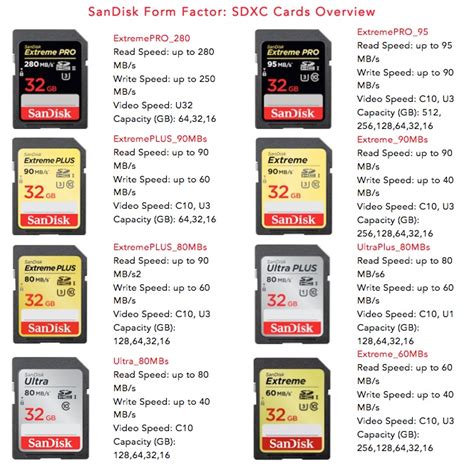
While the Nintendo Switch can’t take advantage of the absolute fastest microSD card speeds, you still want a card that’s quick enough to load games efficiently. Look for cards that are:
- UHS-I compatible: This is the maximum standard the Switch supports.
- Rated A1 (Application Performance Class 1): This rating indicates the card is optimized for running apps, which is crucial for game loading and performance. Most modern microSD cards from reputable brands will meet or exceed these requirements. Avoid older, slower cards not designed for app usage.
Top Recommendations for Nintendo Switch microSD Cards
Based on performance, reliability, and value, a few brands consistently stand out as the best choices for your Nintendo Switch.
SanDisk Nintendo-Licensed Cards
SanDisk offers officially licensed microSD cards specifically designed for the Nintendo Switch, often featuring iconic artwork like Mario or Zelda. These cards are guaranteed to be compatible and meet all the necessary speed requirements. They come in various capacities, typically 64GB, 128GB, 256GB, 400GB, and 512GB.
SanDisk Extreme/Ultra
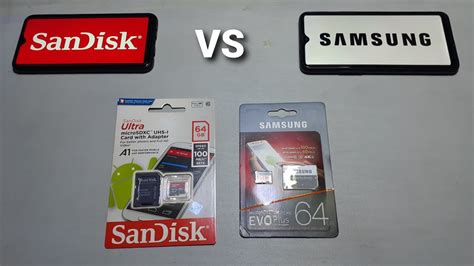
Beyond the licensed cards, SanDisk’s standard Extreme and Ultra series are excellent choices. They offer similar or even superior speeds to the licensed cards and are often more budget-friendly. Look for the ‘Ultra’ for great value and ‘Extreme’ for slightly faster transfer speeds, though both will perform admirably in a Switch.
Samsung EVO Select/Plus
Samsung’s EVO Select and EVO Plus lines are highly regarded for their reliability and competitive pricing. They consistently offer strong performance, meeting the UHS-I and A1 standards needed for the Switch. They are a fantastic alternative to SanDisk and are widely available in various capacities.
Choosing the Right Capacity for Your Gaming Habits
- If you primarily buy physical games: A 128GB or 256GB card is likely enough for updates, DLC, and a handful of digital-only titles.
- If you download most of your games: A 512GB card is an excellent all-around choice, providing ample room for a substantial library without breaking the bank.
- If you’re a digital hoarder with a huge backlog: Go for a 1TB card. It offers peace of mind and the freedom to download almost anything you want.
Tips for Managing Your Switch Game Library
Once you have your new microSD card, here are a few tips to make the most of your expanded storage:
- Move existing data: You can transfer downloaded software and save data from your Switch’s internal memory to the microSD card. Go to System Settings > Data Management.
- Archive rather than delete: If you’re short on space temporarily, archiving a game frees up space but keeps its icon on your home screen, making it easy to redownload later.
- Backup save data: While game data can be redownloaded, save data is precious. Nintendo Switch Online members get cloud save backups for most games.

Investing in a high-quality microSD card is one of the best upgrades you can make for your Nintendo Switch. It frees you from constant storage worries, allowing you to focus on what matters most: enjoying your ever-growing library of fantastic games. Choose a reputable brand, select a capacity that suits your needs, and get ready for endless gaming!


