





Best Switch microSD card for diverse game libraries?

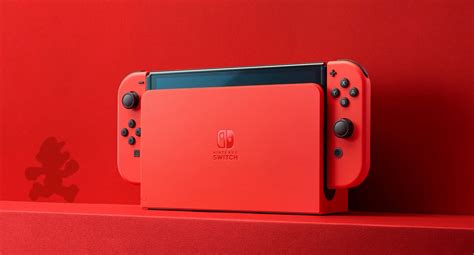
The Nintendo Switch, a marvel of portable gaming, comes with a rather modest 32GB (or 64GB for the OLED model) of internal storage. While sufficient for a few digital titles, players with diverse game libraries—from sprawling RPGs to indie gems and major first-party releases—will quickly find themselves hitting that storage wall. A reliable and spacious microSD card isn’t just an upgrade; it’s an essential expansion for any serious Switch gamer. But with a plethora of options available, how do you choose the best one?
Why Your Switch Needs a Great microSD Card
Digital game downloads, software updates, and even game saves consume valuable space. Many blockbuster titles can easily gobble up tens of gigabytes each. If you enjoy a variety of genres and frequently download games from the eShop, an inadequate microSD card will lead to frustrating dilemmas: uninstalling old favorites to make room for new ones, or constantly archiving games.
Beyond capacity, speed is another critical factor. A faster card means quicker game loading times and smoother gameplay, especially for titles that frequently access data. The Switch supports UHS-I microSD cards, and understanding their speed ratings is key to an optimal experience.
Key Factors When Choosing Your microSD Card
Capacity: How Much Space Do You Really Need?
This is often the first consideration. While 128GB might be a decent starting point for light users, those with diverse libraries should aim higher. Consider these benchmarks:
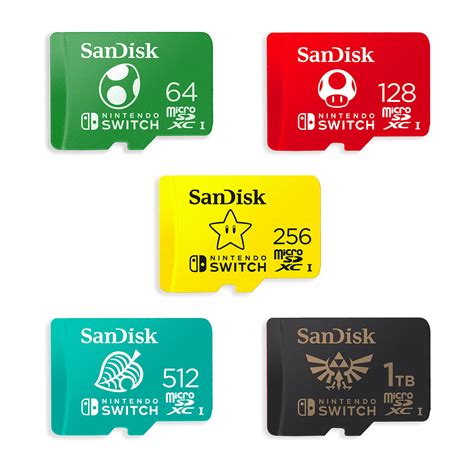
- 256GB: A great balance for many, offering space for 10-20 large games plus numerous smaller ones.
- 512GB: Ideal for avid collectors or those who prefer to keep a vast selection of games installed without worry.
- 1TB (and beyond): For the ultimate digital hoarders. These are more expensive but offer unparalleled freedom.

Speed: UHS-I, A1, and A2 Ratings
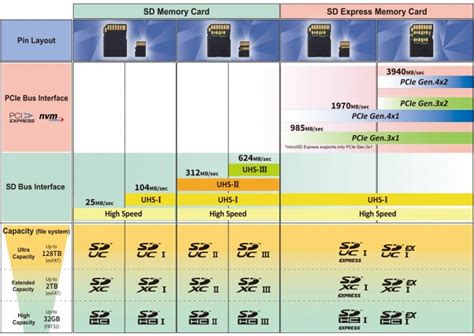
The Nintendo Switch is compatible with UHS-I (Ultra High Speed Phase I) microSD cards. Look for cards with “U3” or “V30” speed class ratings for optimal performance, indicating a minimum sustained write speed of 30 MB/s. Additionally, some cards carry “A1” or “A2” application performance class ratings, which are beneficial for loading apps and games faster, as they specify minimum random read/write speeds.
- UHS-I U3 / V30: Recommended for consistent performance.
- A1 or A2: Excellent for improving game loading times and overall responsiveness. The Switch primarily benefits from A1, but A2 cards are backward compatible and often faster overall.
Top Picks for Your Nintendo Switch
Several brands consistently deliver high-quality, reliable microSD cards suitable for the Switch. Here are some of the most recommended:
- SanDisk Ultra / Extreme: SanDisk is a perennial favorite. The Ultra series offers great value, while the Extreme series provides top-tier speeds, often with A2 ratings, perfect for demanding users. They are officially licensed by Nintendo.
- Samsung EVO Select / Plus: Samsung’s EVO line is another excellent choice, known for its reliability and strong performance. The EVO Select (often Amazon exclusive) and EVO Plus cards offer robust speeds and come in various capacities.
- PNY Elite-X / Pro Elite: PNY offers competitive options with good speeds and capacities, often at attractive price points.
When purchasing, always buy from reputable retailers to avoid counterfeit cards, which can lead to data loss and performance issues.
Tips for Managing Your Switch Storage
- Prioritize Downloads: Install larger, frequently played digital games to your microSD card.
- Archive vs. Delete: If you need space, archive games you’re not currently playing. This removes the game data but keeps the save data and icon, allowing for quick re-downloading.
- Check Your Usage: Go to System Settings > Data Management to see what’s taking up the most space.
- Keep it Clean: Regularly check for unwanted screenshots or video clips that can accumulate.
Conclusion
Investing in a high-quality, high-capacity microSD card is one of the best upgrades you can make for your Nintendo Switch, especially if you have a diverse and growing game library. By prioritizing a card with ample space (256GB or 512GB are often sweet spots) and good speed ratings (UHS-I U3/V30 with A1/A2), you’ll ensure a seamless, frustration-free gaming experience with all your favorite titles readily available. Happy gaming!


