Best Switch microSD card: balancing speed, capacity, and cost?

The Nintendo Switch, with its vast library of digital games and downloadable content, quickly fills up its modest internal storage. A reliable microSD card isn’t just an accessory; it’s an essential upgrade for any Switch owner looking to expand their gaming horizons. However, navigating the myriad of options available – each promising different speeds, capacities, and price points – can be daunting. The key lies in finding the perfect balance that suits your gaming habits and budget.
The Need for Speed: Decoding microSD Card Ratings
While the Switch itself doesn’t demand the absolute fastest microSD cards on the market, understanding speed ratings is crucial. The console supports UHS-I cards, meaning you won’t benefit from the faster UHS-II or UHS-III standards. For UHS-I cards, look for the “U” speed class, specifically U1 or U3. U3 offers faster minimum sequential write speeds than U1, but for the Switch, the real differentiator is often the “Application Performance Class” rating, A1 or A2.
An A1-rated card is optimized for running applications and loading games, offering better random read/write performance which is more relevant for game loading than sequential speeds. Most modern, reputable microSD cards with at least a U1/A1 rating will perform exceptionally well in a Switch, often loading games only marginally slower than internal storage. Overpaying for a super-fast U3/A2 card might not yield significant real-world benefits for Switch gaming specifically, though it could be beneficial for other devices.
![How to Run Micro SD Card Speed Test on Windows 10/11 [Free Tools] - EaseUS](/images/aHR0cHM6Ly90czMubW0uYmluZy5uZXQvdGg/aWQ9T0lQLlViX2R2RHFGTGFRNUtZekRoN3NIWXdIYUVCJnBpZD0xNS4x.webp)
Capacity Considerations: How Much Space Do You Really Need?
Storage capacity is often the first thing people consider, and for good reason. Switch games vary wildly in size, from small indie titles to massive AAA releases like The Legend of Zelda: Tears of the Kingdom, which can easily exceed 15GB. If you primarily buy physical game cartridges, you’ll still need space for game updates, DLC, screenshots, and system data. However, digital-only gamers will devour space much faster.
Common capacities for Switch owners range from 64GB to 1TB. A 128GB card is a good starting point for many, offering ample room for several large games and many smaller ones. If you plan on a vast digital library, 256GB or 512GB provides significant breathing room. While 1TB cards exist, they come at a premium. Consider your current game library, how many new games you anticipate buying, and whether you prefer to keep many games installed simultaneously.
The Cost Factor: Getting the Best Value
Cost per gigabyte (GB) is a major factor. Larger capacity cards often offer better value per GB, but the initial outlay is higher. It’s important to find a balance between what you need now and what you might need in the future, without breaking the bank. Prices fluctuate regularly, especially during sales events, so keeping an eye out for deals can save you a significant amount.
Be wary of suspiciously cheap cards from unknown brands, particularly for very high capacities. Counterfeit cards are prevalent and can lead to data loss or perform poorly. Sticking to well-known brands like SanDisk, Samsung, Lexar, and PNY is always a safer bet, even if they cost a little more. These brands generally offer reliable performance and come with warranties, providing peace of mind.
Recommended Brands and Specifics
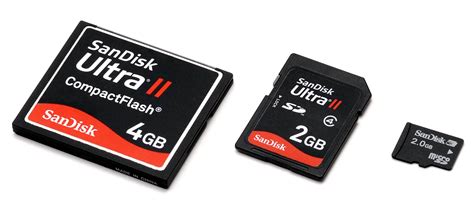
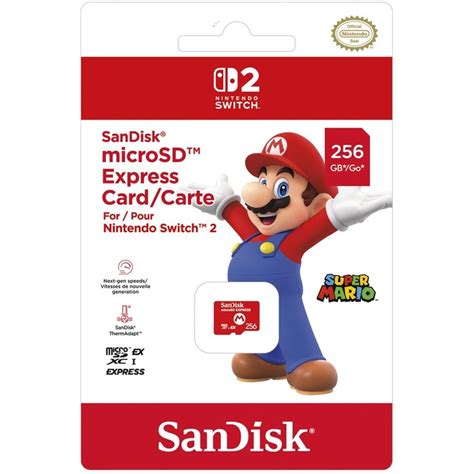
While Nintendo offers officially licensed microSD cards (often SanDisk with Nintendo branding), you’re primarily paying for the branding. Non-licensed cards from reputable manufacturers often offer identical performance for less. Look for cards in the SanDisk Ultra, SanDisk Extreme, Samsung EVO Select, or Samsung EVO Plus lines. These are consistently excellent performers for the Switch, offering a good blend of speed and reliability.
For most users, a 256GB or 512GB card from one of these brands, rated A1 (or A2 if the price difference is negligible), will provide an optimal experience. Anything beyond 512GB might be overkill unless you have an exceptionally large digital library or plan to future-proof for many years to come.
Making Your Choice: A Balanced Approach
Ultimately, the “best” Switch microSD card isn’t a one-size-fits-all answer. It’s about personal preference and priorities. If you’re a casual gamer who mostly plays physical cartridges, a 128GB A1 card might be all you need. If you’re an avid digital collector, a 512GB or even 1TB A1/A2 card will be a better investment.
Prioritize reliability from a trusted brand, then consider your capacity needs, and finally, look for a good balance of speed (A1 is sufficient) and cost. By making an informed decision, you can ensure your Nintendo Switch has plenty of room for all your gaming adventures, now and in the future, without overspending or sacrificing performance.