





Best SD card for Switch storage? Maximize game space!

Why SD Cards Are Essential for Your Switch
The Nintendo Switch, a marvel of portable gaming, comes with a rather modest 32GB (for the standard and Lite models) or 64GB (for the OLED model) of internal storage. While this is enough for a few smaller digital titles, it quickly becomes insufficient once you start downloading larger games, DLC, or a growing collection of indie gems. Many AAA titles alone can chew up more than half of the internal memory, making an external storage solution not just a luxury, but a necessity for most Switch owners.
Digital downloads offer convenience, allowing you to switch between games without swapping cartridges. However, this convenience comes at the cost of internal storage. An SD card significantly expands your console’s capacity, ensuring you never have to delete cherished games to make room for new adventures. This guide will help you navigate the options and find the perfect SD card to maximize your Switch’s game space.
What to Look for in a Switch SD Card
Choosing the right SD card involves understanding a few key specifications. The Nintendo Switch exclusively uses microSD cards, specifically microSDHC (High Capacity) or microSDXC (Extended Capacity) formats. For most users, microSDXC cards are the way to go due to their higher capacity potential (from 64GB up to 2TB).
Speed Matters: UHS-I and A1/A2 Ratings
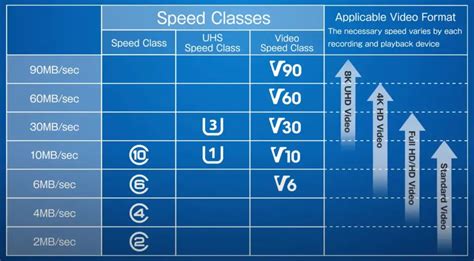
When it comes to performance, you’ll want to pay attention to the speed class. The Switch supports UHS-I (Ultra High Speed Phase I) cards, which have a theoretical maximum read speed of 104 MB/s. While faster UHS-II cards exist, the Switch doesn’t utilize their increased speed, so investing in one would be overkill and won’t offer any performance benefit over a good UHS-I card.
Look for cards with an ‘A1’ or ‘A2’ application performance class rating. These ratings indicate the card’s ability to handle random read/write operations efficiently, which is crucial for running games directly from the SD card. A2 cards offer even better random performance than A1, leading to slightly faster game loading times, though the difference might be subtle for most users. Any reputable brand’s A1 or A2 rated UHS-I microSDXC card will serve your Switch well.
Top Recommended SD Cards for Nintendo Switch
While many brands offer microSD cards, a few stand out for their reliability, performance, and value. Nintendo itself has officially partnered with SanDisk for Switch-branded SD cards, which are an excellent, albeit sometimes pricier, choice.
SanDisk for Nintendo Switch
SanDisk’s officially licensed Nintendo Switch microSD cards are tailor-made for the console. They feature iconic Nintendo character designs (like Mario or Zelda) and are guaranteed to meet Nintendo’s specifications. These are UHS-I, A1-rated cards that offer excellent performance and peace of mind. Capacities range from 64GB all the way up to 1TB.
Samsung EVO Select/Plus
Samsung’s EVO Select and EVO Plus lines are incredibly popular for a reason. These cards offer fantastic performance for their price, consistently delivering high read and write speeds suitable for gaming. They are often more affordable than the officially licensed SanDisk cards while offering comparable or even superior real-world performance. Look for the ‘U3’ speed class, which guarantees a minimum sequential write speed of 30 MB/s, and ideally an A2 rating for optimal app performance.
Other Reliable Options
Brands like Lexar and PNY also produce high-quality microSDXC cards that work perfectly with the Nintendo Switch. When choosing, prioritize reputable brands to ensure data integrity and avoid potential issues with counterfeit or unreliable cards. Always purchase from trusted retailers.

How Much Storage Do You Actually Need?
The ideal capacity depends entirely on your gaming habits. The Switch supports microSD cards up to 2TB, though 1TB is currently the largest commercially available size.
- 128GB: A good starting point for casual gamers who primarily play physical cartridges but download a few digital indies or DLC. Will fill up relatively quickly with larger digital titles.
- 256GB: The sweet spot for most gamers. It offers ample space for a significant digital library without breaking the bank. You can comfortably fit dozens of games.
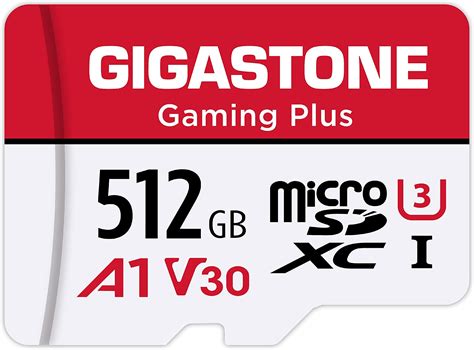
- 512GB: Ideal for avid digital collectors or those who frequently buy new releases. This capacity provides vast storage for an extensive game collection, ensuring you rarely have to manage space.
- 1TB: For the ultimate digital hoarders. If you plan to download almost every game you own and never want to worry about storage again, a 1TB card is your best bet, albeit at a premium price.
Consider the size of your typical games. AAA titles can range from 10GB to over 60GB, while many indie games are under 5GB. A general rule of thumb is to buy a card at least one size larger than you think you’ll need, as game libraries tend to grow rapidly.
Installation and Best Practices
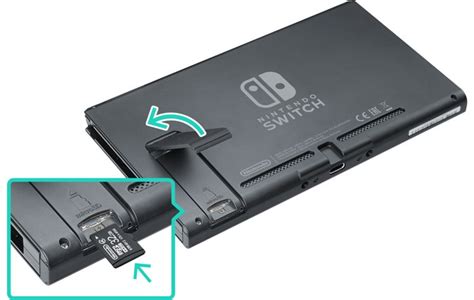
Installing a microSD card in your Switch is straightforward. Simply open the kickstand on the back of the console to reveal the microSD card slot. Insert the card gently until it clicks into place. The Switch will automatically recognize the new storage and prompt you to format it if necessary. Data transfer from internal storage to the SD card can be done via the Switch’s System Settings.
For optimal performance and to prolong the life of your SD card, it’s recommended to:
- Always use the official “Eject microSD Card” option in System Settings before removing it, even if the console is off.
- Avoid cheap, unbranded cards, as they are often prone to failure and data corruption.
- Periodically check for system updates, as these can sometimes improve SD card compatibility or performance.
Maximize Your Gaming Experience
Upgrading your Nintendo Switch’s storage with a high-quality microSD card is one of the best investments you can make as a gamer. It frees you from the constant worry of running out of space, allowing you to download new games without hesitation and keep your entire digital library at your fingertips. By choosing a reputable brand with a good speed rating and sufficient capacity, you’ll unlock the full potential of your Switch, ensuring a seamless and expansive gaming experience for years to come.
Don’t let limited storage hold you back from exploring the vast and vibrant world of Nintendo Switch games. Pick your perfect SD card today and game on!


