





Best SD card for Switch games: boost storage & load times?

The Nintendo Switch, with its ever-growing library of fantastic digital titles, presents a common challenge for many gamers: limited storage space. While the console comes with 32GB or 64GB of internal storage (depending on the model), a significant portion of that is reserved for the system itself. With large games like The Legend of Zelda: Tears of the Kingdom or Pokémon Scarlet and Violet easily exceeding 10GB-15GB each, it doesn’t take long to hit that storage wall. This is where a high-quality microSD card becomes an essential upgrade for any serious Switch owner.
Why Your Nintendo Switch Absolutely Needs a MicroSD Card
Imagine downloading a new game only to be greeted by an ‘insufficient storage’ message. It’s a frustrating reality for many Switch users. Digital game purchases, patches, and DLC quickly eat up the console’s meager internal memory. A microSD card acts as an external hard drive, seamlessly integrating with your Switch to provide massive storage expansion. This means more games, more updates, and less time deciding what to delete just to make room for something new.
Beyond just capacity, some users wonder if a faster microSD card can improve game load times. While the Switch’s architecture imposes certain limitations, choosing a card with good read speeds can offer a noticeable, albeit not revolutionary, improvement in how quickly your games boot up and levels load, especially for larger titles.
Understanding MicroSD Card Specifications for Switch
Not all microSD cards are created equal, and choosing the right one involves understanding a few key specifications:
Capacity: How Much Storage Do You Need?
MicroSD cards come in various sizes, from 32GB all the way up to 1TB or more. For the average Switch gamer, here’s a rough guide:
- 128GB-256GB: A good starting point for casual gamers with a mix of physical and digital titles.
- 512GB: An excellent balance of cost and capacity for most dedicated digital-first gamers. This allows for dozens of large titles.
- 1TB: For the ultimate collector who wants to download everything without worry. It’s an investment, but offers unparalleled freedom.
Always consider future-proofing. Games are only getting bigger, so buying a slightly larger card than you think you need now can save you hassle later.
Speed: Does It Affect Performance?
Nintendo officially recommends using UHS-I (Ultra High Speed Phase I) compatible microSD cards with a read speed of 60-95 MB/s. While the Switch can technically use UHS-II cards, it doesn’t take advantage of their higher speeds, meaning you’d be paying extra for performance you can’t utilize. Focus on UHS-I cards with good read speeds.
Look for these speed ratings on the card:
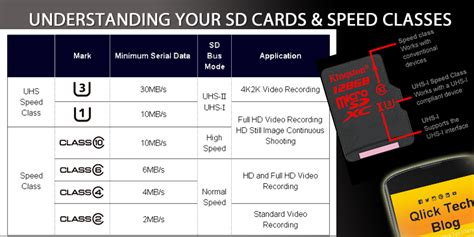
- UHS Speed Class (U1 or U3): U1 guarantees a minimum write speed of 10 MB/s, while U3 guarantees 30 MB/s. For the Switch, U1 is generally sufficient, but U3 offers better overall performance, especially for games with frequent asset loading.
- Video Speed Class (V10, V30, etc.): Primarily for video recording, but V10 or V30 corresponds to U1 and U3 respectively in terms of minimum write speeds.
- Application Performance Class (A1 or A2): A1 and A2 are designed for running apps from the card. While not strictly necessary for Switch games (which are optimized differently), an A1 or A2 rating often indicates good random read/write performance, which can slightly benefit game loading.
Top Brands and Recommendations for Switch
When it comes to reliability and performance, sticking with reputable brands is crucial. Cheap, unbranded cards might offer tempting prices but often come with slower speeds, lower actual capacity, and a higher failure rate. Here are some trusted names:
- SanDisk: Widely recognized and often features officially licensed Nintendo Switch microSD cards. These are a safe bet, often offering excellent value and reliable performance.
- Samsung: Known for their EVO Select and EVO Plus lines, Samsung cards are fast, durable, and highly regarded.
- Kingston: Offers a range of reliable microSD cards suitable for gaming.
- Lexar: Another strong contender with a history of producing quality memory products.
Focus on cards that clearly state their read speeds (e.g., up to 100MB/s) and have at least a U1 speed rating. For optimal performance and peace of mind, a U3 A1 or A2 rated card from a top brand is your best bet.

Installation and Data Management
Installing a microSD card in your Switch is incredibly simple. Just open the kickstand on the back of the console, and you’ll find the microSD card slot. Insert the card with the label facing away from the screen until it clicks into place. The Switch will automatically recognize it.
Once installed, new game downloads will automatically be saved to the microSD card. If you want to move existing games from your internal memory to the SD card (or vice-versa), you’ll need to archive the software from the Switch’s Data Management settings and then redownload it, selecting the desired storage location. Keep in mind that save data is always stored on the console’s internal memory and cannot be moved to the SD card.
Does a Faster SD Card Really Boost Load Times?
While an SD card with higher read speeds (e.g., 100MB/s vs. 60MB/s) can offer a marginal improvement in game loading times, it’s important to manage expectations. The Nintendo Switch’s internal hardware and software architecture are the primary bottlenecks. You won’t see the drastic improvements you might expect from upgrading an SSD in a PC or modern console. However, choosing a U3 A1/A2 rated card from a reputable brand will ensure you’re getting the best possible performance the Switch can offer from external storage, preventing any unnecessary slowdowns.

Ultimately, the main benefit of a good microSD card for your Nintendo Switch is vastly expanded storage, allowing you to carry your entire digital library wherever you go. The slight speed boost is a welcome bonus, but the freedom from storage anxiety is the true game-changer. Invest in a quality card with ample capacity from a trusted brand, and you’ll transform your Switch experience, ensuring you’re always ready for your next gaming adventure without deleting precious memories.


