





Best SD card for Nintendo Switch to maximize game storage for digital titles?

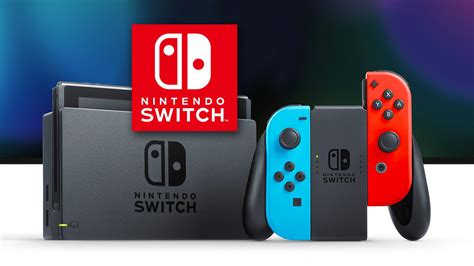
The Nintendo Switch, with its versatile design and expansive game library, is a fantastic console. However, one common frustration for many players, especially those who prefer digital titles, is the console’s limited internal storage. With only 32GB (or 64GB for the OLED model) of internal memory, a significant portion of which is reserved for the system itself, you’ll quickly run out of space after downloading just a few major titles. This is where a high-quality microSD card becomes an indispensable accessory.
Maximizing your game storage isn’t just about having more space; it’s about convenience, faster load times, and ensuring you never have to delete beloved games to make room for new adventures. Choosing the right SD card can feel daunting with so many options available, but understanding a few key specifications will guide you to the perfect choice for your Switch.
Why Expand Your Switch’s Storage?
Digital game sizes are growing, with many AAA titles easily exceeding 10-20GB. Games like The Legend of Zelda: Tears of the Kingdom, Pokémon Scarlet/Violet, or DOOM Eternal can quickly consume your internal storage. Relying solely on internal memory means constant game management, deleting and redownloading titles, which is time-consuming and inconvenient.
An external microSD card seamlessly integrates with your Switch, allowing you to store hundreds of games, DLC, and save data without a second thought. It’s essentially an invisible storage upgrade that significantly enhances your gaming experience.
Key Factors When Choosing an SD Card for Switch
Not all microSD cards are created equal. To ensure optimal performance and compatibility with your Nintendo Switch, pay attention to these crucial specifications:
1. Card Type: microSDXC
The Nintendo Switch exclusively supports microSD, microSDHC, and microSDXC cards. For maximizing storage, microSDXC (eXtended Capacity) is what you need. These cards offer capacities ranging from 64GB up to 2TB, far exceeding the limits of older microSDHC cards.
2. Capacity: How Much Do You Need?
- 128GB: A good starting point for casual digital gamers or those who buy a mix of physical and digital. Will hold several large games and many smaller ones.
- 256GB: The sweet spot for most dedicated digital gamers. Offers a generous amount of space for a substantial library without breaking the bank.
- 512GB: Excellent for heavy digital users, collectors, or if you simply don’t want to worry about storage for a very long time.
- 1TB+: For the ultimate digital library. While expensive, 1TB cards are available and future-proof for years to come, especially if you foresee a massive collection.
Remember that a portion of the card’s advertised capacity will be used for formatting and system files, so the usable space will be slightly less.
3. Speed: Read and Write Performance
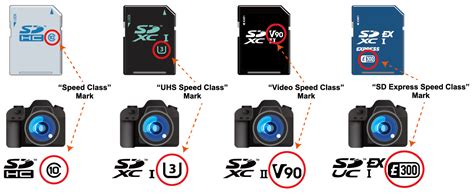
Speed is paramount for smooth game loading and operation. Look for cards with these classifications:
- UHS-I (Ultra High Speed Phase I): This is the standard for Switch-compatible cards.
- Speed Class (U1 or U3): Indicated by a “U” with a number inside.
- U1 (Class 10): Minimum sustained write speed of 10MB/s. Acceptable.
- U3: Minimum sustained write speed of 30MB/s. Recommended for better performance, especially for larger games and future-proofing.
- Read Speed: This is the most critical speed for gaming, as it dictates how quickly games load. Aim for cards with a read speed of at least 90MB/s, with 100MB/s or higher being ideal. The higher, the better for faster load times.
- Application Performance Class (A1 or A2): While less critical than read/write speeds for the Switch, A1 (1500 IOPS random read, 500 IOPS random write) and A2 (4000 IOPS random read, 2000 IOPS random write) cards can offer slightly better performance, especially for certain system operations. A1 is perfectly sufficient.
Top Recommended SD Card Brands for Nintendo Switch
While Nintendo offers officially licensed cards, any reputable, high-speed microSDXC card from a trusted brand will work perfectly. The licensed cards are often just re-branded versions of standard high-performance cards.
- SanDisk: A market leader, their “Extreme” or “Ultra” series microSDXC cards are consistently excellent. They also have officially licensed Nintendo Switch branded cards that perform identically to their equivalent non-branded versions but might cost a bit more for the branding.
- Samsung: The “EVO Select” and “PRO Plus” lines are highly regarded for their reliability and speed, offering great value.
- Lexar: Another strong contender, Lexar’s “PLAY” and “Professional” series microSDXC cards are reliable and fast.
When purchasing, always buy from a reputable retailer to avoid counterfeit cards, which can lead to data loss and poor performance.
Installation and Management Tips
Installing your new microSD card is incredibly simple:
- Power off your Nintendo Switch completely (hold the power button, then select Power Options > Turn Off).
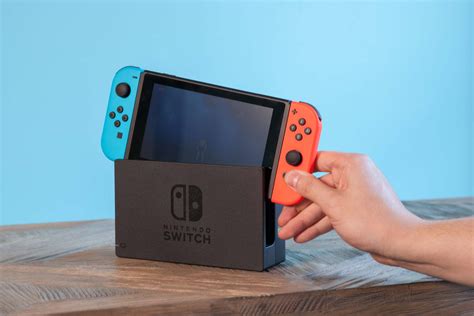
- Open the kickstand on the back of the console to reveal the microSD card slot.
- Insert the card with the label facing down until it clicks into place.
- Close the kickstand and power on your Switch. The console will automatically detect and format the new card.
To transfer games from internal storage to your new SD card, navigate to System Settings > Data Management > Move Data Between System / microSD Card. You can also change the default download location for new games in these settings.
Conclusion: Unlock Your Switch’s Full Potential
Investing in a quality microSD card is perhaps the most impactful upgrade you can make to your Nintendo Switch, especially if you’re a fan of digital titles. It frees you from the constant struggle of storage management, ensures faster game loading, and lets you keep your entire digital library at your fingertips. By choosing a reputable microSDXC card with a good capacity and high read speeds (UHS-I U3, 90MB/s+), you’ll transform your Switch into an even more capable and enjoyable portable gaming powerhouse.


