





Best MicroSD for Switch: Optimize storage for big/small digital games?

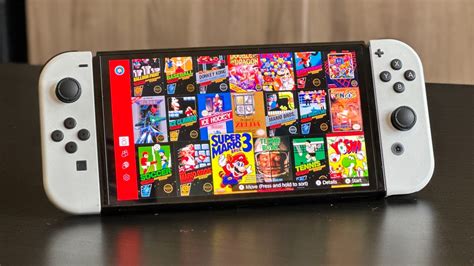
The Nintendo Switch, with its fantastic library of games, quickly reveals one of its few limitations: internal storage. Whether you own the original model, the Switch Lite, or the OLED model, the built-in storage of 32GB or 64GB simply isn’t enough for today’s digital landscape. Large AAA titles can easily consume over 10GB, and even smaller indie games add up rapidly. This makes a MicroSD card an essential accessory for any Switch owner looking to dive deep into digital downloads.
Why Your Nintendo Switch Needs a MicroSD Card
Many Switch owners opt for digital versions of games due to convenience, sales, or the inability to find physical cartridges. However, the system’s internal memory fills up incredibly fast. Imagine downloading The Legend of Zelda: Tears of the Kingdom (approx. 18GB), Super Mario Odyssey (approx. 5.7GB), and a few indie darlings like Hades (approx. 6.3GB), and your 32GB console is already screaming for more space. A MicroSD card is the only way to significantly expand your console’s storage, allowing you to keep a vast library of games ready to play without constant archiving or redownloading.
Capacity: How Much Space Do You Really Need?
The ideal MicroSD card capacity depends entirely on your gaming habits. The Switch supports MicroSD cards up to 2TB, though 1TB is currently the largest commercially available and practical option. Here’s a breakdown to help you decide:
- 128GB: Suitable for casual gamers who primarily buy physical games but want space for a handful of digital titles or DLC. It’s a noticeable upgrade from internal storage.
- 256GB: The sweet spot for most digital-focused gamers. It offers ample space for many AAA games and a substantial collection of smaller titles. This is often the best value for money.
- 512GB: Ideal for heavy digital game collectors. If you prefer to download everything and rarely delete games, this capacity provides significant breathing room for a growing library.
- 1TB: For the ultimate digital archivist. If you plan to own hundreds of digital games and never want to worry about storage again, a 1TB card will serve you well, though it comes at a premium price.
Remember that the operating system and game saves will take up a small portion of the card’s reported capacity.
Speed Matters: Decoding UHS-I, U3, A1, and A2
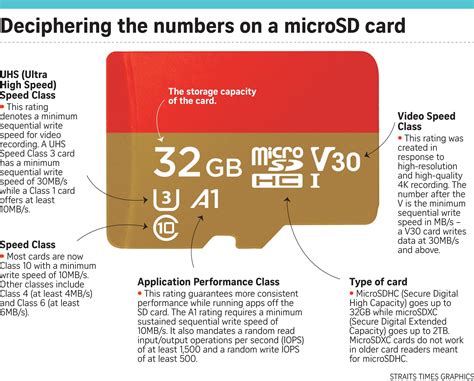
While capacity is important, speed is equally critical for smooth gameplay. The Switch relies on the MicroSD card for loading game data, so a faster card can reduce load times. Here’s what to look for:
- UHS-I: The Switch supports the Ultra High Speed Phase I interface, which is the standard for most modern MicroSD cards. Don’t worry about UHS-II or UHS-III, as the Switch doesn’t support their faster speeds, and you’d be paying for features you can’t use.
- U3 (UHS Speed Class 3): This indicates a minimum sequential write speed of 30MB/s, crucial for recording video and faster data transfer. Most quality cards for gaming will have this rating.
- Class 10: This is an older speed class but still important, guaranteeing a minimum sequential write speed of 10MB/s. All U3 cards are also Class 10.
- A1 or A2 (Application Performance Class): These ratings are designed for better performance when running applications directly from the card. While A2 offers theoretical advantages in random read/write speeds, the Nintendo Switch’s architecture doesn’t fully utilize the benefits of A2 over A1 for game loading. An A1 card with a good U3 rating is often sufficient and more cost-effective. Focus on reliable read speeds (which aren’t always explicitly rated but are generally higher on quality cards) and the U3 rating.
In short, prioritize a UHS-I U3 card from a reputable brand for the best balance of speed and value on your Switch.
Top MicroSD Card Recommendations for Nintendo Switch
Based on performance, reliability, and value, certain brands consistently stand out as excellent choices for the Nintendo Switch:
- SanDisk MicroSDXC for Nintendo Switch: These cards are officially licensed and designed specifically for the Switch. They offer reliable UHS-I, U3 performance and come in iconic Switch-themed designs. A very safe and excellent choice.
- SanDisk Ultra/Extreme: SanDisk’s standard Ultra and Extreme lines are also fantastic. The Extreme series often provides slightly higher read/write speeds, but both offer great value and reliability. Look for the ‘A1’ or ‘A2’ and ‘U3’ ratings.
- Samsung EVO Select/Plus: Samsung’s EVO line (especially the EVO Select and EVO Plus) are highly regarded for their consistent performance and durability. They are often competitively priced and offer excellent read/write speeds suitable for the Switch.
- Lexar PLAY MicroSDXC: Lexar has re-emerged as a strong contender in the storage market, and their PLAY series is optimized for gaming with good read speeds and A1/U3 ratings.
Always purchase from reputable retailers to avoid counterfeit cards, which can lead to data loss and poor performance.

Installation and Management Tips
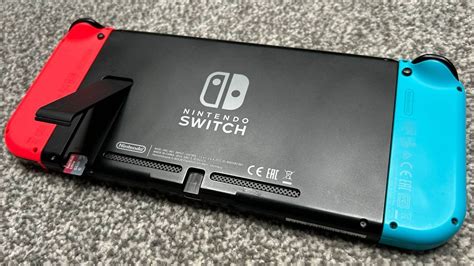
Installing a MicroSD card in your Switch is straightforward. Simply power off your console, open the kickstand, and insert the card into the slot. The Switch will automatically recognize it. You can move games between internal storage and the MicroSD card via the System Settings > Data Management menu. It’s often best to install new digital games directly onto the MicroSD to save internal space for game saves and system updates.
Conclusion: Optimal Storage for Endless Adventures
Investing in a quality MicroSD card is one of the best upgrades you can make for your Nintendo Switch. It frees you from storage anxiety, allowing you to download more games, keep your favorites readily accessible, and spend less time managing data. By understanding your capacity needs and prioritizing UHS-I U3 speed from a reliable brand, you can ensure your Switch is always ready for your next big (or small) digital adventure.


