Best MicroSD for Switch: maximize storage & game performance?

Why Your Nintendo Switch Needs a MicroSD Card
The Nintendo Switch, a marvel of portable gaming, comes with a rather modest internal storage capacity – 32GB for the original and Lite models, and 64GB for the OLED version. While this might suffice for a few small indie titles, it quickly becomes a bottleneck for players who enjoy digital downloads, extensive game libraries, or even just frequent game updates and DLC. A MicroSD card isn’t just an accessory; it’s a necessity for any serious Switch owner looking to expand their horizons and avoid the constant struggle of deleting games to make space.
Beyond simply adding more room for your growing collection, a high-quality MicroSD card can also play a crucial role in game performance, particularly regarding loading times. While the Switch’s CPU and GPU handle the heavy lifting, faster read speeds from your storage can shave precious seconds off boot-up and in-game loading screens, leading to a smoother and more enjoyable gaming experience.
Key Factors When Choosing a MicroSD Card for Switch
Navigating the world of MicroSD cards can be daunting with various brands, capacities, and speed ratings. For your Nintendo Switch, focusing on a few key specifications will ensure you make the best choice:
Capacity: How Much Space Do You Really Need?
- 128GB-256GB: A good starting point for casual gamers or those who buy mostly physical cartridges. It offers a decent balance of price and storage.
- 512GB: The sweet spot for many, allowing for a substantial digital library without breaking the bank.
- 1TB or more: Ideal for digital-only enthusiasts, especially those who plan to keep a vast collection of AAA titles downloaded. Remember that Switch games can range from a few hundred MBs to over 20GB.
Speed Ratings: Understanding UHS-I and A1/A2
The Nintendo Switch officially supports UHS-I (Ultra High Speed Phase I) MicroSD cards. While higher-speed UHS-II cards can technically be inserted, the Switch will only utilize their UHS-I capabilities, meaning you won’t get any extra speed benefits and will have paid for unnecessary performance.
- Class 10/U1/U3: Look for cards rated Class 10 (C10), U1, or preferably U3. U3 cards offer a minimum sequential write speed of 30 MB/s, which is excellent for game data.
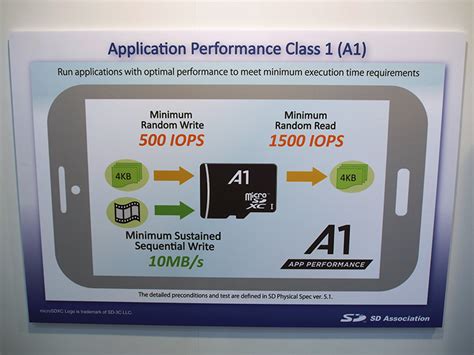
- A1/A2 Rating: This ‘Application Performance Class’ is crucial. A1-rated cards ensure faster random read/write speeds, which are vital for loading game assets and running applications directly from the card. A2 offers even better performance but is often overkill and doesn’t always provide a noticeable difference on the Switch compared to A1.
Ultimately, prioritize a UHS-I card with a U3 rating and at least an A1 rating for the best balance of speed and compatibility with the Switch.
Top MicroSD Card Recommendations for Nintendo Switch
To simplify your decision, here are some of the most reliable and performance-oriented MicroSD cards highly recommended for the Nintendo Switch:
-
SanDisk Ultra/Extreme (and Nintendo-Licensed Cards)
SanDisk is a powerhouse in flash storage, and their Ultra and Extreme series MicroSD cards are consistently top performers. SanDisk also offers officially licensed Nintendo Switch MicroSD cards, which feature recognizable game characters. These are essentially re-branded versions of their proven cards, offering guaranteed compatibility and reliable performance (UHS-I, U3, A1 rated).
-
Samsung EVO Select/PRO Plus
Samsung’s EVO Select and PRO Plus lines are celebrated for their impressive speeds, durability, and competitive pricing. The EVO Select (U3, A1) provides excellent value, while the PRO Plus offers slightly enhanced performance for those who demand the absolute best, albeit at a slightly higher cost.
-
PNY Elite-X
PNY’s Elite-X cards are another strong contender, providing a great balance of speed and affordability. They often come with U3 and A1 ratings, making them perfectly suited for the demands of Switch gaming.

Maximizing Performance: What to Expect
Upgrading your Switch with a high-quality MicroSD card will primarily deliver two key benefits:
- Vastly Increased Storage: No more agonizing decisions about which game to delete. Enjoy a sprawling digital library without compromise.
- Faster Loading Times: While the difference isn’t always night and day for every game, many titles will experience noticeably quicker load screens, saving you precious seconds and getting you into the action faster. This is especially true for games with large assets or frequent loading segments.
The A1/A2 rating, specifically, helps with the random read/write operations that are common when the Switch is accessing small game files or quickly loading assets as you navigate menus or in-game environments. This translates to a snappier overall feel for the system.
Installation and Setup Guide
Installing a MicroSD card into your Nintendo Switch is incredibly straightforward:
- Power Off Your Switch: Ensure your console is completely powered down, not just in sleep mode.
- Locate the Slot: The MicroSD card slot is located under the kickstand on the back of the Switch.
- Insert the Card: Gently push the MicroSD card into the slot until it clicks into place.
- Power On: Turn your Switch back on. The console should automatically detect the new storage. If the card isn’t formatted for the Switch, the system will prompt you to do so. This process is quick and prepares the card for game data.
- Manage Data: You can then go to System Settings > Data Management to view your new storage and, if desired, transfer games or save data between the internal storage and the MicroSD card.
Conclusion
Investing in the right MicroSD card is one of the most impactful upgrades you can make for your Nintendo Switch. It not only eliminates storage anxiety but also subtly enhances your gaming experience with faster load times. By choosing a reputable brand with appropriate capacity and speed ratings (UHS-I, U3, A1), you’ll ensure your Switch is ready for all the adventures Nintendo throws your way, now and in the future.