





Best microSD for Switch: How to expand game storage efficiently?

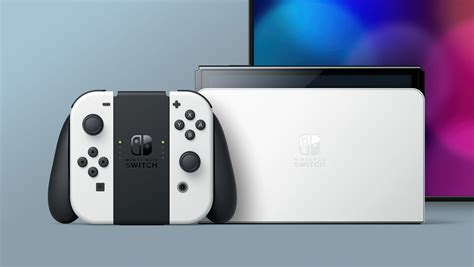
The Nintendo Switch, a beloved hybrid console, offers incredible gaming on the go and at home. However, its modest internal storage, typically 32GB or 64GB on OLED models, can quickly become a bottleneck for avid digital game collectors. Between large game downloads, updates, and DLC, you’ll find yourself running out of space faster than you can say “It’s-a me, Mario!” This guide will help you navigate the world of microSD cards to efficiently expand your Switch’s storage, ensuring you never have to delete a cherished game again.
Why Expand Your Switch’s Storage?
While physical game cartridges save some space, they don’t eliminate the need for extra storage entirely. Game updates, downloadable content (DLC), and digital-only titles still consume your Switch’s precious internal memory. Even if you primarily buy physical games, many modern titles require significant patches or additional data downloads that can quickly eat into the console’s built-in storage. Furthermore, purchasing digital games from the eShop offers convenience and often exclusive sales, making an expanded storage solution almost essential.
Understanding the difference between your Switch’s internal memory and a microSD card is crucial. Save data for all games, both physical and digital, is stored on the console’s internal memory and cannot be moved to an SD card. However, game data itself (the actual game files, updates, and DLC) can be stored and played directly from a microSD card, freeing up valuable internal space.
Key Factors When Choosing a microSD Card
Not all microSD cards are created equal, especially when it comes to gaming performance. Here’s what to look for to ensure a smooth experience:
Capacity: How Much Do You Really Need?
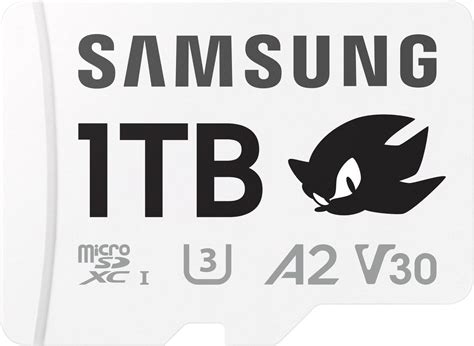
MicroSD cards for the Switch come in various capacities, ranging from 64GB all the way up to 2TB (though 1TB is currently the practical maximum for most users). Consider your gaming habits:
- Casual Gamer (Few digital titles): 128GB – 256GB might suffice.
- Moderate Gamer (Mix of physical & digital): 256GB – 512GB offers a good balance.
- Heavy Gamer (Mostly digital, many large titles): 512GB – 1TB+ is recommended for future-proofing and peace of mind.
Remember that game sizes vary wildly. A single AAA title like The Legend of Zelda: Tears of the Kingdom can be over 18GB, while smaller indie games might only be a few hundred MBs.
Speed: Read and Write Performance
The speed of your microSD card directly impacts game loading times and the responsiveness of your Switch when accessing game data. The Nintendo Switch supports UHS-I microSD cards, which have a theoretical maximum speed of 104 MB/s. While faster UHS-II cards exist, the Switch cannot fully utilize their increased speeds, so investing in one for the Switch specifically isn’t necessary.
Look for cards rated with “U3” (UHS Speed Class 3) or “V30” (Video Speed Class 30), indicating a minimum sequential write speed of 30 MB/s. An “A1” or “A2” app performance class rating is also beneficial, as it signifies good random read/write speeds, which are crucial for game performance.

Top Recommended Brands for Nintendo Switch
While specific models change over time, certain brands consistently deliver reliable performance for the Nintendo Switch. Stick to well-known manufacturers to avoid counterfeit cards or poor performance.
- SanDisk: Often recommended, especially their Nintendo-licensed cards (which are essentially rebranded SanDisk Ultra cards). Their Extreme and Ultra lines are popular and reliable choices.
- Samsung: The EVO Select and EVO Plus lines offer excellent value and performance.
- Lexar: The Lexar PLAY series is designed with gaming in mind, offering good speeds at competitive prices.
- PNY: PNY’s Elite-X and Pro Elite microSD cards are also solid options for Switch users.
Always purchase from reputable retailers to ensure you’re getting an authentic product with the advertised capacity and speed.
Installing and Managing Your microSD Card
Installing a microSD card in your Switch is straightforward:
- Power Off: Fully power down your Nintendo Switch.
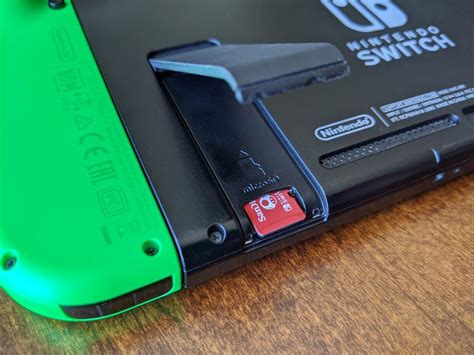
- Locate Slot: Open the kickstand on the back of the console to reveal the microSD card slot.
- Insert Card: Gently push the microSD card into the slot until it clicks into place, with the label facing towards the console’s screen.
- Power On: Turn your Switch back on. The console should automatically detect and format the new card.
Efficient Storage Management Tips:
- Prioritize Digital Games: Make sure your Switch is set to download new games and updates directly to the microSD card. You can check this in System Settings > Data Management.
- Archive Games: If you’re running low on space, you can “Archive Software” from the game’s options menu (press + on the game icon). This deletes the game data but keeps your save data, allowing you to re-download it later without losing progress.
- Check Free Space Regularly: Keep an eye on your remaining storage in System Settings > Data Management.
- Cloud Saves: Nintendo Switch Online subscribers benefit from cloud saves, which back up your save data (for most games) online, adding another layer of security, though this doesn’t free up internal storage.
Conclusion
Expanding your Nintendo Switch’s storage with a high-quality microSD card is one of the best investments you can make to enhance your gaming experience. By choosing the right capacity and speed from a reputable brand, and by practicing good storage management, you can ensure your Switch always has room for your next adventure. Say goodbye to frustrating storage warnings and hello to an ever-growing library of digital delights!


