





Best microSD for Switch games? Maximize storage without breaking the bank.

The Nintendo Switch, a marvel of portable gaming, comes with one significant limitation for avid gamers: its internal storage. With only 32GB (or 64GB for the OLED model) of built-in memory, which is quickly eaten up by system software, digital game downloads, updates, and DLC, you’ll soon find yourself facing tough decisions about which beloved titles to uninstall. Fortunately, expanding your Switch’s storage is straightforward and doesn’t have to cost a fortune, thanks to microSD cards.
The Scramble for Storage: Why Your Switch Needs a Boost
While some games are cartridge-based, many require significant downloads, even physical copies often need large patches or DLC. Fully digital libraries can fill up the Switch’s internal storage in a matter of weeks, leading to frustrating management of your game collection. A reliable microSD card is no longer an optional accessory but a vital component for any serious Switch owner, ensuring you can keep all your favorite adventures ready to play.
Understanding microSD Card Basics for Nintendo Switch
Not all microSD cards are created equal, but for the Nintendo Switch, the requirements are fairly standard:
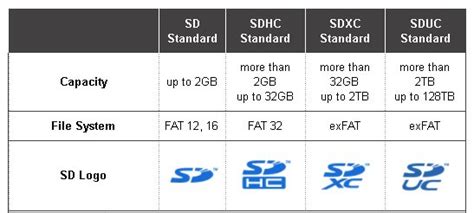
- Type: The Switch supports microSD (up to 2GB), microSDHC (4GB-32GB), and microSDXC (64GB and above) cards. For modern gaming needs, you’ll almost certainly want an SDXC card.
- Speed: Nintendo recommends using a UHS-I (Ultra High Speed Phase I) compatible card with a read speed of 60-95 MB/s. While faster cards exist (UHS-II), the Switch doesn’t fully utilize their speed benefits, meaning you’d be paying extra for performance you can’t fully leverage. Look for cards with an A1 or A2 app performance rating, as these are optimized for running applications and games.
- Capacity: This is where personal preference and budget come into play. Common capacities range from 64GB to 1TB.
Key Factors When Choosing a Switch microSD
Capacity: How Much Do You Really Need?
Game sizes vary wildly, from a few hundred megabytes to over 20GB. A 64GB card is a good starting point for casual gamers, but 128GB to 256GB offers a comfortable balance for most, allowing for several large titles and many smaller ones. If you have a primarily digital library or plan to play many AAA games, a 512GB or even 1TB card might be worth the investment for peace of mind.
Speed: Finding the Sweet Spot
As mentioned, the Switch supports UHS-I cards. Look for cards with a ‘U3’ speed class and an ‘A1’ or ‘A2’ app performance rating. While A2 cards theoretically offer faster random read/write speeds, the real-world difference on a Switch is often negligible compared to A1, especially for the price difference. Focus on consistent read speeds above 60MB/s.
Brand Reliability: Trust Matters
Stick to reputable brands like SanDisk, Samsung, Lexar, and Kingston. These brands are known for their quality control, reliability, and customer support. Counterfeit cards are unfortunately common, especially from unknown sellers at suspiciously low prices, and can lead to data loss or poor performance.
Price vs. Performance: Maximize Value
The sweet spot for value usually lies in the 256GB-512GB range. These capacities often provide the best cost-per-gigabyte without being excessively expensive. Keep an eye out for sales, as microSD cards are frequently discounted.
Top Picks: Best microSD Cards for Nintendo Switch
Best Overall Value: SanDisk microSDXC for Nintendo Switch
Officially licensed by Nintendo, these cards are specifically designed and tested for the Switch. They offer reliable UHS-I U3 A1 performance with read speeds up to 100MB/s and are available in various capacities, often at competitive prices. The iconic Nintendo branding is a nice touch.
Best Performance & Capacity: Samsung EVO Select/Plus
Samsung’s EVO Select and EVO Plus lines are fantastic performers, often exceeding Nintendo’s recommended speeds (up to 130MB/s read) while maintaining excellent reliability. They’re usually very competitively priced, especially during sales, making them a top choice for those wanting a bit more speed and robust performance without breaking the bank.

Budget-Friendly Option: Lexar PLAY microSDXC
The Lexar PLAY series offers a great balance of affordability and decent performance. With read speeds up to 150MB/s and an A1 rating, they are more than capable of handling Switch games. If you’re looking to expand storage on a tighter budget, Lexar PLAY cards are a solid, trustworthy choice.
High-End/Future-Proof: PNY PRO Elite / Kingston Canvas Go! Plus
If you’re looking to truly future-proof your storage and demand the absolute fastest UHS-I speeds available, cards like the PNY PRO Elite or Kingston Canvas Go! Plus are excellent. They offer top-tier read and write speeds, ideal for very large libraries and potentially faster loading times, though the difference on Switch specifically might be marginal compared to other premium UHS-I cards.
Installation and Optimization Tips
Installing a microSD card is simple: just open the kickstand on your Switch and slide the card into the slot. The Switch will automatically recognize and format it. If you’re moving from a smaller card, you’ll need to transfer your data. You can do this by copying the ‘Nintendo’ folder from your old card to your new one using a computer, or by redownloading games from the eShop.
Avoiding Counterfeits and Common Pitfalls
Always purchase your microSD cards from reputable retailers (e.g., Amazon directly, Best Buy, Walmart, major electronics stores). Be wary of deals that seem too good to be true, especially from third-party marketplace sellers. Counterfeit cards often report a larger capacity than they actually possess, leading to corrupted data once the true capacity is filled.

Conclusion: Level Up Your Switch Storage
Choosing the best microSD card for your Nintendo Switch doesn’t require deep technical knowledge. By focusing on reliable brands, a suitable capacity (256GB-512GB is often ideal), and a UHS-I U3 A1/A2 speed rating, you can significantly enhance your gaming experience without overspending. Expand your library, reduce the need for constant game management, and enjoy your Switch to its fullest potential!


