Best MicroSD for Switch game storage? Maximize space for big & small titles.

Why Your Nintendo Switch Needs a MicroSD Card Upgrade
The Nintendo Switch, an incredibly versatile console, comes with a significant drawback: limited internal storage. With only 32GB (or 64GB for the OLED model), a substantial portion of which is reserved for the system itself, you’ll quickly find yourself running out of space, especially if you prefer digital downloads. Modern AAA games can easily consume 10-20GB, making a MicroSD card an essential accessory for any serious Switch gamer looking to build a digital library.
Expanding your storage isn’t just about fitting more games; it’s about convenience. No more agonizing over which beloved title to delete to make room for a new release. A well-chosen MicroSD card ensures your entire collection is always ready to play, whether you’re tackling epic adventures or enjoying quick indie gems.
Key Factors When Choosing a MicroSD for Your Switch
Not all MicroSD cards are created equal. When selecting one for your Nintendo Switch, several critical factors come into play:
1. Capacity: How Much Space Do You Really Need?
This is often the first consideration. Game sizes vary wildly, from a few hundred megabytes for indie titles to over 30GB for major first-party releases like The Legend of Zelda: Tears of the Kingdom. Here’s a general guideline:
- 128GB: Good for casual gamers with a mix of physical and a few digital games.
- 256GB: A solid all-rounder for most users, providing plenty of room for a decent digital library.
- 512GB: Ideal for avid digital collectors who download many AAA titles.
- 1TB or more: For the ultimate digital hoarders who want to download virtually everything without worry. Prices increase significantly at this tier.
Always consider your current and future gaming habits. It’s often better to go one step higher than you think you need to future-proof your setup.
2. Speed: The Importance of UHS-I (U3) and A1/A2 Ratings
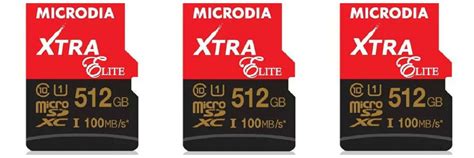
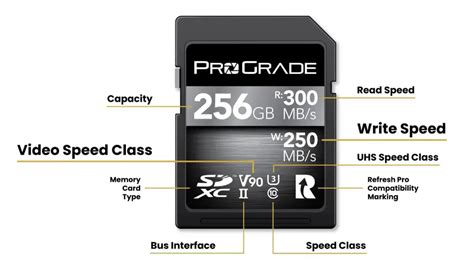
While the Nintendo Switch doesn’t fully leverage the absolute fastest MicroSD card speeds, read and write speeds still matter for game loading times. The Switch supports UHS-I (Ultra High Speed Phase I) cards, with a maximum theoretical transfer rate of 104 MB/s. Look for these specific ratings:
- UHS Speed Class 3 (U3): This indicates a minimum sequential write speed of 30 MB/s, which is recommended for optimal performance on the Switch. Most reputable cards will meet or exceed this.
- Application Performance Class (A1 or A2): These ratings are designed for better performance in Android apps, but they also indicate good random read/write speeds, which can subtly benefit game loading on the Switch. A1 is perfectly fine; A2 offers marginal benefits on the Switch but won’t be a game-changer.
Avoid older, slower cards with just a Class 10 rating, as they will result in noticeably longer loading screens.
3. Brand Reliability and Price
Stick to reputable brands like SanDisk, Samsung, Lexar, and PNY. These brands offer reliable performance, good warranties, and are less prone to counterfeiting or data corruption. While cheaper, off-brand cards might seem appealing, they often come with risks of slower actual speeds, lower capacities than advertised, or premature failure.
Top Recommended MicroSD Cards for Nintendo Switch
Based on performance, reliability, and value, here are some consistently recommended options:
- SanDisk MicroSDXC for Nintendo Switch: Officially licensed, these cards are specifically branded for the Switch, offering guaranteed compatibility and U3/A1 speeds. They come in various capacities and often feature iconic Nintendo imagery.
- SanDisk Extreme / Extreme Pro: These offer excellent U3/A2 performance, often at competitive prices, and are a step up from the ‘Ultra’ series in terms of raw speed, though the Switch’s limitations mean the ‘Ultra’ is often sufficient.
- Samsung EVO Select / Plus: Samsung’s EVO line provides a fantastic balance of speed (U3/A2), reliability, and value. They are a popular choice among Switch users.
- Lexar PLAY MicroSDXC: Designed for gaming and multimedia, Lexar PLAY cards offer good speeds and are a reliable option for expanding your Switch’s storage.

Installation and Management Tips
- Power Off: Always power down your Nintendo Switch completely before inserting or removing a MicroSD card.
- Formatting: Once inserted, navigate to System Settings > System > Formatting Options > Format microSD Card on your Switch. This ensures the card is properly formatted for the console.
- Data Transfer: If you’re upgrading from a smaller card, you can transfer your game data to a new card by copying the contents on a PC (ensure the new card is formatted by the Switch first, then copy files into the Nintendo folder).
Conclusion: Unleash Your Switch’s Full Potential
Investing in the right MicroSD card is one of the best upgrades you can make for your Nintendo Switch. It transforms your console from a device constantly battling storage limitations into a portable gaming powerhouse capable of holding a vast library of digital titles. By considering capacity, speed, and brand reliability, you can choose a card that perfectly fits your gaming lifestyle, ensuring countless hours of uninterrupted fun with all your favorite games, big and small.