





Best microSD for Switch game storage, big & small?

Why Your Nintendo Switch Needs a Storage Upgrade
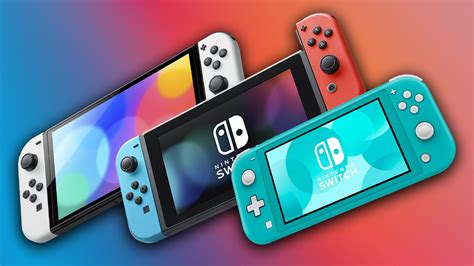
The Nintendo Switch, an incredible portable console, comes with a rather modest 32GB of internal storage (64GB for the OLED model). While this might seem like enough for a few indie titles or save data, modern AAA games can easily consume 10-20GB or more, quickly filling up your console. Digital downloads, in particular, will gobble up that space at an alarming rate, making a microSD card an essential accessory for any serious Switch gamer.
Choosing the right microSD card isn’t just about capacity; speed, reliability, and value all play a crucial role in ensuring a smooth gaming experience. Let’s break down what you need to look for to find the perfect storage solution, whether you’re a casual player or a digital game hoarder.
Understanding Switch microSD Card Requirements
The Nintendo Switch supports microSD (up to 2GB), microSDHC (4GB-32GB), and microSDXC (64GB and up) cards. For optimal performance, Nintendo recommends using a microSD card with a transfer speed of 60-95 MB/s. This typically means looking for cards rated UHS-I (Ultra High Speed Phase I) with a Speed Class 3 (U3) or a Video Speed Class V30 rating. An A1 or A2 (Application Performance Class) rating is also a bonus, indicating better performance for random read/write operations common in gaming.
Capacity: How Much Space Do You Really Need?
This is where the “big & small” question comes into play. Your ideal capacity depends entirely on your gaming habits:
- Small Storage (64GB-128GB): Perfect for those who primarily buy physical game cartridges and only download a few digital indies or DLCs. A 64GB card can hold 3-5 average-sized digital games, while 128GB offers comfortable breathing room.
- Medium Storage (256GB-512GB): The sweet spot for many gamers. If you mix physical and digital titles, or plan on downloading a good number of AAA games, 256GB provides ample space. A 512GB card allows for a substantial digital library without constant management.
- Large Storage (1TB and Beyond): For the hardcore digital-only gamer. If you plan to download every major release, explore the eShop’s vast library, and never want to delete a game, a 1TB microSDXC card is your best bet. While more expensive, it offers unparalleled convenience.

Top Recommended microSD Cards for Nintendo Switch
While many brands offer suitable microSD cards, some have become clear favorites for Switch users due to their reliability, speed, and often, official Nintendo licensing.
SanDisk microSDXC for Nintendo Switch
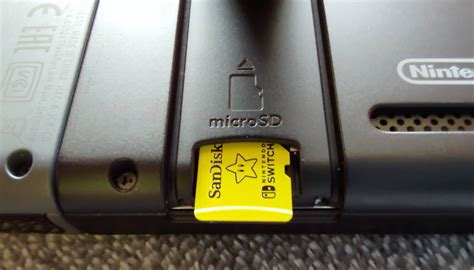
Often considered the gold standard, the officially licensed SanDisk microSDXC cards for Nintendo Switch are designed specifically for the console. They come in various capacities (64GB, 128GB, 256GB, 512GB, 1TB) and boast excellent read/write speeds, ensuring smooth game loading and performance. The iconic Nintendo branding also gives peace of mind.
Samsung EVO Select/Plus
Samsung’s EVO line, particularly the EVO Select or EVO Plus, offers fantastic value. These cards are known for their strong performance, high reliability, and competitive pricing. They meet or exceed the Switch’s recommended speed requirements and are available in capacities from 64GB all the way up to 512GB and 1TB, making them a superb unofficial alternative.
Kingston Canvas Go! Plus / Canvas React Plus
Kingston provides high-performance options with their Canvas Go! Plus and Canvas React Plus series. These cards are built for demanding applications, offering impressive read and write speeds that will effortlessly handle any Switch game. They are a great choice for those looking for robust performance without the premium for official licensing.

Installing and Managing Your New Storage
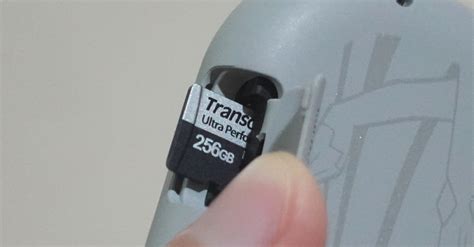
Once you have your chosen microSD card, installation is straightforward. Simply open the kickstand on the back of your Switch (or on the bottom of the OLED model) and slide the card into the slot until it clicks. The Switch will automatically recognize it.
To transfer games, you can either re-download them from the eShop directly to the new card or use the Switch’s Data Management settings to move existing software between the system memory and the microSD card. Remember to always power off your Switch before inserting or removing a microSD card to prevent data corruption.
Conclusion
Adding a microSD card is arguably the most impactful upgrade you can make to your Nintendo Switch. Whether you opt for a modest 128GB card for casual use or a sprawling 1TB for a vast digital collection, choosing a reputable brand with appropriate speed ratings will ensure you spend more time gaming and less time managing storage. Invest wisely, and enjoy an uninterrupted flow of new adventures on your favorite portable console.


