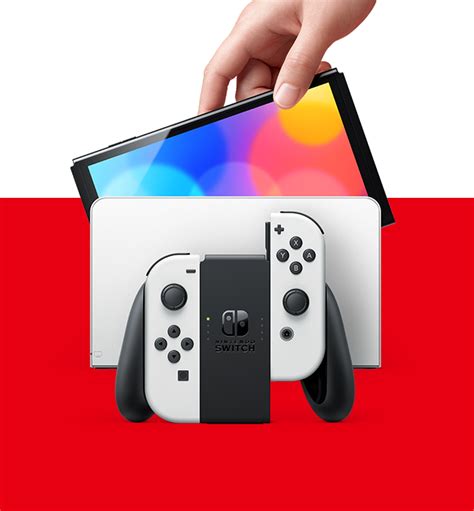
Best MicroSD for Switch game storage?

The Nintendo Switch, an incredibly versatile console, offers a fantastic gaming experience both on the go and docked at home. However, its internal storage of 32GB (or 64GB for the OLED model) quickly fills up, especially with large digital game downloads and game updates. This is where a high-quality microSD card becomes an absolute necessity, transforming your Switch into a true digital gaming powerhouse.
Understanding Your Needs: Capacity and Speed
When selecting a microSD card for your Switch, two primary factors come into play: capacity and speed. The ideal capacity depends on how many digital games you own or plan to acquire. While 64GB might suffice for a casual player, serious gamers will find 128GB, 256GB, or even 512GB more appropriate. For those with extensive digital libraries, 1TB cards are now available and offer immense space, though at a higher cost.
Speed is equally critical. Faster read and write speeds translate directly to quicker game loading times, smoother gameplay, and faster data transfers. The Nintendo Switch supports the UHS-I standard, meaning cards rated UHS-II offer no speed advantage on the console itself. Therefore, focus on UHS-I cards with good performance ratings.
![Nintendo Switch [Articles] - IGN](/images/aHR0cHM6Ly90czQubW0uYmluZy5uZXQvdGg/aWQ9T0lQLmNVSFFMdjB3dVV3eUNpbHdtTk81QkFIYUhhJnBpZD0xNS4x.webp)
Key Specifications to Look For
To ensure optimal performance, pay close attention to these specifications:
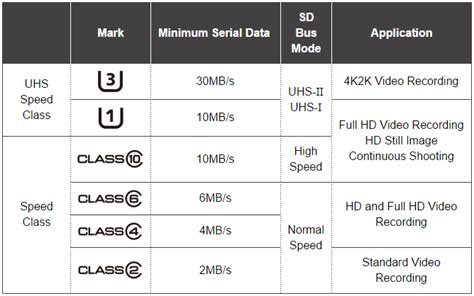
- UHS Speed Class (U1 vs. U3): Look for U3 (UHS Speed Class 3) cards. These guarantee a minimum sequential write speed of 30MB/s, which is superior to U1’s 10MB/s and beneficial for game data.
- Application Performance Class (A1 vs. A2): While the Switch doesn’t fully leverage A2’s enhanced random read/write speeds designed for mobile apps, A1 cards offer a good baseline for game performance. An A2 card won’t hurt, but an A1 is perfectly adequate.
- Read Speed: Aim for a card with a read speed of at least 90-100MB/s. This directly impacts how quickly games load from the card.
Many microSD cards will display these ratings prominently on their packaging. Prioritizing these metrics ensures you get a card that can keep up with the demands of modern Switch titles.
Top MicroSD Card Recommendations for Nintendo Switch
While many brands produce microSD cards, some have consistently proven reliable and high-performing for the Nintendo Switch. Here are some top contenders:
SanDisk MicroSDXC for Nintendo Switch
SanDisk offers officially licensed Nintendo Switch microSD cards, easily identifiable by their iconic red and white packaging featuring the Switch logo. These cards are specifically optimized for the console, come in various capacities (64GB, 128GB, 256GB, 512GB, 1TB), and boast excellent read speeds of up to 100MB/s, ensuring smooth game loading.
Samsung EVO Select/Plus
Samsung’s EVO Select and EVO Plus lines are fantastic alternatives. They are known for their reliability, consistent performance, and competitive pricing. Often available in capacities up to 512GB or 1TB, these cards provide U3 and A2 ratings, making them excellent choices for demanding users.
Other Reputable Brands
Brands like PNY, Lexar, and Kingston also offer high-quality microSD cards that meet or exceed the recommended specifications for the Nintendo Switch. Always check for U3 and A1/A2 ratings and strong read speeds when considering these options.
Installation and Setup Tips
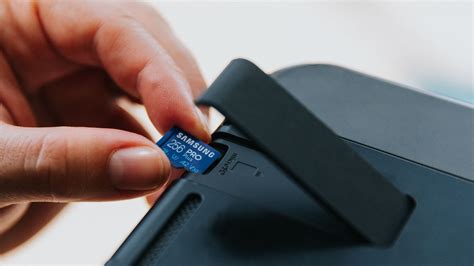
Installing a microSD card in your Nintendo Switch is straightforward. Simply power down your console, flip open the kickstand on the back to reveal the microSD card slot, and insert the card face down until it clicks into place. The Switch will automatically recognize and format the card if it’s new. If you’re upgrading, you can transfer your existing game data by moving software to the system memory, swapping cards, and then redownloading from the eShop or moving data back.
Avoiding Counterfeits and Choosing a Reputable Seller
Beware of suspiciously cheap microSD cards, especially from unknown sellers, as counterfeits are common. These fake cards often report larger capacities than they actually possess or offer significantly slower speeds, leading to data corruption and frustration. Always purchase your microSD card from reputable retailers or official brand stores to guarantee authenticity and performance.
Conclusion
Investing in a high-quality microSD card is one of the best upgrades you can make for your Nintendo Switch. By focusing on U3 speed class, A1 or A2 app performance, and reliable brands like SanDisk or Samsung, you can ensure ample storage and rapid game loading times for your growing digital library. Don’t let limited storage hold back your gaming adventures – choose the best microSD card and unlock your Switch’s full potential!