Best microSD cards to expand Nintendo Switch game storage for large libraries?
Why Your Nintendo Switch Needs a Storage Upgrade
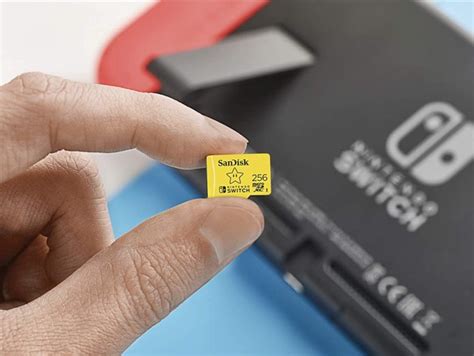
The Nintendo Switch, with its fantastic library of games, can quickly fill up its meager 32GB (or 64GB for the OLED model) internal storage. For players who frequently download digital titles, own large games, or subscribe to Nintendo Switch Online’s retro game libraries, expanding storage is not just a luxury—it’s a necessity. A high-quality microSD card is the easiest and most effective way to keep your entire game collection accessible.
Choosing the right microSD card involves more than just picking the largest capacity. Speed, reliability, and value all play crucial roles in ensuring a smooth gaming experience. Let’s dive into what makes a great Switch storage solution for those with extensive game libraries.
Key Considerations for Nintendo Switch MicroSD Cards
Capacity: How Much Space Do You Really Need?
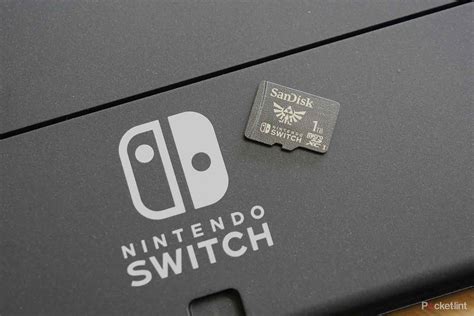
For large game libraries, we recommend starting at 256GB as a bare minimum, but ideally aiming for 512GB or even 1TB. While 128GB might seem sufficient initially, many AAA Switch titles can be 10-20GB or more, filling it up faster than you think. A 512GB card offers a good balance of capacity and cost, allowing you to store dozens of games comfortably. 1TB cards provide ultimate peace of mind for even the most avid digital collectors.
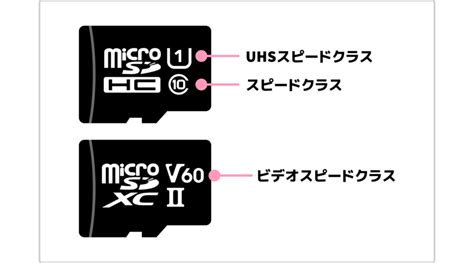
Speed: Understanding A1, A2, and V30 Ratings
The speed of your microSD card affects game loading times. Look for cards with:
- UHS-I (U3) Speed Class: This is a baseline for good performance.
- Video Speed Class (V30): Guarantees a minimum sustained write speed of 30MB/s, beneficial for large file transfers.
- Application Performance Class (A1 or A2): While A2 theoretically offers better random read/write performance, the Switch doesn’t fully utilize A2’s advantages. An A1 card provides excellent performance for Switch games at a typically lower price point. Don’t overspend on A2 if A1 is significantly cheaper for a comparable card.
Ultimately, any modern UHS-I card from a reputable brand will perform well enough, but V30 and A1 classifications are good indicators of quality.
Reliability and Brand Reputation
Stick to trusted brands to avoid counterfeit cards or those with unreliable performance. SanDisk, Samsung, and Lexar are industry leaders known for their quality, durability, and customer support.
Top MicroSD Card Recommendations for Nintendo Switch
1. SanDisk Extreme / Extreme PRO
Why it’s great: SanDisk’s Extreme and Extreme PRO lines offer a fantastic combination of speed, reliability, and robust construction. They are UHS-I, V30, and A2 rated, providing snappy load times and smooth performance for all Switch titles. Often available in capacities up to 1TB, they are a premium choice for serious gamers.
2. SanDisk Nintendo-Licensed MicroSD Card
Why it’s great: Specifically branded for the Nintendo Switch, these cards are officially licensed and guaranteed to work seamlessly. They are essentially SanDisk’s proven technology with a fun Nintendo aesthetic. Available in various capacities (up to 512GB usually), they are a no-brainer for those who want guaranteed compatibility and peace of mind, often at a slightly higher price point for the branding.
3. Samsung EVO Select / EVO Plus
Why it’s great: Samsung’s EVO Select and EVO Plus cards are renowned for their excellent balance of performance and value. They are typically UHS-I, V30, and A1 rated, delivering speeds comparable to the SanDisk Extreme series at a more competitive price. They come in a wide range of capacities, including popular 256GB, 512GB, and 1TB options, making them a top pick for budget-conscious gamers who don’t want to compromise on quality.
4. Lexar PLAY MicroSDXC Card
Why it’s great: Designed specifically for gaming and multimedia, the Lexar PLAY series offers high capacity (up to 1TB) and fast read speeds (up to 150MB/s), with A1 or A2 ratings. They provide a solid, reliable experience for the Nintendo Switch, often at an attractive price point, making them a strong contender for expanding your game library.
Tips for Managing Your Switch Storage
- Archive vs. Delete: If you’re running low on space, you can archive software (deletes game data but keeps the icon and save data) or delete it entirely. Archived games can be re-downloaded later.
- Move Data: You can move downloaded software between the system memory and a microSD card via System Settings > Data Management.
- Check Space Regularly: Keep an eye on your available space in System Settings to avoid interruptions during new game downloads.
Conclusion
For large Nintendo Switch game libraries, investing in a high-capacity and reliable microSD card is essential. While 128GB might cut it for casual users, aiming for 256GB, 512GB, or even 1TB will provide ample room for years of gaming. Focus on reputable brands like SanDisk, Samsung, or Lexar, prioritizing cards with UHS-I (U3) and A1 or V30 ratings for optimal performance without overspending. With the right microSD card, your vast digital collection will always be ready to play, ensuring endless hours of portable fun.