





Best microSD card for Switch: storage, speed, and game performance?

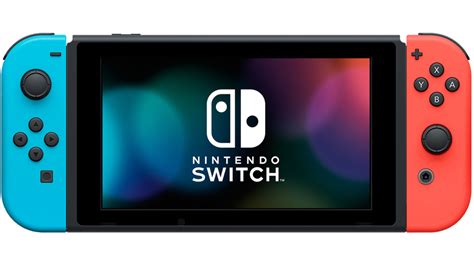
The Nintendo Switch, a marvel of portable gaming, comes with a rather modest 32GB or 64GB of internal storage. While this might suffice for a few small digital titles or saves from physical cartridges, it quickly becomes a bottleneck for any avid gamer looking to download more than a handful of modern games. This is where a high-quality microSD card becomes an indispensable accessory, transforming your Switch from a limited console to a vast digital library.
Choosing the right microSD card isn’t just about grabbing the cheapest or largest one available. Factors like storage capacity, read/write speeds, and even application performance classes play a crucial role in enhancing your gaming experience. A well-chosen card can significantly reduce loading times and ensure smooth gameplay, while a subpar one could lead to frustrating delays. Let’s dive into what makes a microSD card truly “best” for your Nintendo Switch.
Understanding Your Switch’s Storage Needs
Before you even consider speed, think about how much space you’ll realistically need. Most modern AAA titles for the Switch can range from 5GB to over 20GB. Games like The Legend of Zelda: Tears of the Kingdom, Pokémon Scarlet/Violet, and Super Smash Bros. Ultimate can quickly eat up dozens of gigabytes. If you primarily buy physical game cartridges, you’ll still need space for game updates, DLC, and save data, which can accumulate.
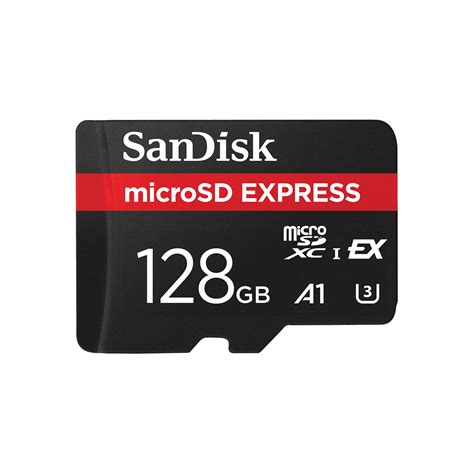
- 128GB: A good starting point for casual gamers or those who mostly buy physical copies. Offers decent space for essential downloads and updates.
- 256GB: The sweet spot for many, balancing cost and capacity. Ample space for a growing digital library without feeling overly restrictive.
- 512GB: Ideal for serious digital collectors or those who want to download many large titles without constantly managing storage. Offers significant peace of mind.
- 1TB: The maximum supported by the Switch and an excellent choice for truly prolific digital game buyers. While more expensive, it virtually eliminates storage concerns for the foreseeable future.
Remember, it’s often better to go slightly larger than you think you need, as game sizes tend to increase over time, and a full card can impact performance.
Speed Matters: Decoding microSD Card Classes
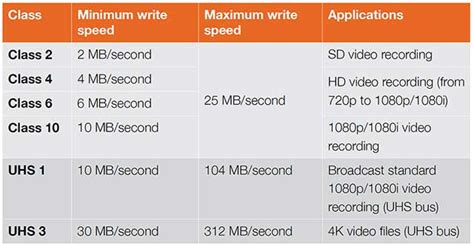
The Nintendo Switch supports the UHS-I (Ultra High Speed Phase I) interface, with a maximum theoretical read speed of around 100MB/s. This is a critical limitation to understand: even if you buy a UHS-II or UHS-III card, your Switch will only operate it at UHS-I speeds. Therefore, investing in an expensive card beyond UHS-I capabilities offers no performance benefit on the Switch itself.
Key Speed Metrics to Look For:
- UHS Speed Class (U1 or U3): For the Switch, a U1 rating (minimum 10MB/s write speed) is generally sufficient, but a U3 (minimum 30MB/s write speed) is preferred for better overall performance, especially for larger file transfers.
- Video Speed Class (V10, V30, etc.): While less relevant for game performance directly, V10 or V30 ratings indicate sustained write speeds suitable for video recording, which often translates to good general performance.
- Application Performance Class (A1 or A2): This is increasingly important.
- A1: Guarantees a minimum random read speed of 1500 IOPS and random write speed of 500 IOPS, with a sequential performance of at least 10MB/s. This is generally good for the Switch.
- A2: Offers higher random performance (4000 IOPS random read, 2000 IOPS random write), while maintaining the same sequential write speed. While theoretically better, the Switch’s UHS-I limitation might cap the noticeable benefits of A2 over A1 for many users. However, if prices are similar, an A2 card is a solid choice.
Focus on cards that offer at least 90-100MB/s read speeds and good sequential write speeds (ideally 30MB/s or more), along with an A1 or A2 rating.
Impact on Game Performance: Loading Times and Responsiveness
The primary benefit of a faster microSD card on your Switch is improved game loading times. While the difference between a very fast and a moderately fast UHS-I card might only be a few seconds, these seconds can add up over many game launches and transitions. For titles with extensive loading screens, even small improvements are welcome.
However, it’s crucial to manage expectations. A microSD card will never make games run “better” in terms of frame rate or graphical fidelity. Its role is purely in data access speed. The Switch’s CPU and GPU are the bottleneck for in-game performance. Therefore, don’t expect a super-fast card to eliminate lag or boost graphics—it’s solely about how quickly data moves from storage to the console’s memory.

Installation and Maintenance Tips
Installing a microSD card in your Switch is straightforward:
- Turn off your Nintendo Switch completely (not just sleep mode).
- Open the stand on the back of the console to reveal the microSD card slot.
- Insert the microSD card with the label facing down until it clicks into place.
- Close the stand and power on your Switch.
The Switch will automatically detect and format the card if needed. If you’re upgrading from an older card, you can transfer your data using a PC or by redownloading games from the eShop. Always ensure you have a backup of your save data, though most Switch game saves are stored on the console’s internal memory or backed up to the cloud via Nintendo Switch Online.
Conclusion
For the best Nintendo Switch experience, prioritize a microSD card with ample storage capacity (256GB or 512GB is often recommended), a UHS-I speed class, and ideally an A1 or A2 application performance rating. Look for read speeds of 90-100MB/s and respectable write speeds (30MB/s+). While top-tier cards can offer marginal improvements in loading times, the most significant impact comes from having enough space for your digital library. Choose a reputable brand for reliability, and enjoy expanding your Switch’s horizons!


