





How can I set up alerts for specific game deals on my wishlist, cross-store?

Navigating the Fragmented World of Game Deals
In the expansive universe of video games, finding your next great adventure at an unbeatable price can feel like a quest in itself. With numerous digital storefronts – from PC giants like Steam, Epic Games Store, and GOG to console marketplaces such as PlayStation Store, Xbox Games Store, and Nintendo eShop – keeping tabs on price drops for games on your wishlist, let alone across all these platforms, is a daunting task. This is where dedicated cross-store deal tracking services become indispensable, transforming your deal hunting from a chore into a seamless, automated process.
The goal isn’t just to find a deal, but to find the best deal, potentially even a historical low, regardless of where the game is sold. Manually checking each store daily is impractical. Fortunately, powerful tools exist that centralize game wishlists and send you alerts the moment a game you’re eyeing hits your desired price point, no matter which platform or retailer is hosting the sale.

The Power of Cross-Store Wishlist Trackers
The solution to cross-store deal hunting lies in specialized price tracking websites. These platforms aggregate deal information from a vast network of digital distributors and authorized key retailers, providing a unified view of game prices. Not only do they show you current discounts, but crucially, they also offer robust wishlist functionality paired with customizable alert systems.
Leading Platforms for Game Deal Alerts
- IsThereAnyDeal (ITAD): Often considered the gold standard, ITAD tracks prices from dozens of stores including Steam, GOG, Epic Games Store, Humble Store, Green Man Gaming, Fanatical, and many more. It provides comprehensive price history, allows you to import your Steam wishlist, and offers highly granular alert settings.
- GG.deals: A strong alternative to ITAD, GG.deals also offers cross-store price comparisons, price history, and a personalized wishlist with email alerts. Its interface is often lauded for being clean and user-friendly.
- Console-Specific Trackers: While less ‘cross-store’ in the PC sense, sites like PSPrices.com (for PlayStation) or DekuDeals.com (for Nintendo Switch) perform similar functions for console games, aggregating deals from their respective official storefronts.
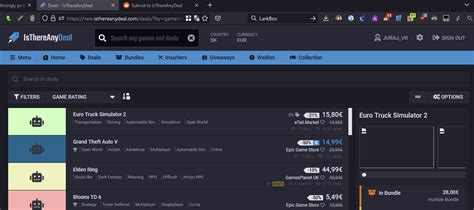
Step-by-Step: Setting Up Your Cross-Store Game Deal Alerts (using ITAD)
While the exact steps may vary slightly between platforms, the core process for setting up alerts is largely consistent. We’ll use IsThereAnyDeal (ITAD) as a primary example due to its comprehensive features.
-
Create an Account:
Visit IsThereAnyDeal.com and sign up for a free account. This allows you to save your wishlist and alert preferences.
-
Populate Your Wishlist:
ITAD offers several ways to add games:
- Manual Search: Use the search bar to find specific games and add them to your wishlist.
- Steam Wishlist Import: This is a massive time-saver. ITAD can directly import your public Steam wishlist, automatically adding all those games to your ITAD list.
- Sync with Other Platforms: Some services allow syncing with other platforms if you provide credentials (e.g., GOG Galaxy).
-
Configure Your Alerts:
This is the most critical step. For each game on your wishlist, or globally for all games, you can set specific alert conditions:
- Price Drop: Get notified when the price drops below a certain amount (e.g., $10).
- Historical Low: Alert me only when the game hits its lowest-ever recorded price.
- Percentage Discount: Notify me when the game reaches a certain percentage off (e.g., 50% or more).
- Store Preference: Specify if you only want deals from certain stores (e.g., only Steam, or only DRM-free stores like GOG).
- DRM Preference: Filter out deals for games with specific DRM if you have a preference.
-
Choose Notification Method:
Most platforms offer various ways to receive alerts:
- Email: The most common method. You’ll get an email when a deal matches your criteria.
- Browser Notifications: Opt-in for push notifications directly in your web browser.
- RSS Feed: For power users, an RSS feed can be integrated into a feed reader.

Maximizing Your Savings with Smart Alert Strategies
Just setting up alerts is a great start, but a few advanced tactics can help you squeeze even more value out of your deal tracking:
- Be Patient and Prioritize: Not every deal needs to be jumped on immediately. If a game often goes on sale, you can afford to wait for a deeper discount or a historical low. Prioritize your most wanted games with stricter alert conditions.
- Utilize Price History: Before setting an alert, check the game’s price history chart. This will show you past lows and sale frequencies, helping you set a realistic target price.
- Combine with Coupons: Keep an eye out for site-wide coupons from stores like Fanatical or Green Man Gaming. Often, these can stack with existing discounts, leading to even greater savings. Deal tracking sites sometimes highlight when a game’s price can be further reduced by an active coupon.
- Check for Bundles: Sometimes, a game you want is part of a bundle (e.g., Humble Bundle). While not a direct ‘deal alert’ from your wishlist, being aware of these can save you a lot, and many tracking sites also monitor bundles.

Conclusion: Your Personal Deal Hunter at Your Fingertips
Gone are the days of tirelessly browsing dozens of digital storefronts hoping to catch a fleeting discount. By leveraging the power of cross-store wishlist and alert services, you effectively deputize a digital assistant to do the heavy lifting for you. Whether you’re a casual gamer or a seasoned collector, setting up these alerts ensures you’re always informed about the best game deals, empowering you to expand your library without breaking the bank. Start setting up your alerts today and let the savings come to you!


